Back-Forward Cache: Lifecycle, Privacy, and State Consistency
Understand how the browser back-forward cache restores pages, which lifecycle events matter, and how to protect private state without breaking navigation.
BotBrowser Team
Want the structured docs for Platform?
This article lives in the editorial library. For step-by-step setup, reference material, and ongoing updates, jump into the docs section.
The back-forward cache (BFCache) lets a browser restore a previously visited page almost instantly when a person goes back or forward. The restored document may include its DOM, JavaScript heap, form values, and in-memory application state; it is not a normal reload. This improves navigation, but it also means code must treat a page as paused and later resumed. The WHATWG HTML specification defines the history traversal model, while MDN's BFCache guide documents practical eligibility and the pageshow and pagehide events. The W3C Page Visibility specification defines the visibility signal used alongside BFCache; visibility is related lifecycle evidence, not proof that a document was cached. BotBrowser can run authorized lifecycle tests in isolated BrowserContexts; it cannot force a site to enter BFCache, change a browser's eviction decision, or decide what an application should retain.
TL;DR
- BFCache restores a prior document without a normal reload;
pageshowandpagehideare key evidence points. - Visibility, restoration, authentication, and server freshness are separate checks.
- BotBrowser repeats an authorized fixture but cannot force eligibility or guarantee restoration.
Contents
- The lifecycle to design for
- Privacy is a state boundary
- Consistency after restoration
- BotBrowser's bounded role
- Conclusion
The lifecycle to design for
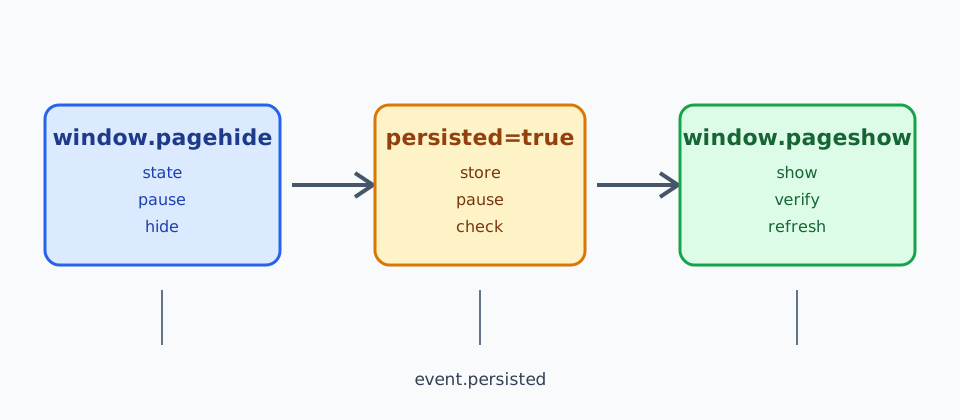
When a document is put into the cache, pagehide can report event.persisted === true. When it returns, pageshow reports the same flag. These events are the portable observation points; a load handler does not run again, and a framework component may still hold its old memory. visibilitychange is useful for saving user work, but it does not prove that a page entered BFCache. The Page Visibility API and Page Lifecycle API guidance describe complementary signals. For how history entries and same-document transitions behave around these events, see Navigation API history and privacy boundaries, which walks through a controlled fixture.
Pause timers, polling, media, and expensive observers when a page is hidden or cached. Resume them from pageshow, and re-check data that may have changed while the document was away. Abort or ignore stale requests so a response from the first visit cannot overwrite a newer account state after restoration. Keep cleanup idempotent: a page can be evicted instead of restored, and a user can close it without a BFCache transition.
Privacy is a state boundary
BFCache is process-local browser state, not a server session. A restored page can still show a private dashboard, draft, or form value that was visible before navigation. Do not put secrets in DOM attributes, URLs, or long-lived JavaScript objects merely because the page is short lived. On pageshow, verify the current authentication and account boundary before rendering sensitive data. If the session is no longer valid, replace the view with a sign-in state and clear account-specific memory.
Logout should revoke the server session first and then clear client state. A Cache-Control: no-store response can prevent a document from being cached, but it is a policy trade-off and is not a universal privacy eraser. Test the browser versions that matter to the product rather than assuming one header gives the same result everywhere. A different origin embedded in the page owns its own storage and session. For how cookies change asynchronously and which origin can see them, see Cookie Store API: Async Cookies, Change Events, and Privacy Boundaries, which covers change events and service-worker visibility.
Consistency after restoration
The most common bug is treating a restored document as current without checking its data. On pageshow, compare a version, account identifier, or freshness token with the server. Revalidate only what can have changed; avoid a blanket reload that defeats the fast history path. Reconnect a WebSocket or event stream only once, and dispose of the previous connection when pagehide says the document is being cached. Service workers and shared workers have independent lifecycles, so coordinate their messages rather than assuming page memory is authoritative. For how a service worker cache is versioned and cleaned up independently of page memory, see Service Worker Cache Lifecycle and Privacy, which covers registration, activation and sign-out cleanup.
Use a small matrix for testing: same-tab back/forward, a cross-origin navigation, an account switch in another tab, a revoked session, a changed record, and a page that is ineligible for BFCache. Assert both the visual result and the network behavior. A restored page should not resend a form, repeat a purchase, or expose data from the previous account.
BotBrowser's bounded role
BotBrowser provides isolated BrowserContexts and repeatable browser profiles for authorized lifecycle and privacy tests. Teams can open two contexts, navigate away and back, revoke a synthetic session, and inspect pageshow/pagehide outcomes without sharing cookies or storage. BotBrowser does not defeat origin policies, guarantee BFCache eligibility, solve interactive challenges, invalidate a site's server session, or remove records outside the context. Browser version, operating system, proxy, and site policy can change the result, so record those inputs with each test.
The fastest way to diagnose a restoration bug is to record an event ledger instead of taking a screenshot. Give each synthetic navigation a label such as same-document-back, cross-origin-forward, or revoked-session-return. For every label, record a monotonic timestamp, the persisted flag, the current account key, the document revision, and whether a network request was sent. Do not record cookies, authorization headers, full customer URLs, or form contents. A useful row has the shape label=revoked-session-return event=pageshow persisted=true revision=41 account=demo request=GET /session status=401. The row shows why a page was replaced without turning the diagnostic file into a copy of a user's session.
Use a fresh browser context for each matrix row. Reusing a context makes a warm service worker, an open WebSocket, or a previous account look like BFCache behavior. Start with a page that renders a synthetic account identifier and a revision number. Navigate to a second same-origin page, then go back. Repeat with a cross-origin page, with a page that has an active unload listener, and with a page that deliberately exceeds the application's memory budget. The expected result is not that every row is cached. The expected result is that the application recognizes persisted=false, performs a normal data load, and keeps the same authorization checks in both branches.
Eligibility and restoration are separate measurements. A page can be eligible when it is left and still be evicted before the user returns. Record pagehide and pageshow independently, and never infer a cache hit from a quick paint or from a stable URL. On Chromium, an open connection, a document policy, or an incompatible unload handler can affect eligibility; the exact list changes by browser release. The test record should therefore include the browser build, operating system, display mode, profile identifier, and whether a proxy was used. A run that only says “back navigation worked” cannot distinguish a restoration from a new load.
The server must participate in the freshness decision. Put a short-lived revision value in the synthetic response, for example profile-revision=41, and increment it between the first visit and the return. On pageshow, compare that value with the value held by the page. If the values differ, fetch the changed record and replace only the affected component. If the session endpoint returns 401, clear the account-scoped memory and render the sign-in state. Do not call location.reload() for every return; that masks whether the application can safely resume and removes the performance benefit the feature is intended to provide.
Account switching is a high-value privacy case. Open context A as demo-a, navigate away, then switch context B to demo-b without sharing storage. Return to A after revoking demo-a on the test server. A correct result is a pageshow event followed by a freshness check and a signed-out or re-authenticated view. It is a failure if the DOM still contains demo-a data after the server says the account is revoked, even when the browser restored the page quickly. The same check should run when the user changes accounts in another tab, because a restored page cannot assume that its in-memory account is still current.
Forms and one-time actions need their own assertions. Fill a synthetic form with an identifier such as order-test-17, submit it once, navigate away, and return. The restored page may show the entered value, but it must not resend the POST or repeat a purchase. Mark the submission with an idempotency key and assert that the server sees one key exactly once. For a draft editor, save a revision before navigation, mutate the record from a second context, and verify that the restored editor asks whether to refresh instead of silently overwriting the newer revision. These checks turn a vague “state survived” claim into observable safety properties.
Service-worker state must be tested separately from page memory. A service worker can serve an older response even when the document itself was reloaded, and a page can be restored while the worker is waiting to activate. Version the worker cache with an explicit name such as app-shell-v41, record registration.active.scriptURL, and clear the old cache during a controlled sign-out test. When the page returns, log whether the response came from the network or the worker, but retain only the route and revision. A passing BFCache row with a stale worker response is not a passing freshness result; the two lifecycles need separate assertions.
For reproducibility, run the same matrix with the visible browser and with the project's headless display. Keep the viewport, locale, timezone, profile seed, proxy route, and test server revision fixed. A minimal command record can include browser=Chrome/155.0.8059.80, profile=bf-cache-demo, route=direct, viewport=1280x800, and serverRevision=41. The command output should report counts, not private values: rows=12 restored=5 normalLoads=7 staleState=0 duplicatePosts=0. If the count changes after a browser update, the release owner has a concrete comparison instead of a memory-based claim.
The matrix should include a control row that cannot use BFCache. Add an unload handler only in the control fixture, navigate away, and verify that the return performs the normal bootstrap path. The control proves that the application has a safe cold-start path; it is not evidence that an unload handler should be added to production. A second control can serve a Cache-Control: no-store response. Compare its network request count with the ordinary row and document the intentional performance trade-off. Controls make it possible to tell a policy decision from a browser eviction.
Measure the visible result and the network result together. A restored page may display the correct shell while an old request is still resolving. Give each request a sequence number and ignore a response whose sequence is older than the current page revision. In the test output, record requestSeq, responseSeq, and renderedRevision; a passing row has responseSeq >= requestSeq and the rendered revision equal to the server revision. This small comparison catches a race that screenshots routinely miss.
When a page owns media or sensors, suspend them at the same boundary as application polling. Stop camera tracks, close a BroadcastChannel, and unregister one-shot observers in the pagehide path. On pageshow, recreate only the resources that the current route needs. Assert that the number of active tracks and channels returns to one after three back-and-forward cycles. If it grows to four, the lifecycle code is leaking even though the page looks correct. Keep the fixture synthetic and use a fake media source; a permission prompt or a real user's device is outside this test.
Navigation timing needs a stable clock. Use performance.now() only for ordering events within one page, and store an ISO timestamp separately for the run record. Do not compare a monotonic value from one document with a value from another document. The useful assertion is ordering: pagehide precedes the next document's first paint, while a restored pageshow is followed by the freshness check before private content is rendered. This avoids treating an implementation-specific duration as a universal performance target.
A release report should state what was not tested. A desktop fixture does not prove mobile eviction behavior; a direct route does not prove proxy failover; and a synthetic account does not prove a production identity provider. List those boundaries beside the counts, then schedule a separate authorized run for each material platform or route. Record the untested platform, route, and identity-provider mode as explicit fields, and reject the release when a required field is blank. This keeps a passing BFCache check tied to a concrete acceptance matrix instead of a broad compatibility promise.
The acceptance record can be reviewed without opening the captured session. Include the run identifier, source commit, browser version, profile checksum, route class, viewport, test-server revision, row count, and the number of duplicate submissions. Keep the raw event ledger behind the same retention policy as other test artifacts, and redact account keys before sharing it with a release review. Those fields are enough to reproduce a disputed row while preserving the boundary between browser evidence and customer data.
The evidence file should preserve failed rows as well as passes. For each failure, record the event label, the first unexpected event, and the next safe action. For example, row=cross-origin-forward firstUnexpected=pageshow.persisted=true expected=false action=review-policy is enough to start an investigation without retaining a user's destination. Do not delete a failure merely because a later run passes; attach the new run to the same matrix and record the browser build that changed the result. This makes a release decision auditable and prevents a fast local machine from hiding a regression seen on a slower host.
Practical checklist
- Observe
pagehideandpageshow; usepersistedas a signal, not a promise. - Pause and resume timers, media, sockets, and observers without duplicating them.
- Re-check authentication, account identity, and data freshness before showing private state.
- Test revoked sessions, account switches, changed records, and non-BFCache navigations.
- Report browser restoration separately from server logout and data deletion.
BFCache is a performance feature with lifecycle consequences. Treat restoration as a new verification point, and fast history navigation can remain both responsive and privacy-aware.
Conclusion
Treat a restored document as a fresh verification point: pause work safely, re-check authorization and freshness, and keep browser observations separate from server-side decisions.
Sources
This article is part of the guide: Web Platform Surfaces: A Consistency Review Map
Related Articles
View Transitions API: State and Navigation
PlatformSpeculation Rules: Prefetch and Prerender Boundaries
PlatformBroadcastChannel: Same-Origin Messaging and Privacy Limits
PlatformNavigation API history and privacy boundaries
IdentityCache Storage API for Offline Web Apps
PlatformCORS Browser Boundaries: Headers, Preflights, Credentials, and Cache
Run the same check in BotBrowser
Load a profile, keep the signals you just read about consistent inside the browser, and confirm the result on your own machine before a rollout.