Privacy-Preserving Browser Validation Methods
Use public browser standards, minimal observations, and explicit limits to validate privacy-sensitive browser behavior.
BotBrowser Team
Want the structured docs for Identity?
This article lives in the editorial library. For step-by-step setup, reference material, and ongoing updates, jump into the docs section.
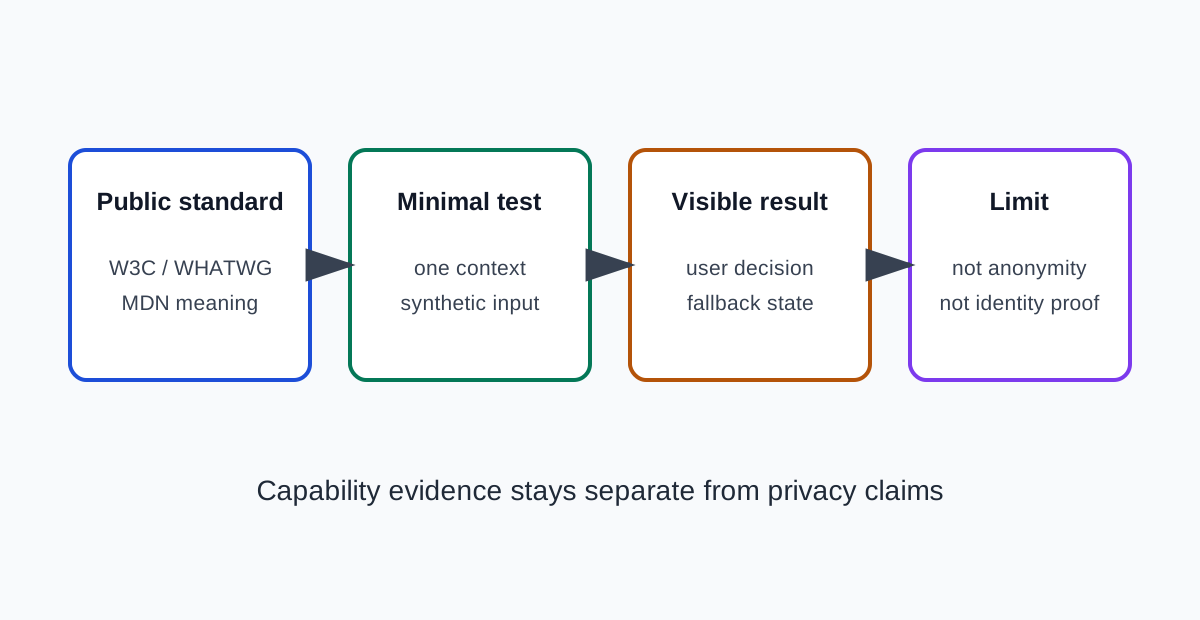
BotBrowser can repeat an authorized browser observation in a declared profile and context. It cannot prove anonymity, identify a person, control what a visited site retains, or replace a privacy review. Privacy-preserving validation starts with a public browser definition, a narrow user-facing decision, and an explicit statement of what the observation cannot establish.
TL;DR
- Ask whether a user may start a location-dependent action; do not treat the permission state as a location result.
- Query
navigator.permissionsforgeolocationand render its state without requesting coordinates. - Keep manual entry when the permission is denied, the query fails, or no position is available.
- Check secure-context and embedding policy conditions before interpreting an unavailable or denied result.
- Label this example as a fixture design, not an observation; it has not been run.
Contents
- Start with a public definition
- Minimize the observation
- Separate signal, purpose, and identity
- Make the result visible and reversible
- Review evidence with its limits
- BotBrowser capability and limitation
- Practical conclusion
Start with a public definition
Use WHATWG, W3C, or MDN to define the browser surface before collecting a value. For a permission-state question, use the W3C Permissions specification and MDN's Permissions API reference, then record the source date. Neither source says that one property identifies a person or proves that a browser is private. For a fuller walk through turning a public definition into a reviewable question, see Browser Privacy Research with Public Specifications, which covers bounded tests and how to report evidence with its limits.
Write the question in user terms: should an application choose a fallback, show a permission message, or keep a feature enabled? Then name the relevant surface and the boundary of the answer. A value can affect compatibility while being shared by many users. A reduced or absent value can reflect a permission, policy, or unsupported operation rather than complete privacy.
Read modality carefully. “May,” “must,” permission-dependent behavior, empty results, and implementation-defined choices are evidence. Preserve uncertainty when the source leaves room for variation. Record the source URL and retrieval date so a later reviewer can distinguish a browser change from a standards change.
Minimize the observation
Use one controlled page, one declared browser release, one profile family, one route, and one visible assertion. Collect only the surface needed for the decision. Do not inventory unrelated hardware, account data, credentials, private destinations, or stable identifiers. Synthetic input keeps the fixture useful without carrying customer content into a public record. For how to keep such a fixture narrow on an application you own, see Responsible Browser Feature Testing on Owned Apps, which covers the owned-app decision, bounded fixtures, and privacy boundaries.
Define the expected result before running the page. It might be “the permission message is visible,” “the fallback table is available,” or “the feature remains usable after a reduced value.” A visible assertion is easier to audit than a private log. If server evidence is required, govern it separately and label it outside the browser observation.
For a location fallback, query only navigator.permissions.query({ name: "geolocation" }) when the permission state answers the product question. Do not call getCurrentPosition() unless obtaining a position is separately required.
Compare one meaningful dimension at a time: browser release, profile, locale, permission state, host class, or route. When several dimensions change, report a comparison rather than a cause. A repeated observation shows repeatability in the tested context; it does not show universal behavior or uniqueness.
Separate signal, purpose, and identity
Browser-visible describes what the page can observe in a declared context. Site-visible describes what the application or server receives after the request crosses the browser boundary. Person-identifying is a stronger claim requiring evidence about correlation, retention, and access outside the page.
Canvas, WebGL, language, timezone, screen geometry, permissions, storage, and timing can affect compatibility or privacy. Treat them as separate signal families with separate purposes. A page may need a graphics capability for a chart without needing a device profile. A locale may select a translation without identifying a person. A permission result may guide a fallback without proving that all tracking is blocked.
Keep a signal inventory focused on the application decision. Record what was needed, what was observed, what was excluded, and when the result expires.
Make the result visible and reversible
Keep a user-facing state for pass, unavailable, denied, failed, and inconclusive outcomes. “Not observed” differs from “does not exist.” If a permission prompt is denied, preserve the task with a documented fallback. If a capability is missing, explain the supported alternative. If a value is reduced, do not silently treat it as a complete privacy control.
Design the fixture so a reviewer can repeat it without private state. Keep the input schema and page revision explicit. Add a cancellation path and a cleanup action. Delete temporary values after the decision, and define retention for screenshots, error details, and test records. A small fixture is easier to inspect and less likely to create a new privacy risk. For retention and minimization of deployment-side logs, see Browser Deployment Logging and Privacy Minimization.
Review evidence with its limits
| Evidence | Supports | Does not support |
|---|---|---|
| Public definition and source date | A shared meaning for the API | A claim about a person |
| Repeated value in one context | Context consistency | Universal browser behavior |
| Variation across declared contexts | A difference to investigate | A cause without more evidence |
| Missing or reduced value | A limitation or fallback path | Complete anonymity |
Keep the conclusion proportional. “The selected profile returned the documented hint and the application chose its fallback” is useful. “The fingerprint is hidden” or “the browser is untraceable” is not supported by that observation. State exclusions such as server retention, account correlation, network observation, extensions, unrelated origins, and untested platforms. For how to write the report itself, see Browser Test Evidence and Reporting Quality, which covers separating observation from interpretation and recording uncertainty.
When observations differ, report the difference before proposing a cause. A permission, locale, browser release, profile, host, or application revision can change the result. Restore the accepted baseline, repeat the same page assertion, and record the changed input. This is a review discipline, not a detector or evasion recipe.
Minimal permission-state fixture
The following is an illustrative example, not a test result. It queries the current geolocation permission state; it does not call getCurrentPosition(), request coordinates, or itself open a permission prompt. The Permissions API may be unavailable or reject an unsupported descriptor, so the fixture keeps a manual path in its error branch.
const output = document.createElement('output');
output.id = 'permission-state';
document.body.append(output);

(async () => {
  try {
    const { state } = await navigator.permissions.query({ name: 'geolocation' });
    output.textContent = state;
  } catch {
    output.textContent = 'unsupported';
  }
})();
| Observed state | Application decision | Limit |
|---|---|---|
granted | Offer the location action after the user asks for it. | Permission state does not guarantee that a position is available. |
prompt | Explain the action and wait for an explicit user choice. | Querying this state does not show the prompt. |
denied | Keep manual location entry available. | It describes this permission context, not every browser surface. |
unsupported | Keep the same manual path and record the API limitation. | It does not mean the browser has no location capability. |
The Geolocation API is a separate step: call it only after the user chooses the location action, and handle denial or unavailable-position errors. Record the state and visible fallback, not coordinates. This fixture design has not been run.
Interpret the permission state
The result belongs to the permission query, not to a device or a person. granted means the browser currently reports permission for the queried feature in this context; it does not promise a position, prove that a sensor exists, or establish that the user is at a particular place. The later location request can still fail because a position is unavailable or because the request times out. The application should display those as different operational outcomes rather than rewriting them as privacy states.
prompt means the permission decision has not been settled for this request context. Calling navigator.permissions.query() reads that state; it does not open a prompt. Do not turn the query into an automatic location request. First explain why location is needed, then wait for a user action. A browser prompt may be suppressed, deferred, or handled through browser and operating-system controls, so the page must retain a path that does not depend on the prompt appearing. denied means the queried operation is currently blocked. It does not identify who made the decision or why, and it says nothing about unrelated browser features. The safe product action is to preserve a non-location route, not to keep retrying the request.
The catch branch above intentionally maps any query failure to the same manual path. That is conservative for this fixture, but unsupported is a presentation label, not a diagnosis: an unsupported permission descriptor, an API unavailable in the execution context, or another query failure can all reach it. A production application that needs to distinguish these causes should capture a bounded error category for support and keep raw exception messages out of public reports. It should never recast a rejected query as denied, because those states have different meanings and recovery actions. If the product does not need the distinction, do not collect it.
Check the execution boundary
Permissions and geolocation behavior is constrained by execution context. The Permissions API and Geolocation API require a secure context; use HTTPS or the browser's recognized local-development context when validating them. An insecure page where an API is absent is not evidence that the browser lacks the capability. Record the scheme and whether the fixture is top-level or embedded so reviewers can separate environment setup from the result.
An embedded page has another boundary: Permissions Policy can restrict the geolocation feature for a document or iframe. Check the response policy and the iframe's allow delegation before attributing a blocked location operation to a user's choice. A policy denial and a user permission decision can both prevent the operation, but they are controlled at different layers. The permission-state query alone is not a complete audit of those headers or embedding settings. For this example, use a top-level synthetic page first; if the owned product relies on an iframe, test that declared embed separately and record the policy alongside the visible fallback.
Keep the two operations separate in both code and reporting. The permission query answers “what state does the browser report for this feature here?” A later getCurrentPosition() call asks for a position and may return an error such as permission denied, position unavailable, or timeout. Do not log coordinates to prove the request worked when the product question is only whether the fallback is shown. A visible result such as “manual entry remains available” is sufficient for that decision; a separate location-accuracy test would need its own purpose, consent, and retention controls.
BotBrowser capability and limitation
BotBrowser can provide a repeatable browser context, profile boundary, and visible assertion for an authorized validation. It helps teams compare the same browser observation across declared configurations. It does not decide whether a collection purpose is lawful, control a site’s server records, identify a person, or prove that a value is unique or anonymous.
Keep BotBrowser evidence separate from server logs and product decisions. A profile boundary can make a test repeatable without making a person anonymous. A proxy can change network context without deleting site records. When a server-side fact is unknown, label it unknown instead of filling the gap with a browser result.
Record the question, decision, public source, source date, browser release, profile family, locale, route, permission state, expected result, visible assertion, observed state, exclusions, retention rule, owner, and review trigger. Keep private destinations, credentials, account names, raw captures, and session identifiers out of the article.
Re-run the narrow test after a browser major, profile refresh, permission-policy change, route change, application revision, or standards update. An expired observation is a prompt to refresh evidence, not proof that the old result was false. State what remains untested, including mobile, another graphics backend, another origin, or server retention.
- Link a current WHATWG, W3C, or MDN definition.
- Name the user-facing decision and the minimum observation.
- Keep synthetic input, visible assertions, and cleanup explicit.
- Separate browser-visible, site-visible, and person-identifying claims.
- Record variation and exclusions beside the result.
- State BotBrowser capability and limitation independently.
- Set an owner and a refresh trigger.
Related reading: Privacy claims, evidence, and product comparison and Cross-surface browser privacy.
Sources
W3C Permissions, W3C Permissions Policy: geolocation, MDN Permissions API, MDN Geolocation getCurrentPosition(), WHATWG HTML, and BotBrowser advanced features.
Practical conclusion
Before shipping this flow, exercise granted, prompt, and denied separately in the target browsers using their permission controls. Start with a top-level HTTPS fixture and a fresh origin state; for each state, reload the same page and record the rendered label plus whether the manual form remains available. Confirm that the permission query alone produces no location request. Then click the explicit location action only in the case where the product needs a position, and assess that request's outcome separately from the earlier permission state.
Exercise the unsupported branch only where the target environment genuinely lacks the API or rejects the descriptor; do not turn a mocked exception into evidence about browser support. If the real product is embedded, repeat the declared case in its actual iframe arrangement and inspect the response Permissions Policy and allow value. Keep a policy block separate from a user's permission choice in the result record. Store no coordinate value for this fallback test: the acceptance criterion is that the manual path remains usable, not that a location was obtained.
The fixture owner should retain the test page revision, browser release, permission setup, embedding mode, expected visible label, and actual visible label. This makes a later rerun comparable without preserving a person's location or a diagnostic profile. Mark a failed or inconclusive state explicitly; do not turn an absent API, denied permission, policy block, and unavailable position into one generic “private” result. Repeat the same four checks after a browser update or permission-flow change, and revise the table only when the observed product behavior changes. This is a proposed acceptance procedure, not a report that these cases have been exercised.
For an embedded product, include the actual response policy and iframe delegation in the fixture notes; a top-level run cannot validate that boundary.
This article is part of the guide: Browser Identity Surfaces: A Practical Consistency Overview
Related Articles
Browser Privacy Research with Public Specifications
FingerprintBrowser Geolocation Permissions and Location Accuracy
ComparisonResponsible Browser Feature Testing on Owned Apps
ComparisonOpen-Source Browser Research and Reproducibility
ComparisonBrowser Privacy Policy Review Before a Product Release
IdentityPrivacy Review for Web Measurement Projects
Run the same check in BotBrowser
Load a profile, keep the signals you just read about consistent inside the browser, and confirm the result on your own machine before a rollout.