Browser Proxy Configuration: SOCKS5, HTTP, and HTTPS Guide
Practical guide to configuring SOCKS5, HTTP, and HTTPS proxies with embedded credentials, DNS boundaries, and geographic consistency.
BotBrowser Team
Prefer the maintained product doc?
This article has a matching page in the docs center. Use the docs for the canonical setup flow, current flags, and long-term reference.
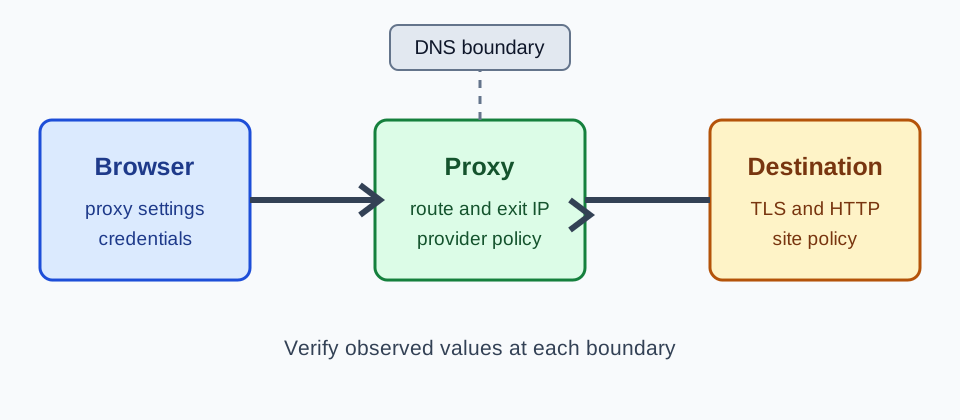
BotBrowser can configure the browser-side proxy endpoint, accept credentials in a proxy URL, and derive timezone, locale, and language from the proxy's public IP. It cannot control provider routing, provider authentication, upstream DNS, or destination policy. Treat those as separate operational boundaries, then use the Launcher proxy egress verification runbook to record what two controlled endpoints actually observed.
TL;DR
- Choose SOCKS5H when DNS should be resolved through the proxy; use HTTP or HTTPS when that is what the provider supports.
- Put credentials in
protocol://username:password@host:port, URL-encoding reserved characters. - Verify the observed public IP, timezone, and locale. Override browser settings only when the expected values are documented.
- A failed proxy should fail closed; do not silently fall back to a direct connection.
Contents
Introduction
A fingerprint profile alone is not enough for a consistent browser identity. Your IP address, DNS behavior, and geographic metadata must all align with the identity your profile presents. If your profile says "Windows user in Berlin" but your IP resolves to a data center in Virginia, the inconsistency is obvious.
BotBrowser provides enhanced proxy support built directly into the browser engine. Unlike standard Chromium, BotBrowser accepts embedded credentials in proxy URLs, auto-derives geographic settings from your proxy IP, and supports SOCKS5, SOCKS5H, HTTP, HTTPS, and QUIC where the browser/client, authorized context, and proxy provider support it. QUIC support does not guarantee HTTP/3 success, provide a direct fallback, or control the provider's upstream route.
Privacy Impact
Without a properly configured proxy, your real IP address is visible to every site you visit. IP addresses reveal your ISP, approximate physical location, and can be correlated across sessions to build a persistent tracking profile.
Even when using a proxy, misconfigurations can undermine your privacy. DNS queries may leak outside the proxy tunnel, revealing your browsing activity to your ISP. WebRTC ICE candidates may expose your real IP through STUN requests that travel outside the proxy path. Timezone and locale mismatches between your stated identity and your IP's geolocation create inconsistencies that tracking systems can flag. For a fuller account of how these paths interact, see proxy, DNS, and WebRTC consistency.
--proxy-server configures the browser's proxy route; it does not verify DNS, WebRTC, provider policy, or destination authorization. When public-IP detection succeeds, BotBrowser can derive timezone, locale, and language values from that IP. Check those page-visible values against the provider's route record instead of treating them as proof of a physical location.
Technical Background
How Browser Proxying Works
When a browser uses a proxy, HTTP and HTTPS traffic is forwarded through the proxy server instead of connecting directly to the destination. The destination sees the proxy's IP address, not yours.
Different proxy protocols handle this differently:
SOCKS5 forwards connections through a proxy. Whether DNS is resolved locally or by the proxy depends on the client and scheme; verify the resolver path with the provider's approved test rather than inferring it from a successful page load.
HTTP proxies use the CONNECT method to establish a tunnel for HTTPS traffic. The proxy sees the destination hostname but not the encrypted content. HTTP proxies do not handle UDP traffic.
HTTPS proxies encrypt the connection between your browser and the proxy server itself. This prevents your ISP from seeing which proxy commands you send, adding a layer of confidentiality to the proxy connection.
Credential Handling in Standard Chromium vs. BotBrowser
Standard Chromium's --proxy-server flag accepts only the proxy address without credentials. Authentication requires separate handling through system prompts or framework-specific APIs like page.authenticate(). This is inconvenient and can interfere with BotBrowser's automatic geographic detection. For stock Puppeteer, distinguish HTTP credentials from SOCKS5 method negotiation with the local authentication cases.
BotBrowser extends --proxy-server to accept credentials embedded directly in the URL:
protocol://username:password@host:port
This can avoid a separate browser authentication prompt by keeping the proxy endpoint and credentials in one URL value.
Supported Proxy Types and Configuration
BotBrowser supports five proxy protocols through the --proxy-server flag:
| Protocol | URL Format | Use Case |
|---|---|---|
| SOCKS5 | socks5://user:pass@host:port | General purpose, TCP traffic |
| SOCKS5H | socks5h://user:pass@host:port | DNS resolution stays within tunnel |
| HTTP | http://user:pass@host:port | Widely available, HTTP/HTTPS traffic |
| HTTPS | https://user:pass@host:port | Encrypted proxy connection |
| QUIC | quic://user:pass@host:port | Only when the client and provider support QUIC |
The quic:// route is available only when the browser/client and proxy provider support the required QUIC operations. BotBrowser does not provide QUIC service automatically, force an origin to use HTTP/3, or control the provider's upstream route.
SOCKS5 vs. SOCKS5H
With socks5://, the client may resolve a hostname locally; socks5h:// requests proxy-side resolution. The latter does not control the provider's recursive resolver or prove its retention policy. Record the selected scheme and resolver owner when the DNS path matters.
Structured Proxy Usernames
Some proxy providers encode routing instructions inside the username using separators like commas or pipes. BotBrowser supports these structured usernames:
--proxy-server=socks5://user_abc,type_mobile,country_GB,session_1234:[email protected]:1080
This is common with residential proxy providers that route traffic based on parameters embedded in the credentials.
BotBrowser's Approach to Proxy Integration
Automatic Geographic Alignment
When BotBrowser connects through a proxy, it detects the proxy's public IP and automatically configures:
- Timezone: Derived from the IP's geolocation
- Locale: Matched to the proxy's country
- Languages: Set based on the proxy's region
- Geolocation: Coordinates approximated from the IP
This means a basic launch with just --proxy-server already produces a geographically consistent identity:
chrome --bot-profile="path/to/profile.enc" \
       --proxy-server=socks5://user:pass@de-proxy:1080
BotBrowser will detect the German IP and set timezone to Europe/Berlin, locale to de-DE, and languages to de-DE,de,en automatically.
Manual Geographic Overrides
When you need specific geographic settings that differ from what the IP suggests, use the override flags:
chrome --bot-profile="path/to/profile.enc" \
       --proxy-server=socks5://user:pass@proxy:1080 \
       --bot-timezone=America/New_York \
       --bot-locale=en-US \
       --bot-languages=en-US,en \
       --bot-location=40.7128,-74.0060
CLI flags carry the highest configuration priority and override both profile settings and auto-detected values.
Skipping IP Lookup with --proxy-ip
If you already know your proxy's public IP, you can skip the automatic IP lookup on the first navigation with the --proxy-ip flag (ENT Tier1):
chrome --bot-profile="path/to/profile.enc" \
       --proxy-server=socks5://user:pass@proxy:1080 \
       --proxy-ip="203.0.113.1"
--proxy-ip accepts IPv4, IPv6, or a comma-separated pair with one address from each family. Use a pair when the proxy has separate IPv4 and IPv6 exit identities:
--proxy-ip="203.0.113.1,2001:db8::1009"
This eliminates the IP detection request on the first navigation, improving startup speed.
Route boundaries and fail-closed behavior
Keep the intended browser traffic on the configured proxy path unless an approved network policy defines another route. The configuration should preserve that control boundary. If the proxy is unavailable, record the failure and stop the workflow rather than falling back to a direct connection. For Playwright, the launch and context route-counter checks distinguish the configured path from unchanged browser profile values.
Configuration and Usage
Basic Playwright Setup
const { chromium } = require('playwright-core');

(async () => {
  const browser = await chromium.launch({
    executablePath: 'path/to/botbrowser/chrome',
    args: ['--bot-profile=path/to/profile.enc', '--proxy-server=socks5://user:pass@proxy-host:1080'],
    headless: true,
  });

  const context = await browser.newContext();
  const page = await context.newPage();
  await page.goto('https://example.com');
  await browser.close();
})();
Puppeteer Setup with Geographic Overrides
const puppeteer = require('puppeteer-core');

(async () => {
  const browser = await puppeteer.launch({
    executablePath: 'path/to/botbrowser/chrome',
    args: [
      '--bot-profile=path/to/profile.enc',
      '--proxy-server=socks5://user:pass@de-proxy:1080',
      '--bot-timezone=Europe/Berlin',
      '--bot-locale=de-DE',
      '--bot-languages=de-DE,de,en',
    ],
    headless: true,
    defaultViewport: null,
  });

  const page = await browser.newPage();
  await page.goto('https://example.com');
  await browser.close();
})();
Common Region Configurations
| Region | Timezone | Locale | Languages |
|---|---|---|---|
| US East | America/New_York | en-US | en-US,en |
| US West | America/Los_Angeles | en-US | en-US,en |
| UK | Europe/London | en-GB | en-GB,en |
| Germany | Europe/Berlin | de-DE | de-DE,de,en |
| Japan | Asia/Tokyo | ja-JP | ja,en |
| Brazil | America/Sao_Paulo | pt-BR | pt-BR,pt,en |
| South Korea | Asia/Seoul | ko-KR | ko-KR,ko,en |
Custom IP Detection Service
If you run your own IP detection endpoint, configure it with --bot-ip-service:
chrome --bot-profile="path/to/profile.enc" \
       --proxy-server=socks5://user:pass@proxy:1080 \
       --bot-ip-service="https://ip.example.com"
You can provide multiple endpoints as a comma-separated list. BotBrowser races them and uses the fastest response:
--bot-ip-service="https://ip1.example.com,https://ip2.example.com"
Verification
After launching BotBrowser with a proxy, verify your configuration:
const page = await context.newPage();

// Check public IP
await page.goto('https://httpbin.org/ip');
const ipData = await page.textContent('body');
console.log('Public IP:', ipData);

// Check timezone
const tz = await page.evaluate(() => Intl.DateTimeFormat().resolvedOptions().timeZone);
console.log('Timezone:', tz);

// Check language
const lang = await page.evaluate(() => navigator.language);
console.log('Language:', lang);

// Check locale
const locale = await page.evaluate(() => Intl.NumberFormat().resolvedOptions().locale);
console.log('Locale:', locale);
Confirm that:
- The IP matches your proxy's expected address
- Timezone aligns with the proxy's geographic region
- Language and locale are consistent with the timezone
- No DNS leaks are visible; verify this with the approved DNS test for the provider.
Choose the next diagnostic from the failed observation. A browser-visible result narrows the question, but each network layer needs its own check.
| Observation | What it establishes | Next check |
|---|---|---|
| Exit IP differs from the route record | The observed endpoint and expected route disagree | Compare the configured proxy, address family, and provider session label |
| Exit IP matches but timezone or locale differs | Page-visible browser values differ from the expected profile | Inspect --bot-timezone and --bot-locale overrides |
| Page loads but DNS ownership is unknown | The request returned content; the resolver path remains unverified | Run the provider-approved DNS test and record its resolver |
| CONNECT succeeds but TLS fails | The proxy tunnel answered; destination TLS still failed | Check the destination certificate and TLS policy separately |
Reading the network boundary
Proxy configuration changes the route requested with --proxy-server; it does not give the browser authority over the provider or destination. The page can expose an observed exit address and browser values, but cannot prove the upstream resolver, gateway retention, or account authorization. For a related network-boundary topic, see Browser Port Scanning Protection for Localhost Services.
For DNS, distinguish local lookup under socks5:// from requested proxy-side lookup under socks5h://; neither scheme controls a provider's recursive resolver or an enterprise policy outside the tunnel. WebRTC ICE gathering can involve additional network services, so a page-level candidate check cannot certify every host, VPN, gateway, or provider behavior. Use the documented DNS and WebRTC policies and their approved tests.
Credentials also need an ownership boundary. Embedding a username and password in the proxy URL is a browser-side configuration convenience. Store the complete launch command only in an access-controlled system, redact credentials from logs, and rotate them through the provider's normal process. A successful CONNECT response proves reachability and authentication for that request, not authorization for a destination account.
Geographic alignment should be treated as an observation, not a guarantee. BotBrowser can derive timezone, locale, and language from the public IP it observes. IP databases can be stale, shared exits can move between regions, and a provider may assign an address family different from the one expected by the workflow. Compare the observed values with the provider record, then apply an explicit browser override only when the workflow owner approves the difference.
For repeatable verification, capture the browser release, profile label, proxy protocol, route label, observed IP, timezone, locale, timestamp, and visible result. Redact proxy passwords and unrelated account data. A successful page load proves only that this request returned a result, not that every part of the path is healthy.
The same discipline applies to CORS and TLS observations. A page may report a blocked cross-origin request, an HTTP status, or a certificate warning, but those signals belong to different layers. CORS is enforced by the browser for a requesting origin; a proxy can still return a reachable response while the browser refuses to expose it to script. Conversely, a browser-visible CORS error does not prove that the upstream service is unavailable. Record the requesting origin, destination, method, response class, and browser release before asking the network owner to change a route.
For HTTPS, distinguish the tunnel from the destination connection. An HTTPS proxy protects the browser-to-proxy leg; the destination's certificate and TLS policy apply on the proxy-to-destination leg. A CONNECT success therefore does not certify the destination certificate, and a certificate error does not necessarily mean the proxy route is down. Test each leg with the approved diagnostic and keep credentials out of the captured output.
When a route changes, create a fresh Playwright context with the intended proxy setting and repeat the checks. This isolates browser storage such as cookies and cache from the comparison; it does not erase provider-side history. Record old and new route labels, effective time, expected geographic values, and the visible result.
Report the configured proxy, observed exit IP, and provider geolocation record as separate values; none establishes physical identity. If they disagree, retain the discrepancy and ask the owner of the relevant boundary whether the route or profile should change. Recheck after a browser release or provider migration, and keep credentials out of shared records.
Best Practices
-
Choose the DNS boundary deliberately. With
socks5h://, the client requests proxy-side resolution.--bot-local-dnsselects BotBrowser's local DNS handling; it does not control the provider's upstream resolver. -
Verify derived geography. Compare page-visible timezone and locale values with the provider record before relying on them.
-
URL-encode special characters in passwords. Characters like
@,#, and%must be encoded. For example,p@ssbecomesp%40ss. -
Keep DNS ownership explicit. A browser flag cannot control a provider's upstream resolver; verify that boundary with the network owner.
-
Test with curl first. Before configuring BotBrowser, verify proxy connectivity:
curl --proxy socks5://user:pass@host:port https://httpbin.org/ip. -
Use --proxy-ip when the IP is known. This removes the first-navigation lookup and speeds up startup.
Frequently Asked Questions
What proxy protocol should I use?
SOCKS5H is recommended for most use cases. It supports TCP traffic, handles DNS resolution through the proxy, and works with the widest range of proxy providers.
Can I use a proxy that requires IP whitelisting?
Yes. Ensure your machine's IP is whitelisted with the proxy provider, then use the proxy URL without credentials if the provider authenticates by IP.
Does BotBrowser support proxy chaining?
BotBrowser connects to the proxy specified in --proxy-server. If you need proxy chaining, configure it on the proxy infrastructure side.
Why does my timezone not match my proxy location?
If you set --bot-timezone manually, it overrides automatic detection. Remove the manual override to let BotBrowser derive timezone from the proxy IP.
Can I use different proxies for different tabs?
Yes. Use Playwright's browser.newContext({ proxy: ... }) to assign different proxies per context. See the dynamic proxy switching guide for details.
What happens if the proxy connection fails? BotBrowser will not fall back to a direct connection. If the proxy is unreachable, page loads will fail, which is the safer behavior for privacy.
How do I handle proxy rotation? Create a new browser context for each proxy rotation. Closing the old context and opening a new one with a different proxy server is the cleanest approach; keep the route change in the audit record.
What BotBrowser Provides
BotBrowser embeds proxy credentials directly in the --proxy-server flag and automatically configures timezone, locale, and language settings from your proxy's public IP address, eliminating the need for separate authentication APIs and manual geographic configuration. However, BotBrowser cannot control how the proxy provider routes traffic, verify the accuracy of the provider's IP-to-location database, authenticate credentials on the provider's infrastructure, or manage DNS and WebRTC behavior outside the browser-proxy tunnel. Geographic auto-detection depends entirely on the upstream provider's IP database accuracy; if detection fails or mismatches your intended identity, manual geographic overrides using --bot-timezone, --bot-locale, and --bot-languages flags are required.
Public sources
Practical conclusion
Proxy configuration is one part of a consistent browser identity. BotBrowser simplifies proxy setup with embedded credentials, geographic alignment signals, and support for SOCKS5, SOCKS5H, HTTP, HTTPS, and QUIC where the browser/client, authorized context, and proxy provider support it. QUIC support does not guarantee HTTP/3 success, provide a direct fallback, or control the provider's upstream route. Combined with a documented profile and provider checks, it helps keep IP, timezone, locale, and language values aligned for review; results remain subject to provider behavior and testing.
For multi-proxy workflows, see Dynamic Proxy Switching. Apply the documented DNS and WebRTC policies separately.
This article is part of the guide: Proxy Configuration Overview: A Browser Network Decision Map
Related Articles
Puppeteer Proxy: Auth, SOCKS5 and Browser Signals
NetworkVerify Proxy Egress IP in BotBrowser Launcher
NetworkProxy, DNS, and WebRTC Consistency for a Coherent Browser Identity
Getting StartedPlaywright Proxy: Routing, Auth and Unchanged Signals
NetworkQUIC Proxy Routing for HTTPS and HTTP/3
NetworkBrowser Proxy Authentication and Credential Hygiene
Run the same check in BotBrowser
Load a profile, keep the signals you just read about consistent inside the browser, and confirm the result on your own machine before a rollout.