A Fair Browser Comparison Methodology for Product Teams
A repeatable method for comparing browsers on the same product journeys, evidence, and support boundaries.
BotBrowser Team
Want the structured docs for Platform?
This article lives in the editorial library. For step-by-step setup, reference material, and ongoing updates, jump into the docs section.
BotBrowser can repeat an authorized comparison fixture in controlled contexts, but it cannot make browsers equivalent or certify every host, site, or user device.
TL;DR
- Name one owned journey and the support decision it informs.
- Keep the fixture and starting state fixed; vary one declared factor per comparison.
- Record the visible oracle, prerequisites, and uncertainty without generalizing beyond the tested conditions.
Contents
- Compare the product journey, not the logo
- Define the evidence boundary
- Build a controlled fixture
- Classify differences fairly
- Where BotBrowser helps, and where it stops
- Publish a decision record
- Practical conclusion
Compare the product journey, not the logo
That boundary matters before a product team treats a comparison as a support decision.
Browser comparisons become unreliable when each browser is tested with a different page, account, network, or success definition. Start with one authorized product journey: for example, open a test account, complete a form, upload a permitted fixture, and reach a named confirmation state. Write the expected state in observable terms before running either browser.
Keep the browser versions, operating-system class, viewport, locale, timezone, network route, test data, and automation steps in the record. Change one comparison variable at a time. A fair comparison can show that two browsers behave differently; it cannot explain a difference when five inputs changed together.
Write the decision before choosing browsers. A rule such as “support the journey on the declared browser set when the required state is reached and the documented accessibility checks pass” is auditable. “Choose the browser with the highest score” hides the weighting and the meaning of the score. Record the audience, task, starting state, required end state, allowed permissions, data classification, expected evidence, and decision owner.
Define the evidence boundary
Separate three questions:
- Capability: can the browser expose the web API or render the required page?
- Product outcome: does the authorized journey reach the expected state?
- Operational fit: can the team support the browser version, host, profile, and release cadence?
Do not turn a capability check into a claim about user identity, security, accessibility, or business correctness. A passing API feature test is not proof that a payment flow succeeds. A screenshot match is not proof that every display or assistive technology will produce the same experience.
Make the product oracle observable, for example confirmation.visible after the declared response; it does not by itself prove payment settlement or account correctness.
Use standards and browser documentation as the definition of an API, then use your own fixture for the product decision. The WHATWG HTML specification describes platform behavior; MDN browser compatibility data helps identify support notes and caveats. Record the date and browser build for every result because compatibility changes. For where the engine definition ends and the product journey begins, see Browser Engine Versus Browser Product Comparisons, which separates standards-defined behavior from the journey a browser must deliver.
Normative specifications define interfaces and processing rules, while compatibility data and implementation documentation describe support notes and known conditions. Neither source decides whether a product journey is usable for a particular audience. Link the exact specification or feature page that defines the behavior under test, then keep the product oracle in the owned fixture.
For example, a test of a web API can cite the relevant WHATWG or W3C definition, use MDN compatibility notes to identify conditional support, and still require the application fixture to verify its own success state. If a browser exposes the interface but the product cannot complete its workflow, report a product difference rather than “the API is supported.” If the interface is absent, report capability failure without inferring anything about a person or device beyond the declared test condition.
Keep source dates and links in the decision record. Specifications evolve, compatibility data is updated, and implementation notes can change with a release. A later reader should be able to tell whether a conclusion came from a normative definition, an implementation note, or an application observation.
A comparison can collect more information than its decision needs. Minimize account data, use synthetic fixtures, redact identifiers, and keep screenshots limited to the relevant state. Do not convert browser observations into an identity claim, a risk score, or a third-party targeting rule. A comparison about rendering does not justify collecting unrelated storage, sensor, or hardware values.
Security and privacy conditions also need explicit limits. A secure context, permission grant, cross-origin policy, or server response may be required for a feature. These conditions are part of the test setup and should be stated without exposing secrets, detector recipes, or customer data. The goal is transparent product evidence, not advice about changing how a third party evaluates a browser.
Build a controlled fixture
The fixture should expose only the evidence needed for the decision. Include a visible status panel, deterministic test data, and a final state that can be asserted without collecting unrelated user information. Exercise the normal path and bounded alternatives: unsupported API, denied permission, network failure, slow response, and user cancellation where relevant. For how to phrase and bound privacy conclusions drawn from such evidence, see How to Evaluate Browser Privacy Claims with Public Evidence, which covers comparing products without inferring identity or anonymity.
For each run, record:
- browser name, exact version, host OS and architecture;
- viewport, device-pixel ratio, locale, timezone, and reduced-motion preference;
- profile or context identifier and launch settings;
- fixture revision, test-data identifier, start time, and outcome;
- screenshots or logs needed to explain a difference, with sensitive values redacted.
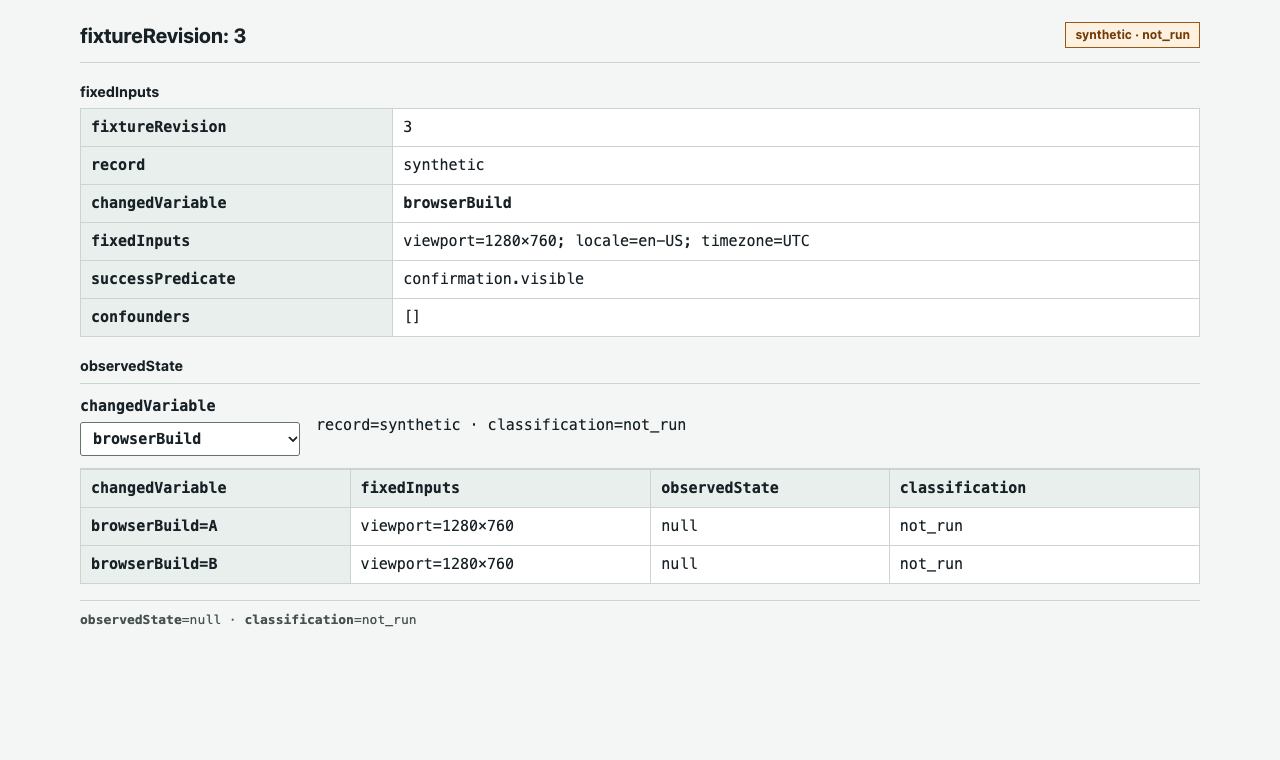
Use stable field names such as fixtureRevision=3, record=synthetic, and successPredicate=confirmation.visible; these identifiers make the worksheet directly reviewable without implying that a run occurred.
Choose dimensions only when the product decision can use their observations. Navigation, input, layout, API availability, permission handling, media, storage, network recovery, performance marks, and accessibility can be relevant; unrelated browser-readable values add noise and privacy risk. For every selected dimension, specify the question, observable oracle, fixture inputs, what the observation cannot prove, and the action for supported, conditional, different, or unknown outcomes. For example, a confirmation heading after the owned response resolves is an oracle; “the page feels fast” is not.
Run enough repetitions to distinguish a stable difference from ordinary variance. Report counts and distributions rather than one fastest or slowest run. If a result is conditional, state the condition: a feature may require a secure context, user activation, permission, a codec, or a specific server response. When timing is one of the compared dimensions, Web Vitals: How to Read Field Data and Lab Data Together explains how those two kinds of measurements relate.
Fairness means that the test gives each browser the same opportunity to perform the same task. It does not mean that every host, display, font, GPU, network path, or assistive technology is identical. Declare which factors are fixed and which are intentionally varied. A comparison across two browser versions may hold the fixture constant while changing only the version. A comparison across host classes may hold the browser build constant while changing the host. Do not label a host difference as a browser difference unless the design supports that attribution.
Use a reset procedure between runs. Start from the same permitted account state, clear only the data the fixture owns, restore the same server seed, and verify that the expected starting state is visible. Avoid reusing a session whose previous run may have granted a permission, filled a cache, or changed a feature flag. The reset procedure belongs in the worksheet so another team member can reproduce it.
Record interruptions instead of silently retrying them. A timeout, denied permission, missing fixture, or unavailable host is evidence about the run, not automatically evidence about the browser. Mark the run as setup failure, product failure, environment difference, or unknown according to the declared boundary. A retry may be useful, but the original observation should remain in the record.
Classify differences fairly
Use a small decision vocabulary:
| Result | Meaning | Next action |
|---|---|---|
| Supported | The same required state was reached under the declared conditions. | Keep the evidence and continue review. |
| Conditional | The state was reached only with a documented prerequisite. | Make the prerequisite part of support documentation. |
| Product difference | The browsers expose different behavior that affects the journey. | Decide whether to adapt, limit, or defer the feature. |
| Environment difference | Host, network, profile, or fixture inputs differed. | Restore the baseline and rerun. |
| Unknown | Evidence is insufficient or contradictory. | Assign an owner; do not call it a pass. |
This classification keeps a browser comparison from becoming a scorecard detached from product risk. Include accessibility checks with the same care as visual and functional checks: keyboard operation, focus order, readable status, zoom, and the assistive technology combinations your product supports. For writing these results up, see Browser Test Evidence and Reporting Quality, which separates expected behavior, observed evidence, uncertainty, and product action.
Accessibility is part of product behavior, not an optional visual appendix. Define the supported keyboard path, focus order, zoom level, reduced-motion expectation, readable status, and assistive technology combinations that the product commits to. If a team cannot test a combination, mark it unknown rather than implying universal accessibility. A screenshot can support a visual observation but cannot prove keyboard access or screen-reader output.
After each run, separate observation from interpretation. The observation might be “the confirmation state appeared after the request returned 200.” The interpretation might be “the journey is supported under the declared conditions.” The interpretation should include the conditions and the boundary. It should not silently become “this browser is compatible with the product everywhere.”
Use an unknown state when evidence conflicts, the fixture is incomplete, the environment changed, or the observation cannot distinguish two explanations. Unknown is useful: it tells the team where another controlled run or a better fixture is needed. Replacing unknown with pass makes later decisions look more certain than the evidence allows.
When comparing repeated outcomes, report the population and the rule used to classify it. Do not hide failed setup attempts or omit inconvenient runs. If the team needs a service-level policy, document it separately from the browser observation and obtain the product owner's approval.
Where BotBrowser helps, and where it stops
BotBrowser can provide controlled browser contexts and documented profile-backed surfaces so an authorized fixture can be repeated with a declared browser setup. Teams can compare visible outcomes, API behavior, and workflow evidence while keeping the test inputs explicit. See the advanced features documentation for supported controls.
BotBrowser does not make two browsers equivalent, decide what your product should support, or certify that a result represents every user's device. It cannot control a website's server behavior, host dependencies, display hardware, assistive technology, proxy quality, or the meaning a third party assigns to browser signals. A profile or context also does not justify collecting identity data that the comparison does not need.
Publish a decision record
End with a short record: scope, fixtures, versions, evidence links, observed differences, support decision, owner, and review date. Keep inconclusive results visible. When a browser, profile, host image, or product dependency changes, rerun the same fixture and compare with the accepted baseline. To write up a single observed difference so another person can repeat it, see How to Write a Reproducible Browser Bug Report.
A durable record contains the worksheet revision, task and starting state, browser and host declarations, profile or context description, fixture revision, test data identifier, source links, run timestamps, observed outcomes, screenshots or logs with sensitive values removed, classification, support decision, owner, and review date. Store enough detail to reproduce the comparison without storing unnecessary personal data.
When a browser release, profile, host image, server dependency, permission policy, or accessibility support claim changes, rerun the same worksheet. Compare the new record with the accepted one and explain any change in classification. If the task itself changes, create a new worksheet instead of editing the old conclusion in place.
For related background, see cross-platform browser consistency and browser release validation. For the application-side compatibility distinction, see browser API compatibility and fallbacks.
Keep the worksheet fields separate so reviewers can tell setup, observation, and interpretation apart:
| Field | Record | Why it matters |
|---|---|---|
scope | Journey and support question | Bounds the decision to a product task. |
fixtureRevision | Immutable fixture identifier | Makes later runs comparable to the same test logic. |
changedVariable | One factor, such as browser build or host OS | Shows which comparison the run can support. |
fixedInputs | Viewport, locale, timezone, test data, and response seed | Exposes conditions that must remain stable. |
successPredicate | Observable state, such as confirmation.visible | Makes pass and failure reviewable. |
prerequisites | Permission, secure context, activation, or codec | Distinguishes conditional support from failure. |
confounders | Any unexpected host, network, or fixture change | Prevents attribution when the setup drifted. |
observedState | Captured value or null before a run | Keeps an unexecuted template distinct from evidence. |
classification | Supported, conditional, product difference, environment difference, or unknown | Connects evidence to a consistent decision vocabulary. |
evidenceRef | Redacted screenshot or log identifier | Lets another reviewer inspect the relevant state. |
rerunTrigger | Relevant build, host, profile, or journey change | Defines when the accepted decision expires. |
owner | Responsible role and review date | Makes unresolved or conditional outcomes actionable. |
The worksheet schema describes what to capture; it does not supply observations. Leave observedState unset and classification at not_run until an authorized execution record exists. A synthetic sample may illustrate field shape, but it must never be presented as browser support evidence.
FAQ
What makes a browser comparison fair?
Use one owned journey, the same starting state and inputs, and vary only the declared comparison factor.
Does API support prove that a product workflow works?
No. API availability is a capability observation; the fixture must separately assert the user-visible state required by the workflow.
When should the team rerun the fixture?
Rerun after a relevant browser build, host image, profile, permission policy, server dependency, or product journey changes.
Public sources
Practical conclusion
Before approving browser support, require a named journey, a resettable fixture, and a recorded observable state for each declared condition. Treat missing or mixed evidence as unknown, assign someone to resolve it, and schedule a rerun when a relevant input changes.
This article is part of the guide: Web Platform Surfaces: A Consistency Review Map
Related Articles
Browser Engines: What They Are and How They Differ
ComparisonHow to Evaluate Browser Privacy Claims with Public Evidence
PlatformDesigning Browser Test Matrices by Platform and Release
PlatformBrowser Feature Support Is Not Feature Quality
PlatformBrowser Compatibility Review for Web Components
PlatformMobile Browser Consistency on Android, iOS, and Desktop
Run the same check in BotBrowser
Load a profile, keep the signals you just read about consistent inside the browser, and confirm the result on your own machine before a rollout.