Partitioned Cookies (CHIPS): Privacy and Safe Embedded Sessions
Understand the Partitioned cookie attribute, its top-level-site key, and how to design safe embedded sessions without confusing CHIPS with storage access.
BotBrowser Team
Want the structured docs for Identity?
This article lives in the editorial library. For step-by-step setup, reference material, and ongoing updates, jump into the docs section.
Embedded sessions often fail for a reason that looks like a login bug: the same third-party service sees a different cookie jar on each top-level site. The Partitioned cookie attribute, commonly called CHIPS, makes that separation explicit. The practical answer is to model the top-level site as part of the cookie key, then decide whether the embedded feature can work with isolated state. BotBrowser can repeat an authorized profile journey to observe cookie behavior under declared browser and proxy conditions; it cannot merge partitions, grant storage access, or prove that an application’s identity and consent model is correct. BotBrowser supports repeatable authorized CHIPS workflows; it cannot merge cookie jars or grant storage access.
TL;DR
Partitionedstores a cookie in a jar keyed by the top-level site and the cookie’s origin.- CHIPS is not the same as general cookie management, all browser storage partitioning, or the Storage Access API.
- A partitioned cookie can keep an embedded session separate, but it does not authenticate a user or replace consent and authorization.
- Test a real embed, a first-party route, rejection, expiry, and a top-level-site change with synthetic accounts.
- BotBrowser can repeat an authorized profile workflow and report observed cookie results, but it cannot merge jars, alter browser policy, or certify server-side identity.
Contents
- What Partitioned means
- A cookie fixture
- CHIPS versus neighboring APIs
- Privacy and identity boundaries
- Evidence and decision matrix
- Conclusion
- Sources and next reading
What Partitioned means
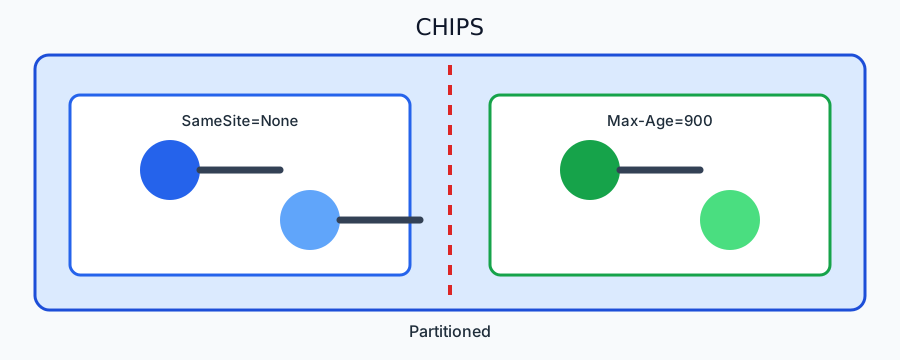
RFC 6265bis defines cookie syntax and processing rules, while browser documentation describes the Partitioned attribute as a request to keep a cookie in partitioned storage. The partition key includes the top-level site and the cookie’s origin. An embedded service at https://embed.example can therefore receive one cookie jar when embedded by news.example and another when embedded by shop.example. The browser does not treat those jars as one shared third-party identity.
The attribute is used with Secure, and deployment still needs a compatible browser, correct Set-Cookie syntax, and a server that understands the resulting isolation. A cookie can be syntactically accepted while the application still fails because the iframe is not the expected origin, the server rejects the session, or the feature depends on an unpartitioned identifier. Separate browser acceptance from application success in every test record.
Partitioning is about storage scope, not secrecy. JavaScript running in the embedded origin can still read cookies available to that origin under normal cookie rules. The server can still receive the cookie on requests that include it. HTTPS protects transport in transit, but it does not decide who may use an account or how long a service retains events. Keep those decisions in authorization, consent, and data-governance contracts.
The attribute is one token appended to a Set-Cookie header, and everything else about the cookie stays the same:
Set-Cookie: session=abc123; Path=/; Secure; SameSite=None; Partitioned
Three details decide whether a browser keeps that cookie. Secure is required, so the header must arrive over HTTPS. SameSite=None is required for a cross-site iframe context. Partitioned then asks for a per-top-level-site jar. Drop any one of the three and the cookie is either rejected or stored unpartitioned, which changes what the embedded service sees on the next request.
The partition key is assigned by the browser, not by the server: a site cannot choose its own key, and a cookie set outside a partitioned context stays unpartitioned regardless of the token. Support is not uniform across engines, and an engine that does not honor Partitioned may store the cookie unpartitioned or reject it outright. A deployment therefore cannot assume one header behaves identically everywhere; it has to read the value back on each engine it supports.
The practical check is a round trip rather than a header inspection. Set the cookie in the embedded frame, then read document.cookie in the same frame under two different top-level pages and compare. One value in both means partitioning did not apply. Two different values mean it did. A cookie missing entirely means the header was rejected, which is the case Secure, SameSite=None or a blocked third-party context will each produce.
// Run inside the embedded frame. One run per top-level page.
const seen = document.cookie
  .split(';')
  .map(part => part.trim())
  .filter(part => part.startsWith('session='));
console.log('partitioned view:', seen[0] ?? '(cookie not available)');
A cookie fixture
Use a synthetic endpoint and two top-level test pages. The embedded service sets a short-lived cookie and returns a non-sensitive session label. The fixture should vary one input at a time:
Set-Cookie: embed_session=synthetic-a; Secure; HttpOnly; SameSite=None; Partitioned; Max-Age=900
Expected behavior: the embed can send embed_session again within the same top-level site, a different top-level site receives a different jar, and a first-party route does not automatically reveal the embedded partition. The exact browser version and deployment mode belong in the record. Do not use a customer account, a real token, or a persistent identifier for this check.
Add a negative fixture that omits Partitioned, one that omits Secure, and one that uses an invalid attribute order or value. The goal is to see the browser and server’s observable result, not to infer a hidden implementation. Record whether the cookie was stored, sent, rejected, expired, or absent from the request. A missing cookie is not enough to conclude that storage partitioning caused the failure.
Test navigation and lifecycle separately. Reload the same top-level page, open the embed in a new tab, clear the synthetic profile, wait past the short expiry, and then change the top-level site. A session that survives reload but not a top-level-site change is consistent with partitioning. A session that disappears after profile cleanup is consistent with the cleanup operation. These observations should remain separate from claims about browser identity.
Determining whether a browser supports Partitioned
Do not answer this from a version table. A table becomes wrong the moment a build ships, and a managed or embedded runtime can lag its vendor release without saying so. Ask the browser instead, in the embedded frame, against the endpoint you control:
// Run in the embedded frame after the Set-Cookie response. `fail` is the observation, not an error.
const probe = async () => {
  const before = document.cookie.includes('probe_partitioned=');
  document.cookie = 'probe_partitioned=1; Secure; SameSite=None; Partitioned; Max-Age=60; path=/';
  await new Promise(resolve => setTimeout(resolve, 0));
  const after = document.cookie.includes('probe_partitioned=');
  console.log({ stored: before || after, supportsPartitioned: after });
};
probe();
Three outcomes, three different next steps. The cookie is stored and readable in the same top-level site: the attribute is honored and the partitioning contract applies. The cookie is absent after the write: the browser either dropped the unknown attribute or refused the combination, so treat the runtime as unsupported and fall back. The cookie is stored but the request does not carry it: the failure is in SameSite=None or Secure and transport, not in Partitioned, and clearing storage will not fix it.
The probe proves what one embedded origin did in one context. Run it in each browser family and each deployment mode you ship, and store the result next to the version and the profile family rather than inferring one from the other. A runtime that reports a current user agent can still refuse the attribute, which is the reason the cookie result and the version string have to be recorded as two separate observations.
For the fallback itself, the shape matters more than the vendor list. A browser without Partitioned does not reject the whole Set-Cookie in every case, so the same endpoint can silently produce an unpartitioned cookie on one runtime and a partitioned one on another. Check the stored attribute, not the fact that a session appeared to work. When the attribute is missing, serve the isolated flow the product already documents instead of letting a shared identifier stand in for it.
Why Chrome, Safari, and Firefox answer this differently
Readers searching for partitioned cookies by browser name are usually trying to work out which mechanism they are dealing with. The three engine families reached the same goal by different routes, and that difference changes what a probe result means. This is mechanism, not a version table, so it does not expire when a build ships.
Chromium-based browsers (Chrome, Edge, and anything embedding Chromium) implement Partitioned as an attribute on the cookie. The partition key is the pair of top-level site and the cookie's origin. This is the only one of the three where adding Partitioned to a Set-Cookie header is the mechanism, and therefore the only one where the probe above returns a meaningful supportsPartitioned.
Safari partitions third-party storage through its own policy rather than asking the origin to opt in with an attribute. A Set-Cookie carrying Partitioned is not how Safari decides the jar; it applies partitioning to third-party storage without requiring the site to declare intent. The consequence matters for measurement: a probe that reports "not supported" in Safari does not mean Safari is sharing cookies across sites. It means the question the probe asks does not exist there.
Firefox partitions third-party storage through its state-partitioning work, again without requiring the attribute to exist for the separation to happen. Outside Chromium the attribute is therefore not a capability oracle.
What each observation means, without a version number:
| Observation | Correct reading | Incorrect reading |
|---|---|---|
Chromium reports supportsPartitioned: true | the attribute is honored and the key includes the top-level site | that the embedded login will succeed; test a top-level-site change |
Chromium reports supportsPartitioned: false | this build or context does not honor the attribute | that third-party cookies are shared; partitioning may still apply |
| Safari ignores the attribute | Safari partitions by policy, so the probe cannot see the mechanism | that Safari behaves like an older Chromium |
| Firefox ignores the attribute | same, through state partitioning | that no partitioning is happening |
The cookie is absent after Set-Cookie | a rejection: check syntax, Secure, context, then policy | which of those caused it, without inspecting the network row |
The reader's real question (is this embedded session isolated) is not the same as whether the attribute is supported. Record the probe result, the engine family, and the profile in one record. A result without the engine family cannot be compared to anything, because "supported" means three different things in the three rows above.
CHIPS versus neighboring APIs
Cookie management is the application work of setting, reading, expiring, scoping, and deleting cookies. It answers “which cookie should this request use?” CHIPS adds a storage boundary to that work. A cookie management library cannot make an unpartitioned cookie safe by renaming it, and it cannot decide whether a user should be logged in across unrelated top-level sites. For the application side of setting and expiring cookies, see Browser Cookie Management for Multi-Identity Workflows, and for the asynchronous script-side interface and its change events, see Cookie Store API: Async Cookies, Change Events, and Privacy Boundaries.
General storage partitioning covers more than cookies. A browser may isolate caches, DOM storage, or other state according to a site or network partition key. The exact covered surfaces and compatibility conditions are browser concerns. Do not infer that a partitioned cookie proves every storage surface is partitioned identically. Test the surface the product actually depends on and name the untested surfaces in the support record.
The Storage Access API is a different mechanism. It lets an embedded document request access to unpartitioned cookies under browser permission and user-interaction rules. It is not a way to turn every Partitioned cookie into a shared cookie. A product can use CHIPS for isolated embedded sessions and request storage access for a distinct first-party continuity use case, but the two paths need separate consent copy, tests, and fallback behavior.
Do not use a top-level redirect as an implicit substitute for either model. A redirect can change the browsing context and account journey, but it does not make an embedded third-party cookie first-party by definition. Document whether the user leaves the top-level site, which origin handles the credential, and how the user returns. The visible journey matters as much as the cookie attribute.
Privacy and identity boundaries
Partitioned cookies reduce cross-site reuse of one embedded cookie jar. They do not make a service anonymous, prevent all correlation, or remove the need for consent. The top-level site, embedded origin, server logs, request timing, and account actions can still create application-level records. Keep the purpose narrow: a partitioned cookie may preserve a shopping widget’s local session without making that session a cross-site identifier.
Identity belongs to an explicit account contract. A cookie value is a bearer credential only within the server’s authorization rules, and a partition key does not establish who is behind a browser. Require server-side authorization for every state-changing action, rotate session material, and expire it on the documented schedule. Never put secrets or account data in the partition key or in a URL used to set a cookie. For how separate browser identities and team accounts are kept apart, see Browser Identity Boundaries for Team Accounts.
For privacy review, record the top-level-site class, embedded-origin class, cookie attributes, result state, and retention decision. Avoid full URLs, account names, raw cookie values, and message bodies. A coarse result such as partitioned-sent, partitioned-missing, rejected, or expired usually gives support enough information to choose the next test.
BotBrowser’s topic-specific capability is repeatable observation of an authorized embedded-session workflow across declared browser, platform, profile, and proxy inputs. Its limitation is that it cannot merge cookie jars, grant Storage Access permission, alter a server’s authorization decision, or prove that a cookie policy satisfies legal consent requirements. Treat a profile run as evidence about the tested journey, not as a universal privacy certification.
Evidence and decision matrix
| Observation | Safe interpretation | Next action |
|---|---|---|
| Same embed sends the cookie after reload on one top-level site | The tested partition retained the synthetic session | Continue with expiry and cleanup checks |
| A second top-level site receives no matching cookie | Isolation is consistent with the partition key | Verify the server has a separate login or explicit handoff path |
| Cookie is rejected before a request | Syntax, Secure, context, policy, or browser support may be involved | Inspect the network fixture and compatibility record |
| Storage Access request is denied | The unpartitioned path is unavailable in this context | Keep the isolated CHIPS flow or show a user-directed fallback |
| Session disappears after expiry or profile cleanup | The tested lifecycle removed it | Re-authenticate deliberately; do not silently reuse another jar |
This matrix is the reader artifact. It connects an observable cookie result to one safe product decision. Repeat it for first-party, embedded, private, headed, and headless contexts only when those are supported deployments, and keep each result labeled.
Operational rollout.
Ship a partitioned-cookie change behind a reversible server flag. The server should accept a new synthetic session label, expose a clear fallback for older browsers, and retain the old path only for the documented migration window. Do not silently copy an unpartitioned identifier into a partitioned cookie. That creates a new scope without explaining its consent and account meaning.
Monitor outcome classes rather than raw cookie values. Compare session start, session continuation, explicit sign-in, and sign-out rates by top-level-site class and browser support bucket. A lower continuation rate can mean correct isolation, a server bug, or a missing fallback. Pair the metric with a deterministic fixture before changing the cookie policy.
Document deletion. Removing a partitioned cookie from one top-level site does not imply that an account or server record is deleted. Define client cleanup, server revocation, and retention separately. A user-facing sign-out should clear the local jar and invalidate the server session when the product contract requires it. Keep those actions auditable without retaining raw cookie material.
Migration checklist.
Start with an inventory of embedded routes and classify each session as isolated, first-party, or explicitly shared. For every isolated route, record the top-level-site class, embedded origin, expected cookie attributes, and sign-out owner. This small contract prevents a deployment from silently changing a cookie from partitioned to unpartitioned merely because a framework default changed.
Add a compatibility row for older browsers or managed environments that do not implement the attribute. The fallback should preserve the task, explain the reduced continuity, and avoid copying a cross-site identifier into a new jar. A user who signs in again is safer than a product that silently links sessions across sites. Keep the fallback visible in support documentation and localization.
Incident diagnosis.
When a user reports a missing embedded session, reproduce the same top-level site first. Inspect the Set-Cookie response, the request cookie row, expiry, and profile cleanup state. Then repeat on a second top-level site. Do not begin by clearing every browser store, because that removes the evidence needed to distinguish partitioning from expiration, a server rejection, or an origin mismatch.
If the cookie appears on the first site but not the second, the result is consistent with CHIPS and should lead to a clear sign-in step. If it disappears on the first site after reload, inspect Secure, SameSite, expiry, response headers, and the endpoint’s authorization response. A clean diagnosis names the observed row and the next owner; it does not infer a person from the cookie value.
Review after changes.
Re-run the two-site fixture when the browser baseline, embedded origin, proxy, consent prompt, account service, or sign-out flow changes. Keep the synthetic value and expected result stable so a diff is attributable to one change. Review both headed and headless modes only when both are supported products, and retain their records separately. A passing headed test cannot establish a headless deployment guarantee.
The review record should include the fixture revision, browser release, profile family, top-level-site class, embedded origin class, attribute set, visible fallback, and deletion decision. It should exclude raw values and account identifiers. This is enough for a maintainer to decide whether to keep CHIPS, request Storage Access, or route the user through a first-party page.
Conclusion
Use Partitioned when an embedded feature needs a per-top-level-site session and can tolerate that isolation. Distinguish it from general cookie management, broader storage partitioning, and Storage Access permission. The next safe action is to run the synthetic two-top-level-site fixture, inspect the cookie request rows, and verify sign-out, expiry, rejection, and fallback behavior.
FAQ
Does CHIPS share a login across every site?
No. It intentionally separates the embedded cookie jar by top-level site. A shared login needs a separate, explicit account journey and authorization contract.
Is a Partitioned cookie a replacement for consent?
No. Storage scope does not decide whether processing is lawful or expected. Keep consent and privacy notices aligned with the feature’s purpose.
Is CHIPS the same as the Storage Access API?
No. CHIPS provides partitioned storage. Storage Access is a permissioned request for unpartitioned cookie access under browser rules.
Can BotBrowser merge two partitions?
No. It can repeat an authorized test workflow and report observed results, but it cannot change the Partitioned storage policy or server authorization.
Support handoff.
When an embedded session fails, support should capture only the top-level-site class, embedded-origin class, browser release, profile mode, and visible fallback. This bounded packet lets owners compare one controlled fixture without requesting a customer cookie value.
A release rehearsal.
Before enabling the attribute for real users, rehearse the complete journey with a clean synthetic profile. Open the first top-level site, complete the embedded sign-in, reload, sign out, and verify that the local session disappears. Open the second top-level site and confirm that it starts with its own state. Repeat with the documented fallback. The expected result is an understandable message and a deliberate sign-in action.
Keep rehearsal inputs stable. Use the same short-lived cookie name, response headers, account class, and endpoint revision for every browser candidate. Change one variable at a time and write that variable in the result row. This makes a regression actionable: a missing cookie after a browser update differs from a missing cookie after a server framework update or a changed consent prompt.
The product owner should approve the visible boundary before launch. Explain that an embedded session is local to the current top-level site and another site may ask the user to sign in again. Explain what sign-out clears locally and what the server revokes. This copy is part of the privacy contract, not a troubleshooting detail.
Record the decision in the release note, link the synthetic fixture, and assign an owner for expiry and deletion checks. Revisit it whenever an embedded origin or consent flow changes.
Sources and next reading
Sources
This article is part of the guide: Browser Identity Surfaces: A Practical Consistency Overview
Related Articles
Browser Storage Partitioning and Privacy
IdentityStorage Access API for Embedded Content
IdentityBrowser Cookie Management for Multi-Identity Workflows
IdentityCookie Store API: Async Cookies, Change Events, and Privacy Boundaries
IdentityFedCM and Browser Privacy: Designing Account Flows for a New Context
NetworkScraping Cookies: Keep State Across Browser Runs
Run the same check in BotBrowser
Load a profile, keep the signals you just read about consistent inside the browser, and confirm the result on your own machine before a rollout.