Scraping Cookies: Keep State Across Browser Runs
Separate scraping cookies, localStorage, IndexedDB and sessionStorage across runs. Check restored client state without confusing it with a valid server session.
BotBrowser Team
Want the structured docs for Network?
This article lives in the editorial library. For step-by-step setup, reference material, and ongoing updates, jump into the docs section.
Scraping cookies can be present in a new run while the application still treats the browser as signed out. A cookie jar, an application database and a browser fingerprint profile describe different state. BotBrowser documents reusable fingerprint profiles and isolated browser contexts, but it does not restore a third-party login or guarantee that a server accepts a restored session. For an authorized workload, continuity needs two records: which client state crossed the declared run boundary, and whether the application accepted the resulting request.
TL;DR
- Define whether the next run reuses a tab, creates a browser context or launches a new process. Those boundaries are not equivalent.
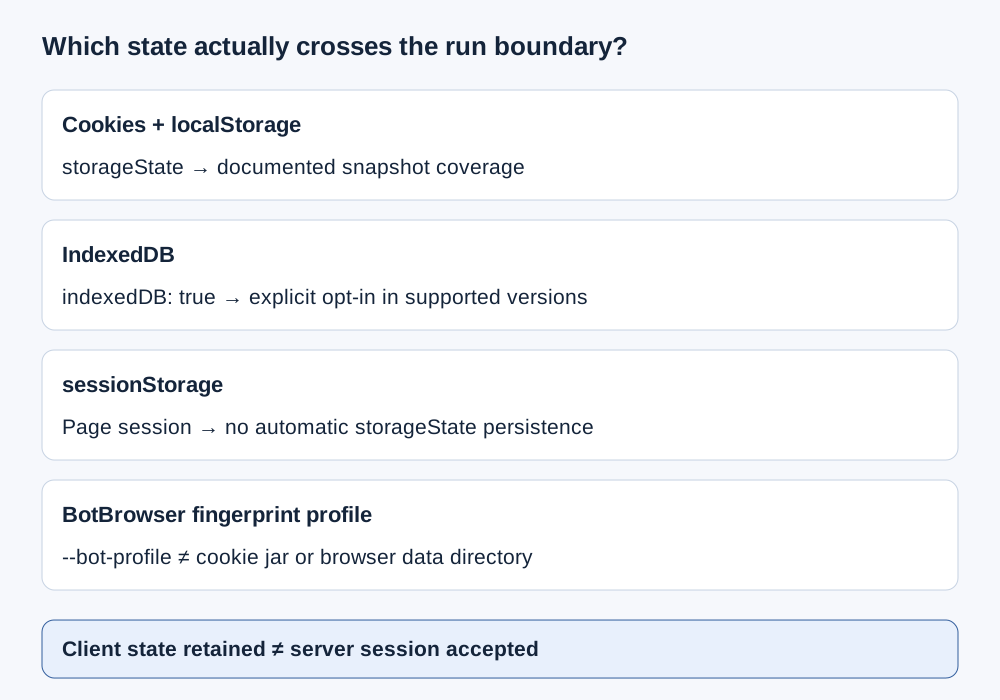
- Treat cookies, localStorage, IndexedDB and sessionStorage as separate stores with different scope and lifetime.
- Playwright state snapshots can include IndexedDB when explicitly enabled in supported versions; sessionStorage needs a separate application-specific decision.
- A BotBrowser fingerprint profile is not a replacement for a browser data directory or framework state snapshot.
- Check an owned fixture with harmless markers, keep secrets out of diagnostics and record server acceptance separately.
Contents
- Declare the boundary between runs
- Four stores and four continuity questions
- Cookie presence is not request eligibility
- Choose the state handoff deliberately
- An owned-origin continuity preflight
- Failure signatures without guessed causes
- BotBrowser identity and application state
- Practical conclusion
Declare the boundary between runs
Start by naming the lifecycle operation. Reloading an existing tab, opening an independent tab, creating a fresh browser context and restarting a browser process are different events. A scheduler's run identifier does not define any of them automatically. Keep the chosen context and storage policy with the job configuration so an incident can distinguish an intentionally empty context from an unexpected loss. A job that creates a fresh context has not demonstrated persistence simply because it launches the same executable again.
For example, a reader-owned fixture might store a harmless preference in localStorage and a temporary workflow marker in sessionStorage. A reload and a fresh context should not be treated as interchangeable experiments. The first can retain a page session; the second requires an explicit state handoff for applicable stores. This is a proposed fixture design, not a reported browser measurement. Declare the expected outcome for each store before comparing the two boundaries.
Keep origin and application revision in the record. An origin includes scheme, host and port, so changing a local fixture port changes the storage question. Cookies use their own host/domain and path rules rather than the same origin partition as localStorage. The browser storage model separates those scopes. A successful read under a different origin is not an observation of the original store, even when both pages look like the same application.
Also declare what the next run is permitted to reuse. A public-data job may require no authenticated state; an owned application test may use a dedicated test account. These have different security requirements. Do not preserve an account session merely because a tool offers an export function. The authorization and service agreement must permit that reuse, and the job should request only the state it actually needs. Record absence as intentional where a clean context is the requirement.
Four stores and four continuity questions
MDN's cookie guide distinguishes persistent cookies with an expiry from session cookies without one. Browser session restoration can restore session cookies, so a browser restart alone is not a reliable assertion that all such cookies disappeared. Conversely, expiry is not a promise that a stored value will remain available until that instant. Retention, request eligibility and server validity must not be collapsed into one cookie-present flag.
MDN's localStorage reference describes origin-scoped storage saved across browser sessions without an intrinsic expiration time. That does not promise retention after explicit clearing, a change of browser storage context or the end of private browsing. An application can also apply its own timestamp and reject an old value. Inspect the declared store and application rule rather than interpreting no built-in expiry as permanent account authentication.
MDN's sessionStorage reference separates data by origin and top-level browsing context. It survives reloads within the page session, while closing the tab ends that session. An opener can initially provide a copy to another tab; subsequent state is not one shared live store. Do not use this exception as a general promise that an independently created run inherits the previous tab's state.
Playwright's authentication documentation makes the handoff distinction concrete: reusable state covers cookies and local storage, and IndexedDB can be included with indexedDB: true. IndexedDB is not included by default. The same documentation explains that session storage is tab-specific and has no automatic persistence API in this workflow. A browser data directory can contain more state than a framework snapshot; the snapshot's documented coverage, not its filename, defines its scope.
| Store | Scope and lifecycle question | Cross-run check |
|---|---|---|
| Cookies | Which host/domain, path, security attributes and expiry apply? | Inspect applicable cookie metadata and the owned server's request observation |
| localStorage | Is the same origin using the intended storage context? | Check a non-secret marker at that origin |
| IndexedDB | Did the chosen snapshot include the required database state? | Confirm the supported IndexedDB option and an application-level marker |
| sessionStorage | Is this the same page session or a newly created tab/context? | Check the tab-local marker; do not assume automatic snapshot coverage |
The table is a handoff checklist, not a complete serialization specification. It does not claim to cover every browser store or every authentication mechanism. A service worker cache, an in-memory variable or an application-held key can create additional dependencies. When the required state is outside these four rows, name that dependency and use its documented lifecycle rather than extending the meaning of a cookie export to cover it.
Cookie presence is not request eligibility
RFC 6265 defines the HTTP state-management mechanism and applicable cookie selection rules. A cookie name and value alone omit important scope information. A host-only cookie differs from a domain-scoped cookie, and the path can exclude the request being investigated. Keep these attributes with an authorized handoff instead of converting every stored entry into an unrestricted name/value pair. The server sees the cookies eligible for that request, not a dump of the entire browser jar.
The Document.cookie reference describes a page-facing interface, not a universal credential export. HttpOnly cookies are unavailable through page JavaScript. An empty document.cookie result therefore does not prove that the browser has no cookies for an application. Use the framework's documented cookie interface for an authorized metadata check, and never expose token values merely to make a diagnostic record look more complete.
Secure and SameSite attributes affect when cookies may be sent; a redirect or cross-site request can therefore change the question even when storage is unchanged. Preserve the relevant top-level site, request destination and navigation context without logging private values. For partitioned or embedded use cases, check the documented partition context as well. Do not flatten those conditions into a claim that copying a cookie guarantees it will accompany every request to a similarly named host.
The cookie-management guide covers configuration details and attribute handling. Across runs, the additional check is whether the application accepted the resulting request. A server can invalidate its session independently of the client's storage. A retained cookie can reference an expired or revoked server-side session, and an accepted public page need not prove an authenticated operation is allowed. Retain the application result that the authorized job actually needs, not merely a count of stored cookies.
Choose the state handoff deliberately
The BrowserContext storageState API documents the framework snapshot. In a compatible version, await context.storageState({ indexedDB: true }) requests IndexedDB alongside the supported state. A context created from that state is a new context receiving documented data, not the old tab continuing its execution. The snapshot does not turn sessionStorage, open sockets or arbitrary JavaScript memory into automatically restored state.
Record the framework version and selected snapshot options. An option documented by the current API may be absent from an older installed framework. Treat an unsupported option as a compatibility issue to resolve explicitly, not as evidence that the site detected a scraper. If IndexedDB is required, confirm support and include the option before relying on the handoff. Keep the application readiness condition before capture too; a snapshot taken before a write completes can faithfully preserve incomplete state.
Browser data directories and framework snapshots also have different operational ownership. A directory belongs to the browser's storage lifecycle and should not be shared by concurrent independent browser processes as a casual synchronization mechanism. Follow the browser/framework's supported persistent-context setup. A snapshot is a selected handoff that can be scoped and checked separately. Neither approach justifies cross-account state mixing or replacing a required clean context with a previously used account's directory.
Treat saved state as sensitive. Playwright's authentication documentation warns that browser-state files can enable impersonation and should not be checked into repositories. Keep any authorized state artifact in the application's access-controlled secret workflow, separate from blog evidence, screenshots and ordinary job logs. Diagnostic records should contain store presence, a non-secret fixture marker and an opaque artifact reference, not real cookies, passwords or the complete contents of an account's storage.
An owned-origin continuity preflight
Use an application or fixture that you control. Give it a harmless continuity-marker value in a readable cookie, localStorage and sessionStorage, and an application-defined IndexedDB marker if that database matters. Use a synthetic cookie value, not an account credential. The fixture should define when each write is committed and which state is expected after the selected boundary. For an HttpOnly dependency, the fixture server must observe it; page JavaScript cannot supply that observation.
The following function accepts a page already at the declared owned origin. It checks only three page-readable markers and returns booleans. The caller supplies the harmless marker value and controls logging. It neither navigates nor creates or exports a session, and the origin assertion prevents silently reading another origin after a redirect. This is an illustrative checker, not a recorded test result:
export async function checkReadableMarkers(page, ownedOrigin, marker) {
  return page.evaluate(
    ({ ownedOrigin, marker }) => {
      if (location.origin !== ownedOrigin) throw new Error('Origin mismatch');
      const cookies = document.cookie.split(';').map(value => value.trim());
      return {
        cookie: cookies.includes(`continuity-marker=${encodeURIComponent(marker)}`),
        local: localStorage.getItem('continuity-marker') === marker,
        tab: sessionStorage.getItem('continuity-marker') === marker,
      };
    },
    { ownedOrigin, marker }
  );
}
Check both sides of one declared boundary using the same fixture revision and origin. Keep the observation time and boundary kind with the boolean record. Check IndexedDB through a fixture-defined read after its transaction completes; this function intentionally does not claim to inspect it. A missing database check is an explicit coverage gap, not an implied pass. Avoid adding a generic database dump that exposes unrelated application data to the job log.
Finally, have the owned server confirm its own harmless request and required application result. Keep that result separate from the client-marker record. If the markers survive but the server declines the operation, investigate the server's session or authorization record. Do not repeatedly retry an unauthorized request to turn marker retention into a success claim. The preflight passes only the conditions declared by the fixture; it is not proof that an unrelated third-party service will accept the same browser.
Failure signatures without guessed causes
If all origin-local markers disappear after a new context, first check whether the job intentionally started empty or loaded the intended state artifact. Retain the artifact reference and context-creation operation. If localStorage remains but a tab marker disappears, the page-session boundary is a concrete difference to inspect. Neither observation identifies browser fingerprint detection. Match the lost store to its documented scope before changing unrelated browser settings or increasing traffic. Layered scraper diagnosis separates an incomplete state handoff from a received HTTP refusal or page-data error.
If a cookie is visible in a permitted metadata check but absent from the owned request, inspect request eligibility: destination, path, security attributes, site context and any relevant partition. If it accompanies the request but the application rejects it, the question has moved to server validity or authorization. The browser's presence check cannot establish either. Preserve these as separate outcomes so an operator can distinguish a handoff failure from an invalid session using only a redacted artifact reference.
If data is missing only after snapshot restoration, inspect capture timing and documented coverage. Confirm whether IndexedDB was required, whether indexedDB: true was enabled and whether an application write had completed. A late asynchronous write and an omitted store are different failure signatures. If the code changes origin through a redirect, retain that route change before interpreting empty local storage. A storage miss at the wrong origin is not a measurement of loss at the original origin.
Keep the preflight bounded and side-effect aware. A read-only fixture condition is preferable to a real purchase, message send or other state-changing operation merely to test session continuity. Stop on a failed prerequisite and inspect the corresponding record. Record an unknown when no authorized server evidence is available. A stored-state checklist is useful precisely because it narrows the next investigation without inventing a detector verdict or promising continued account access.
BotBrowser identity and application state
BotBrowser profile management distinguishes the reusable device model from cookies and other session settings. Separate processes use their own browser data directories; BrowserContexts isolate storage and cookies within a shared process. A fingerprint package is therefore not the application session itself. Reusing the same --bot-profile input does not mean a new context contains the previous run's cookies or localStorage.
The profile configuration reference documents configuration priority and browser-surface settings. Retain the profile reference, active overrides and framework state policy as separate job inputs. A changed timezone setting and a missing database are different observations; neither should silently stand in for the other. Keep credentials out of shared profile packages, and verify the intended context's storage rather than inferring it from a familiar fingerprint report.
Browser identity consistency can describe configuration intent, while application-state continuity describes particular retained data. Server acceptance remains a third question with its own evidence. BotBrowser does not keep a third-party session alive, grant authorization or guarantee acceptance of a restored snapshot. For a permitted integration, the actionable result is a known state boundary, checked required stores and a separately established application outcome.
FAQ
Are scraping cookies enough to restore an application?
Not necessarily. The application may also need localStorage or IndexedDB, and a server can reject a retained session. Declare the required state and check the application result separately.
Does a Playwright state snapshot include sessionStorage?
Not automatically in the documented authentication workflow. It is tied to the page session; an application-specific handoff requires a separate decision and authorization.
Why can a cookie be present but unused?
Its scope or security attributes may exclude the request. If it was sent, server session validity is still separate from client retention.
Does the same BotBrowser profile restore the previous cookies?
No. The fingerprint package and application storage have different roles. Follow the intended browser-context or persistent-data lifecycle instead of treating the package as an account snapshot.
Sources
- MDN: Document.cookie
- MDN: Using HTTP cookies
- MDN: sessionStorage
- MDN: localStorage
- RFC 6265: HTTP State Management Mechanism
- Playwright: Authentication
- Playwright: BrowserContext storageState
- Playwright: persistent browser contexts
- BotBrowser: Profile configuration
- BotBrowser: Profile management
- Browser storage model
- Cookie management
Practical conclusion
Define the run boundary before deciding what to preserve. Check each required store at the correct scope, use a documented handoff and keep account secrets outside diagnostics. A fingerprint profile, client-state retention and server acceptance answer different questions. For an authorized workload, proceed only after its required state and application outcome are established; a cookie-present flag alone is insufficient.
This article is part of the guide: Proxy Configuration Overview: A Browser Network Decision Map
Related Articles
Cookies, localStorage, and IndexedDB: Where State Belongs
NetworkProxy Rotation for Web Scraping: Session Boundaries
Getting StartedScraping with Playwright: Browser and Profile Setup
IdentityPartitioned Cookies (CHIPS): Privacy and Safe Embedded Sessions
NetworkScraper Blocked? Diagnose DNS, TLS, HTTP and Page Errors
NetworkScraping CAPTCHA: Diagnose a Challenge Mid-Run
Run the same check in BotBrowser
Load a profile, keep the signals you just read about consistent inside the browser, and confirm the result on your own machine before a rollout.