Headless Browser Scraping: What Actually Changes
Compare headed Chrome, unified headless, and headless shell for scraping. Track renderer, viewport, and webdriver signals without claiming a site verdict.
BotBrowser Team
Want the structured docs for Getting Started?
This article lives in the editorial library. For step-by-step setup, reference material, and ongoing updates, jump into the docs section.
BotBrowser support includes profile-backed Chrome for headed or headless scraping. BotBrowser profile-backed values cannot replace the Chrome renderer or guarantee a remote site's response. An extraction script can return different page content in a headed and a headless run even when both visit the same URL. The first question is which browser implementation and launch mode ran; the second is whether viewport, device scale, fonts, storage, or fixture state changed at the same time. Those are separate causes, not interchangeable labels for a browser being visible or invisible.
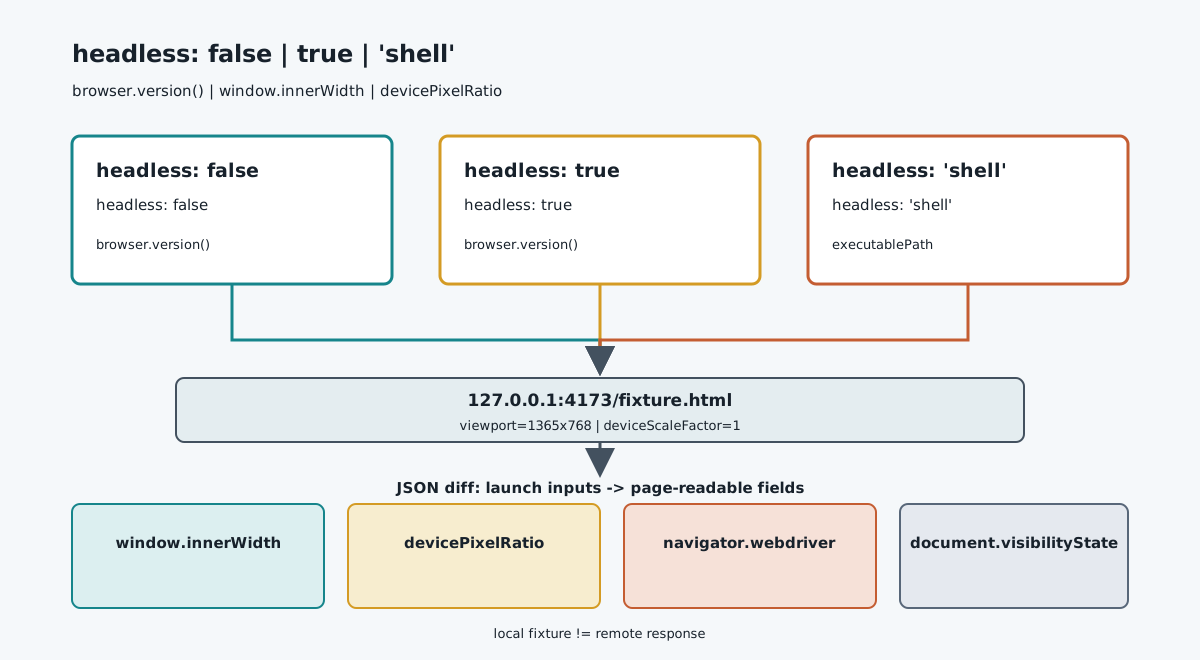
For a controlled scraping comparison, distinguish three cases: a visible Chrome window, Chrome's unified headless mode, and Puppeteer's optional headless shell. Chrome documents unified headless as using the regular Chrome implementation; the shell is a separate executable. Neither description promises identical page output, and neither predicts whether a remote service will accept a request. A local fixture can show which values changed under a declared configuration.
TL;DR
headless: falseopens a visible browser window;headless: trueselects unified headless in current Puppeteer;headless: 'shell'selects Puppeteer's separate shell build.- Keep browser version, fixture, viewport, device scale, storage, and launch flags fixed before attributing a difference to mode.
- Record
window.innerWidth,screen.width,window.devicePixelRatio,navigator.webdriver, and the browser version as observations, not an identity or acceptance score. - Use an owned local fixture and change one variable at a time. A page-visible difference is not evidence that a third-party detector accepted or rejected the run.
Contents
- Three execution modes
- What a page can read
- A controlled two-mode diff
- Classifying a difference
- When the comparison is inconclusive
- Practical conclusion
Three execution modes
“Headless” describes how a browser is launched, not one universal rendering engine. The browser binary, browser version, launch flags, operating system, display server, viewport, fonts, and profile all remain relevant. A useful comparison names the mode and the executable rather than recording only a Boolean value.
Headed Chrome
In a headed run, Chrome creates a visible top-level window. The window manager and display environment can affect the outer window dimensions, available screen size, scaling, focus, and visibility state. A test harness may still set a page viewport independently of the outer window, so “headed” does not mean the page receives whatever dimensions happen to be on the physical monitor.
For Puppeteer, headless: false requests the visible mode. The page can read the inner viewport through window.innerWidth and window.innerHeight; screen.width and screen.height describe the screen dimensions exposed to the page. These values answer different questions. A fixed viewport can make the first pair stable while the display or window manager changes the second pair.
Unified headless Chrome
Chrome's current headless mode uses the regular Chrome browser implementation rather than the older, separate headless implementation. Chrome's documentation describes this change beginning with Chrome 112. That is an implementation boundary: it does not say that a headless session has a visible desktop window, nor that every page-visible value must match a headed session on every host.
Puppeteer uses headless: true for this unified mode. A command-line launch can also request headless execution. The exact executable and version still matter: an old automation package, a pinned binary, or a custom command-line flag can change what actually ran. Record browser.version() or the equivalent negotiated version alongside the mode rather than assuming the installed package selected the browser you expected.
Headless shell
Puppeteer also exposes headless: 'shell', which selects the separate chrome-headless-shell executable. It is not simply a second name for unified headless Chrome. Chrome's documentation describes the shell as a distinct headless binary, and the Puppeteer guide documents its separate mode selector. As a result, a shell-versus-headed comparison can change both launch mode and executable implementation unless the experiment explicitly records them.
The option is Puppeteer-specific; other automation libraries may expose different names or may not offer the shell mode through the same API. Do not translate a Puppeteer string option into a Playwright setting without checking that library's current documentation. For browser setup rather than mode semantics, the Puppeteer integration guide and headless server deployment notes cover separate operational questions.
| Run label | Puppeteer selector | Implementation to record | What the label does not prove |
|---|---|---|---|
| Visible window | headless: false | Chrome executable and version | That page output matches a real user's device |
| Unified headless | headless: true | Regular Chrome implementation and version | That the page cannot distinguish its environment |
| Headless shell | headless: 'shell' | chrome-headless-shell executable and version | That shell and regular Chrome expose identical behavior |
Chrome 132 made the older headless implementation available as a standalone shell binary. Version numbers therefore belong in the record: mode names can remain similar while the executable behind an automation setting changes. Consult the Chrome headless documentation and the Puppeteer headless-mode guide when upgrading a runner; do not infer the selected implementation from a flag copied from an older article.
What a page can read
A page does not receive one standardized isHeadless property. It reads browser APIs, layout results, and behavior exposed by the configured environment. A useful fixture records a small set of concrete fields and keeps their meanings separate instead of collapsing them into a “headless fingerprint.”
window.innerWidth and window.innerHeight describe the layout viewport in CSS pixels. screen.width and screen.height describe screen dimensions exposed to the document. window.devicePixelRatio relates CSS pixels to device pixels for the current display configuration. A responsive page can choose different layouts when the viewport changes even if the browser implementation and URL stay constant. The MDN innerWidth reference and devicePixelRatio reference specify these API meanings; they do not claim that headless mode alone determines their values.
navigator.userAgent and, where available, navigator.userAgentData expose browser-identification data subject to the browser's reduction and availability rules. Those strings are not a reliable way to label a session as headed or headless. A User-Agent value can remain the same while viewport or rendering outcomes differ, and page code should not treat a browser string as proof of a physical device.
navigator.webdriver is an automation-related signal standardized by WebDriver. MDN documents when a browser reports that automation state; Chrome may expose it in automation configurations including headless operation. It is not a mode-complete classifier: a true value means the browser reports WebDriver control, not that a particular website has reached a verdict. The Navigator.webdriver reference is the right source for the property contract. A separate headless signal comparison covers how to record multiple browser-visible surfaces without treating any one field as a detector result.
Other outputs depend on more than launch mode. Font availability can change line wrapping and element dimensions. Locale and time zone can change formatted text. A stored cookie can change whether a page shows a sign-in wall or a data table. Network routing can change the server response or timing. A scraping run that changes several of these at once cannot attribute the resulting DOM difference to headless mode.
The deployment environment is another independent axis. BotBrowser's headless server setup documents its virtual-display and profile requirements for that product. Its automation consistency reference describes profile-backed browser values. Those are BotBrowser operating details, not claims about the architecture of upstream Chrome or a promise that a page receives identical values in every mode.
A controlled two-mode diff
Use a page you own or are authorized to inspect. A local fixture avoids mixing launch-mode observations with a remote site's authorization, rate limits, challenges, content changes, or service policy. The example below expects a fixture at http://127.0.0.1:4173/fixture.html; it has not been run here and contains no measured output.
Run one mode per process. Use the same Puppeteer installation, executable, browser version, local page, profile policy, viewport, device scale, locale, and storage state. The mode name is the only intended variable for the first two runs. A shell run is a separate comparison because its executable differs.
import puppeteer from 'puppeteer';

const modeName = process.argv[2];
const modes = {
  headed: false,
  headless: true,
  shell: 'shell',
};

if (!Object.hasOwn(modes, modeName)) {
  throw new Error('Choose one mode: headed, headless, or shell');
}

const fixture = 'http://127.0.0.1:4173/fixture.html';
const browser = await puppeteer.launch({
  headless: modes[modeName],
  defaultViewport: {
    width: 1365,
    height: 768,
    deviceScaleFactor: 1,
  },
});

try {
  const page = await browser.newPage();
  await page.goto(fixture, { waitUntil: 'domcontentloaded', timeout: 10000 });
  const pageFields = await page.evaluate(() => ({
    origin: location.origin,
    userAgent: navigator.userAgent,
    webdriver: navigator.webdriver,
    viewport: { width: innerWidth, height: innerHeight },
    screen: { width: screen.width, height: screen.height },
    devicePixelRatio,
    visibilityState: document.visibilityState,
  }));

  process.stdout.write(
    `${JSON.stringify(
      {
        mode: modeName,
        browserVersion: await browser.version(),
        pageFields,
      },
      null,
      2
    )}\n`
  );
} finally {
  await browser.close();
}
Save the same script as mode-diff.mjs, then capture each run separately:
node mode-diff.mjs headed > headed.json
node mode-diff.mjs headless > headless.json
node mode-diff.mjs shell > shell.json
diff -u headed.json headless.json
The code prints a record, not a pass/fail result. It intentionally does not contact a third-party domain, compare an account, or claim that any mode is accepted. A non-zero exit or missing JSON file is an execution problem; differing field values are observations to classify. For a strict headed-versus-unified comparison, compare the first two files and verify browserVersion matches. Treat the shell output as a separate implementation comparison and preserve its version in the notes.
The viewport values in the example are fixed inputs, not evidence of a universal viewport. defaultViewport establishes Puppeteer's page viewport; it does not control every operating-system window dimension. The script records screen dimensions and device scale because those can reveal a changed host setup. If a fixture requires a specific viewport to reproduce a responsive branch, keep that value identical in each run and note it next to the JSON files.
For a local fixture with dynamic data, make the test page deterministic before comparing modes. Pin the fixture version, use static local assets, freeze application state, and avoid a live API whose response may change between captures. If a font is loaded from the network, a timing difference can alter layout even when the renderer is unchanged. Keep the test page's source revision and asset set with the capture record so a future browser upgrade is not compared against a different fixture.
Classifying a difference
Start with the recorded browser version and launch configuration. If those do not match the intended comparison, the run is not a controlled mode comparison. Next inspect the viewport, screen dimensions, and device scale. A different innerWidth can select another CSS breakpoint; a different devicePixelRatio can alter rasterization and canvas backing resolution. Those results explain a page difference through concrete inputs, not through a generic headless label.
Then separate three result classes:
| Class | Example | Next diagnostic |
|---|---|---|
| Declared-input difference | The shell run reports a different browser version or executable | Keep it as a separate binary comparison; do not attribute it only to visibility |
| Environment-mediated difference | Screen dimensions, fonts, locale, or storage differ | Align the input or record the difference as part of the environment |
| Page-observed difference | A local fixture reads another navigator.webdriver value or selects a different layout | Verify the API contract and browser configuration; do not infer a remote detector decision |
For example, a change in navigator.webdriver should be traced to the automation control and browser launch configuration. The property reports WebDriver-related state; it does not state whether a scraper is authorized or whether a site accepted a session. A changed innerWidth should be checked against the configured page viewport before investigating CSS. A changed screen.width points to screen configuration exposed to the page and should not be relabelled as a physical-device identity.
The mode comparison also cannot isolate network-side behavior. Two runs may receive different markup because the fixture server, cookies, request timing, or cached content changed. Compare the fixture's response and source state before attributing a DOM difference to Chrome. If a remote site is in scope, follow its documented access policy and keep server responses separate from browser API readings; this page does not provide instructions for bypassing challenges or access controls.
If the purpose is to understand how a named detector groups observations, that is a different question from selecting a scraper launch mode. The CreepJS headless detection layers page covers public signal categories, while the profile consistency overview examines profile-backed values. Neither turns a local comparison into a prediction about a service that was not measured.
When the comparison is inconclusive
The comparison is inconclusive when the actual executable is unknown, the browser versions differ, the fixture changed, or the two runs did not use the same viewport and state. It is also inconclusive when only a final screenshot is retained without launch metadata: a screenshot shows pixels, but not which binary, flags, profile, fonts, locale, or display configuration produced them.
A single observation does not establish that a behavior belongs to all headless browsers. Browser releases change. Puppeteer and Chrome can update on different schedules. A headless: true setting is meaningful only in the library version that interprets it and for the executable that it launches. Pin those dependencies for a reproducible comparison, then re-run the owned fixture after an intentional upgrade.
Do not combine mode, viewport, profile, locale, and network changes into one “before versus after” run. When several variables move, the page result has several plausible causes. Make a small matrix instead: headed and unified headless with the same executable/version and viewport; then a separate shell row with its actual executable; then, only if needed, a second viewport test with mode held fixed. Each pair answers one bounded question.
BotBrowser's documented profile behavior belongs in that matrix as a product configuration, not as an upstream Chrome mode. A profile can supply documented browser-facing values, and the server setup page describes deployment constraints. Neither claim means that renderer architecture changes, that all host signals become identical, or that a site will return the same content. More on the boundary between profile-backed consistency and headed/headless output keeps those questions distinct.
FAQ
Is headless Chrome always detectable?
There is no supported universal boolean that answers that question for every page and browser version. A page can read APIs and layout results, and automation configuration can expose WebDriver-related state. A particular reading is evidence about that run, not a guarantee that every site uses the same fields or reaches the same conclusion. The defensible result is a record of the browser version, launch mode, inputs, fixture, and observed fields.
Does Chrome headless produce the same page as headed Chrome?
Chrome's unified headless implementation shares the regular Chrome implementation, but shared implementation does not mean every environment input is equal. A visible desktop window, virtual display, fonts, graphics stack, viewport, device scale, and profile can differ. Compare the same executable and controlled fixture before attributing a change to the launch mode. Do not promise byte-identical pixels or DOM output across operating systems.
Is headless: 'shell' just a faster spelling of headless: true?
No. Puppeteer documents the shell selector as a separate headless-shell executable, while true selects unified headless Chrome. Package versions and installation options determine which binary is available. Record the browser version from each run; do not merge shell results into a unified-headless baseline without documenting that implementation change.
Should a scraper switch to headed mode when data differs?
First identify the field that changed and check the controlled inputs. If the difference comes from viewport size, fonts, storage, or page state, changing mode may hide the cause rather than fix it. If a remote service changes its response, follow its documented access rules and investigate the server response separately. A launch-mode change is not an access-control workaround and does not establish that the extraction is permitted or reliable.
Sources
- Chrome Headless mode
- Chrome's new Headless mode
- Puppeteer: Headless modes
- BotBrowser: Headless server setup
- BotBrowser: Automation consistency
- MDN: Navigator.webdriver
- MDN: Window.innerWidth
- MDN: Window.devicePixelRatio
Practical conclusion
Choose a launch mode for the deployment and workload, then record what actually launched. Compare headed and unified headless on the same local fixture with one version, viewport, profile policy, and state; treat the shell as a separate executable. The resulting diff can explain page-visible changes in that setup. It cannot certify identity, authorization, or a site's response.
This article is part of the guide: Browser Automation Getting Started: A First Run Map
Related Articles
Chrome Headless New vs Old: Shell, Mode and What Differs
Getting StartedHeadless Browser Selenium: Chrome Options and What Differs
DeploymentHeadless vs Headed Browser Signals: A Comparison Method
Getting StartedScraping with Puppeteer: Options and Observable Differences
PlatformHeadless and Headed Browser Profile Consistency
Getting StartedScraping with Playwright: Browser and Profile Setup
Run the same check in BotBrowser
Load a profile, keep the signals you just read about consistent inside the browser, and confirm the result on your own machine before a rollout.