Chrome Headless New vs Old: Shell, Mode and What Differs
Unified headless is Chrome with no window; the old shell is a separate binary. One measured run shows what actually changes, and what stays different from headed.
BotBrowser Team
Want the structured docs for Platform?
This article lives in the editorial library. For step-by-step setup, reference material, and ongoing updates, jump into the docs section.
Chrome ships two headless implementations under one name, and the difference is architectural rather than cosmetic. BotBrowser provides a declared profile that keeps the surfaces a page can read consistent across launches, and it does not change which binary Chrome launched; the mode question has to be answered before the profile applies. The split is easy to state and easy to get wrong in a script: one mode is the full browser with no visible window, the other is a separate executable that shares neither the renderer nor the extension system.
Summary
- Since Chrome 112,
--headlessruns the full browser without a window; that is the mode the term now means. - The old implementation is a separate binary,
chrome-headless-shell, which since Chrome 132 is distributed only through Chrome for Testing. - The two differ in ways a page can observe: the shell reported zero plugins and no
window.chromeobject in the run recorded here, while unified headless reported both. - Neither is headed, and neither matches headed exactly;
webdriverwastruein all three because the client set it, not because of the mode. - Puppeteer selects between them with
headless: trueandheadless: 'shell', and Playwright takes anexecutablePathor its own channel. - Check which one you launched by reading the binary name and the reported user agent token, not by assuming the flag.
Contents
- Two implementations, one flag name
- What the three modes reported
- How each tool selects a mode
- What still differs from headed
- What a difference actually rules out
- Practical conclusion
Two implementations, one flag name
The history matters because most scripts written before 2023 encode the old assumption. The original headless was a separate implementation that happened to ship inside the same Chrome binary; the Chrome documentation states that it did not share the //chrome browser code. In Chrome 112 the browser gained a unified headless mode, in which Chrome creates the platform windows it would create in headed mode and simply does not display them, and the documentation describes all other functions as available with no limitations.
old headless   -> separate implementation, own binary since Chrome 132
new headless   -> full Chrome, no visible window, since Chrome 112
From Chrome 132 the old implementation is only available as chrome-headless-shell, a standalone binary published through the Chrome for Testing dashboard, and the Puppeteer documentation adds the operational detail that the shell does not match regular Chrome behaviour completely while being more performant for tasks that do not need the full feature set.
That single sentence explains most of the confusion in the search results around this topic. chrome headless new and chrome headless new vs old are not asking about a flag that changed meaning twice; they are asking which of two executables a script is starting, and the answer decides whether extension loading, media codecs and plugin enumeration behave the way the author expected.
The practical test is not the flag string but the artefact. A build directory that contains chrome-headless-shell is the old implementation regardless of arguments, and a launch that points at the full browser with --headless is the unified one even though the same word appears on the command line.
There is a reason the two live under one name for so long. Both answer the same question, whether a browser can run where no one is watching, and both satisfy it. They diverge only when the caller depends on a component the shell leaves out: the extension system, the plugin registry, the codec set, and the parts of the browser UI that a page can still observe through the windows object. A pipeline that only takes screenshots of static pages will not notice the difference, and a pipeline that loads an extension will notice it immediately.
That is also why migrating a pipeline is a two-part change rather than a flag edit. Moving from the shell to unified headless changes what the browser reports, so assertions written against the shell's values start failing for a correct reason; moving the other way makes them pass again, which is worse, because the test now passes while measuring a smaller browser than the one a user runs. A pinned Puppeteer version makes this concrete: before v22 the default was the shell, and the documentation records that the default is now the unified mode, so a dependency bump alone changes which implementation runs.
What the three modes reported
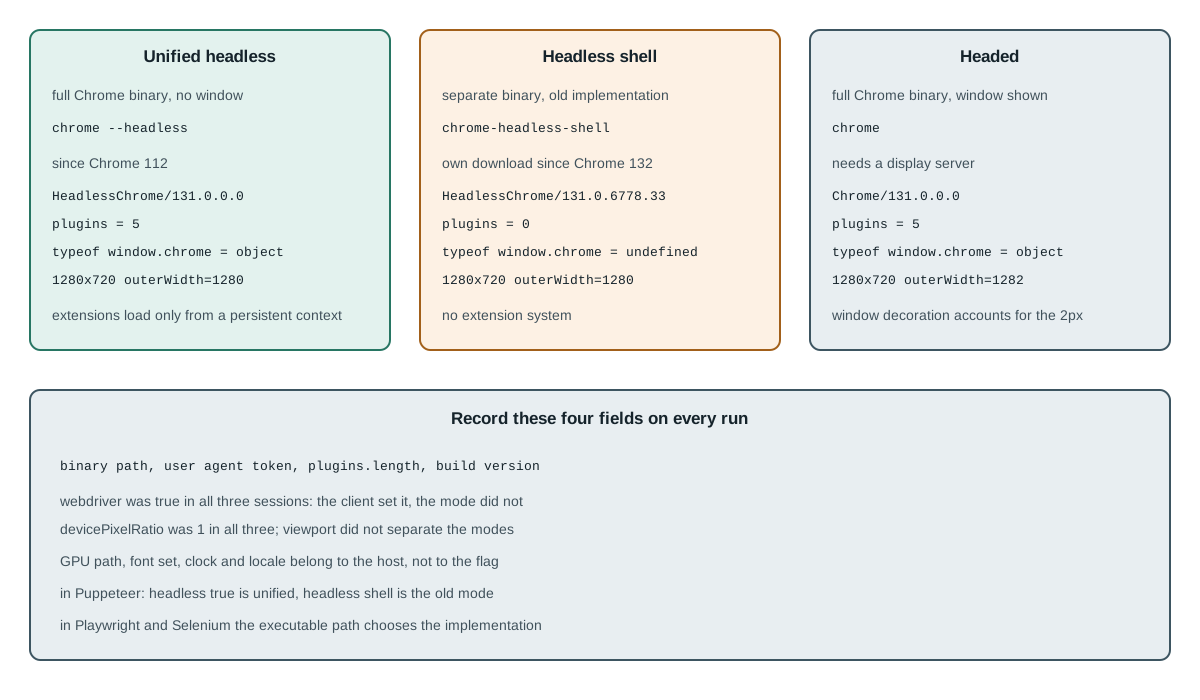
One local run recorded the same fields in three sessions on the same host, using a stock Chromium build and one throwaway profile per session. The values below are what that run printed, not a claim about every build.
unified headless  HeadlessChrome/131.0.0.0      plugins=5  chrome=object   1280x720  outerW=1280
headless shell    HeadlessChrome/131.0.6778.33  plugins=0  chrome=undefined 1280x720 outerW=1280
headed            Chrome/131.0.0.0              plugins=5  chrome=object   1280x720  outerW=1282

webdriver=true in all three (the client set it, not the mode)
devicePixelRatio=1 in all three
Two fields separate the shell from the other two, and both are the kind of value a page can read in one expression. The shell reported navigator.plugins.length === 0 while unified headless and headed both reported five, which follows from the shell excluding the browser components that register those entries. The shell also reported typeof window.chrome === 'undefined' where the other two reported an object.
navigator.plugins.length         shell 0   unified 5   headed 5
typeof window.chrome             shell undefined  unified object  headed object
user agent token                 HeadlessChrome in both headless modes, Chrome in headed
The window measurements are the more interesting result, because they are the same in all three: innerWidth 1280, innerHeight 720, screen.width 1280, devicePixelRatio 1. Only outerWidth differs, and only by two pixels in the headed session, which is a window-decoration artefact rather than a mode property. That is the useful correction to a common assumption: these three modes did not differ in viewport, so a screenshot comparison across them is not measuring what the author thinks it is.
The practical use of that finding is a control. Before attributing a rendering difference to the mode, run the same fixture twice in the same mode and confirm it is stable, then run it once in the other mode and diff the two. If the same-mode pair differs, the difference is measurement noise from animation, lazy loading or a timer, and the cross-mode comparison cannot be read until that is fixed. If the same-mode pair is identical and the cross-mode pair differs, the mode or the binary is a plausible cause, and the four recorded fields say which one moved.
Three fields that were deliberately left out of the table are worth naming, because they are the ones readers ask about first. navigator.webdriver was true in all three sessions, but that is the client's doing: every automation library here sets it on the page before any script runs, so it says nothing about the mode and comparing it across modes would produce a false finding. Notification.permission read denied in all three and navigator.hardwareConcurrency read 16 in all three, which is the host's core count rather than anything the window state changes.
field                       unified   shell   headed
navigator.webdriver         true      true    true    (client-set, not mode)
Notification.permission     denied    denied  denied
navigator.hardwareConcurrency  16      16      16
navigator.language          en-US     en-US   en-US
That block is the negative result the mode comparison needs, because it removes three candidate explanations before any difference is attributed. A reader who finds a difference in one of those fields between two runs is looking at a host difference or a client difference, not at headless versus headed.
The user agent token is the field to record rather than to infer. Both headless modes reported HeadlessChrome and headed reported Chrome, and the version tails differed because the two builds are at different patch levels, which is a second reason to record the build alongside the mode.
There is a caveat about that token which matters for anyone comparing versions across time. The token is a client-side override as well as a binary property: a launch that sets a custom user agent replaces the string the page reads while the binary underneath is unchanged. So the token tells you what the page saw, which is what a site reads, and the binary path tells you what actually ran. Recording both is what lets a later reader tell an upgrade from an override.
How each tool selects a mode
The three clients in common use each express the choice differently, and only one of them has a dedicated option for it.
puppeteer      headless: true      -> unified headless
               headless: 'shell'   -> chrome-headless-shell
               headless: false     -> headed
playwright     executablePath: ... -> whichever binary the path names
               channel: 'chromium' -> Playwright's bundled build, unified headless by default
selenium       options.addArguments('--headless')            -> unified in current Chrome
               options: binary at chrome-headless-shell       -> old implementation
Puppeteer is the only one that names the shell in its API, and the documentation records the version where the default changed: before v22, Puppeteer launched the old headless by default, and the current default is headless: true, which is the unified mode. A script pinned to an older Puppeteer therefore runs a different implementation than one written today, with the same line of code.
The dependency file is therefore part of the record. Two repositories on the same commit of a test suite can run different browsers because their lockfiles resolve Puppeteer differently, and the launch line they share says nothing about which one won. Recording the resolved Puppeteer version next to the resolved binary path turns that from a mystery into a diff.
Playwright has no shell option, because it launches the binary the path names. Pointing the path at chrome-headless-shell is possible and produces the shell's behaviour, including the missing plugin list, which matters if the test asserts on plugin counts. Pointing it at the full browser with headless default gives the unified mode.
Selenium expresses the choice entirely through the binary and the arguments. --headless in current Chrome means unified, and the old implementation is reached by configuring the browser binary path to the shell. That is the whole mechanism: the flag describes a window, and the binary decides the implementation.
Selenium choice = (options.addArguments) + (browser binary path)
                 flag picks a window; the path picks the implementation
Older tutorials sometimes show a variant flag rather than a shell path. Current Chrome documentation pages describe --headless and the chrome-headless-shell binary and do not document that variant, so the reliable check is the same one the rest of this article uses: resolve the executable path that actually ran, and read the user agent token afterwards.
Chromedriver adds a separate requirement that is documented and easy to violate: the driver version has to match the browser version it drives. The ChromeDriver version-selection page states the rule, including the pre-115 split where the major, minor and build numbers had to match. A mismatch is a driver problem, not a headless-mode problem, and it shows up as a session that will not start rather than as a session that reports the wrong mode.
--headless              current Chrome: unified
chrome-headless-shell   separate download from Chrome for Testing
driver version          must match the browser it drives
The mismatch to watch for is a chromedriver whose version does not match the browser it drives, because a mode change is often made at the same time as a browser upgrade and the two failures look alike. Chrome for Testing version pinning covers the three-artefact rule that keeps the browser, the driver and the shell on one version.
What still differs from headed
The unified mode removes the separate implementation, not the difference between an unattended browser and a windowed one. Three differences survived the run above, and they are the ones a test that compares headless to headed has to account for.
field                 unified vs headed
user agent token      HeadlessChrome vs Chrome
outerWidth            1280 vs 1282 (window decoration)
window focus/visibility   assumptions about focus do not hold in an unattended session
Extension support is the difference that changed with the switch and still catches people out. The old shell does not implement the extension system, while the unified mode runs the full browser and can load an unpacked extension under the conditions a headed launch needs; the persistent-context requirement and the paired flags are recorded in loading extensions in Puppeteer and Playwright.
That difference also explains a class of test that passes for the wrong reason. A suite that expects an extension to inject a helper and runs on the shell will not fail at load; it will fail later, or not at all, because the page never receives the helper and the assertion that depends on it is skipped. Asserting the installed set at startup, as that article describes, converts the silent case into a named one.
The rendering path is a second difference that is easy to overstate. On this host, with this build and a hardware-accelerated headed session, the composed output matched, but that is one measurement rather than a guarantee: a machine without a usable GPU reaches a software rasteriser, and the fonts a container ships decide whether text renders at all. Those are host properties, not mode properties, and they change independently of the flag.
mode decides:   whether a window exists, which binary runs, which extensions load
host decides:   GPU path, font set, system libraries, clock and locale
record field:   navigator.plugins.length (0 or 5), window.outerWidth, --load-extension present
That split is why a comparison of headless and headed that only records the mode cannot explain a difference. Headless versus headed signal comparison is the method for recording both sides; headless server setup is where the host half of the list is configured. Neither of them substitutes for knowing which binary is running, which is the one fact this flag family controls.
What a difference actually rules out
A difference between two runs is only informative once the cheap explanations are gone, and the measurements above make that order explicit. When a screenshot changes after a mode switch, four candidates are on the list, and three of them can be excluded before touching the browser.
1. same-mode rerun        -> identical? animation and lazy loading are excluded
2. viewport fields        -> innerWidth 1280 and dpr 1 in all three here
3. plugin count           -> 0 for the shell, 5 for unified and headed
4. binary path and build  -> the only candidate left when 1 to 3 match
The same discipline applies to a migration decision, which is the reason most readers arrive at this topic. Moving a suite from the shell to unified headless costs a rebuild of the assumptions that were written against the smaller browser: a plugin count of zero, a missing chrome object, no extension support. Moving from unified back to the shell looks like a performance win and quietly reinstates all three, and the only way to tell is to keep the four fields in the report and compare them across the change.
On this topic specifically, the claim worth avoiding is that the unified mode leaves nothing to observe. It does. It is the full browser with no window, which means it presents the same components as headed and still reports the mode in the user agent token, in window focus behaviour and in whatever the deployment does about the GPU and the fonts. A reader who wants the mode to stop appearing in every field is asking for something no launch flag can deliver, and a reader who wants to measure whether it did should record the fields above rather than trusting the flag.
Some of that noise is worth quantifying before it is attributed to the mode. In the three sessions above, the viewport was identical, so any layout difference between them came from the page rather than from the window size; the only measurement that moved was outerWidth, and it moved by two pixels in the one session that had a real window frame. When a screenshot comparison between two headless sessions differs, that is the first alternative to check, because two sessions of the same implementation on the same host should not differ in layout at all.
The second alternative is font substitution. A container that ships no CJK fonts renders those glyphs as boxes or notdef, and that happens identically in both headless modes; it is not a property of the flag and switching modes will not fix it. The way to tell the two apart is to render a fixed string containing one Latin and one CJK character and compare the pixel count of the text region, which changes when a font is missing and does not change when only the mode changed.
Practical conclusion
Decide the mode by naming the binary and then confirm it by reading the record. In Puppeteer, headless: true and headless: 'shell' are different implementations, not two settings of one; in Playwright and Selenium the choice lives in the executable path, which means a copied configuration can change the implementation without changing any visible option. Selenium users have a worked version of the same checklist, with the ChromeOptions that set the mode and the four host properties that differ in CI: headless browser Selenium. Selenium users have a worked version of the same checklist, with the ChromeOptions that set the mode and the four host properties that differ in CI: headless browser Selenium.
Record four fields on every run: the resolved binary path, the user agent token, the plugin count and the build version. Those four separate the shell from unified headless and either from headed, and they do it from the page side, where a test can assert on them without reading the launch code. When a difference appears between two runs, check the binary first, because that is the variable this topic is about.
The honest summary of the three-way comparison is short. Unified headless behaves like the full browser with no window; the shell behaves like a smaller browser that omits components; headed behaves like a full browser with a window. Everything else that changes between two runs on different machines belongs to the host, not to the flag.
Sources
This article is part of the guide: Web Platform Surfaces: A Consistency Review Map
Related Articles
Headless Browser Scraping: What Actually Changes
Getting StartedHeadless Browser Selenium: Chrome Options and What Differs
DeploymentHeadless vs Headed Browser Signals: A Comparison Method
PlatformHeadless and Headed Browser Profile Consistency
FingerprintChrome for Testing: Pinning a Build, Not a Fingerprint
PlatformLoading Extensions in Puppeteer and Playwright
Run the same check in BotBrowser
Load a profile, keep the signals you just read about consistent inside the browser, and confirm the result on your own machine before a rollout.