What Is a Browser Fingerprint?
Learn how ordinary browser signals combine into a fingerprint, why cookies do not control it, and how to test privacy boundaries safely.
BotBrowser Team
Prefer the maintained product doc?
This article has a matching page in the docs center. Use the docs for the canonical setup flow, current flags, and long-term reference.
A browser fingerprint combines ordinary answers from a browser into a recognizable pattern, even when a site does not store a cookie locally. The overview explains how those signal families combine; the Canvas analysis and WebGL check each own their concrete measurement.
BotBrowser supports repeatable authorized browser-context checks with declared profile settings; it does not identify people, guarantee anonymity or access, or prove a remote service decision.
TL;DR
A fingerprint is a collection of browser-visible signals, not proof of who is using the browser.
Contents
- Signal families
- What common privacy actions change
- A bounded validation approach
- Interpreting fingerprinting signals
- Practical review checklist
- Why consistency and privacy are separate goals
- Conclusion
Video
This English-language video demonstrates a read-only local check: it clears a page identifier and reads the same browser signals again. It uses no proxy or profile and does not establish identity, anonymity, access, or a remote site decision.
Signal families
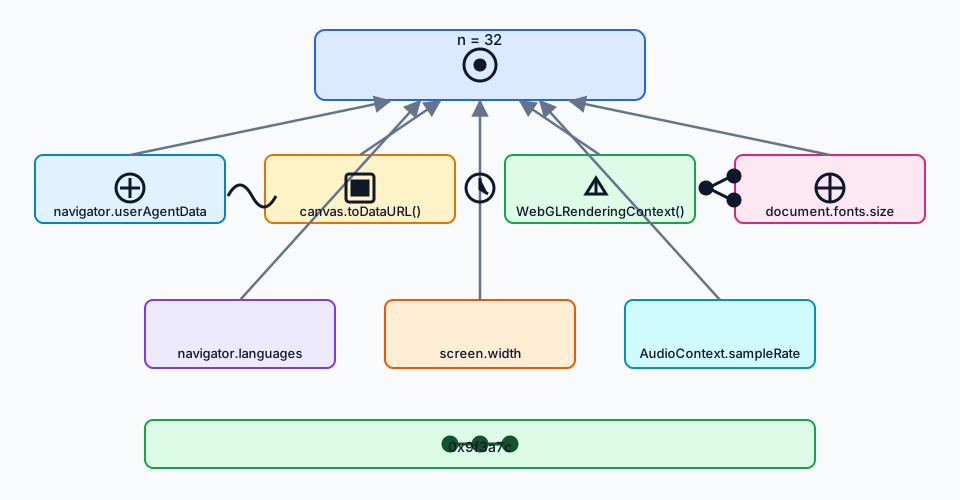
Every value below is one a page can request for an ordinary compatibility reason. None of them names a person. The question a fingerprint asks is how many independent values one visit can read.
Navigator and user agent. navigator.userAgent, navigator.language and navigator.languages, navigator.platform, navigator.hardwareConcurrency, navigator.deviceMemory, and the plugin list. These are cheap to read and coarse: hardware concurrency reports one of a handful of values, and the user-agent string is largely frozen for compatibility. User-Agent Client Hints moved part of that surface into sec-ch-ua request headers, which a server reads before any JavaScript runs.
Canvas rendering. A page draws text and shapes into an offscreen canvas, reads the pixels back, and hashes them. The result depends on font rasterization, anti-aliasing, and GPU or software rasterizer behavior, so it separates machines that report identical navigator values. For what the drawing measures and how to check its stability, see Canvas Fingerprinting: How It Works and What Helps.
WebGL and GPU strings. WEBGL_debug_renderer_info exposes vendor and renderer strings such as a GPU model, and WebGL parameter queries return limits like the maximum texture size. A renderer string often names a chip family rather than a device. What those strings reveal about hardware is covered in WebGL Fingerprinting: Read GPU Signals and Prevent Leaks.
Installed fonts and text metrics. Font availability is enumerated by measuring text width in a hidden element, and text metrics vary per font and platform. A machine with the same browser build but a different font set is still distinguishable. Speech Synthesis Fingerprinting: Voice List Tracking covers the adjacent voice-list surface that text-to-speech exposes.
Screen and viewport geometry. Screen dimensions, device pixel ratio, color depth, and the gap between the visual viewport and the layout viewport. These correlate with device class more than with a specific unit.
Audio processing. An OfflineAudioContext renders a fixed oscillator graph and the samples are hashed. The output varies with the audio stack and its floating-point path, so it separates builds that agree on everything above.
Timing and performance. performance.now() resolution, timer coarsening under cross-origin isolation, and the shape of resource timing entries. Resolution is reduced on purpose in some contexts, which itself becomes a readable value. Performance Timing Fingerprinting covers the measurement.
Network and protocol hints. The IP-derived location a server observes, Accept-Language, and connection-level properties. These are decided before the document exists, so no page-level setting changes them. This is the layer where a proxy and a browser profile have to agree.
The families differ in cost and stability. Navigator values are nearly free and nearly identical across a device class. Canvas and audio need computation, are more distinctive, and are also more sensitive to legitimate update noise. That tradeoff is why a "fingerprint score" from a public test page describes that page's weighting, not a universal measure.
What common privacy actions change
Clearing cookies removes stored state, not browser behavior. Private windows isolate some local state, and a network change affects routing, but neither guarantees a new fingerprint. Sites and policies still determine what is collected.
A bounded validation approach
For an authorized test page, record only the visible result needed for the question, keep the profile and browser release explicit, and avoid collecting raw identifiers. Compare repeated runs as observations, not as proof of a person or a remote decision. The EFF Cover Your Tracks result guide separates simulated tracker requests and cookie outcomes from fingerprint uniqueness, so those reports do not turn into a single identity claim.
BotBrowser can repeat an authorized browser-context check with declared profile settings. It cannot identify a person, guarantee anonymity or access, change or defeat site controls, or prove what a remote service decided.
Interpreting fingerprinting signals
A browser fingerprint is best understood as an observation about a browser context. A page may read several public interfaces during an ordinary visit and combine the returned values. The result can be stable enough to support recognition, but stability is not the same as a person-level identity claim. The same person can use multiple browsers, and multiple people can share a browser profile or device. A responsible explanation therefore names the surface, the collection purpose, the retention decision, and the uncertainty.
The distinction also matters for product teams. A browser test can show that a declared context returned a value at a given time. It cannot show that every browser returns the same value, that a remote service used it, or that a business decision followed. Treat the page result as one bounded observation alongside application logs, consent records, and policy review.
Practical review checklist
Before running a fingerprint-related check, write down the authorized origin, the exact question, the minimum fields needed, and the retention period. Use synthetic data and a disposable test context where possible. Keep cookies and local storage separate from signal observations so a state reset is not mistaken for a signal change. Record the browser release, profile label, locale, timezone, viewport, and network declaration only when they are relevant to the question.
After the run, compare only the fields named in the test plan. Explain differences as browser, platform, configuration, or timing observations until stronger evidence exists. Do not publish raw identifiers, full canvas output, audio buffers, or device inventories when a yes/no assertion is enough. A short evidence table is usually more useful than a large fingerprint dump.
Why consistency and privacy are separate goals
Compare two canvas assertions in one declared profile before making a broader claim.
Consistency helps a team reproduce a documented browser journey. Privacy asks whether the journey collects more information than necessary and whether people can understand or control that collection. A consistent profile can make a test easier to compare, but it does not turn a browser into an anonymous channel. Network routing, storage policy, permissions, and server-side records remain separate concerns.
When a site changes its collection behavior, revisit the purpose and retention decision rather than assuming that a profile setting resolves it. When a browser release changes an API, rerun the smallest authorized fixture and update the evidence date. This keeps the article useful without turning a narrow browser observation into a universal promise.
Fingerprinting also has a measurement boundary. A test page can report a value returned by one declared browser context, while the site, server, consent record, and retention policy remain separate evidence. Keep those layers separate when interpreting a result.
Signal ownership and interpretation
The report names navigator.userAgent separately from Canvas output.
Different signals have different owners. Navigator properties are exposed by browser APIs. Canvas and font results depend on rendering and text metrics. Graphics capabilities describe what the browser makes available to a page. Locale and display values reflect declared preferences and current window conditions. Audio and timing results emerge from processing behavior. Network hints describe a connection context rather than a person. Naming the owner helps reviewers ask the right follow-up question and avoid treating every value as a hardware identifier. For how text rendering and installed fonts become a signal, see What Is Font Fingerprinting? Cross-Platform Text Consistency, which covers what font checks measure and why consistency matters.
A useful report records the category, the API or visible behavior, the test time, and the declared context. It does not need to include the raw value. For example, a report can say that two authorized runs returned the same canvas assertion under the same profile, without exporting the pixel buffer or a persistent digest. This keeps the evidence useful while reducing unnecessary exposure.
Cookies, storage, and fingerprints
Cookies and local storage are state mechanisms. A site can clear them, expire them, or isolate them in a private context. Fingerprint signals are observations of browser behavior and configuration. A page can read some observations during a visit even when no identifier has been stored previously. The two mechanisms can be combined by a site, but they should not be described as the same thing.
This distinction explains why a cookie-clearing demonstration can still show a stable digest. The page identifier is removed, then the browser answers the same public questions. The result does not establish that every site will collect the same fields or that a site will recognize a person. It only illustrates that storage reset and signal change are separate operations.
Browser and platform variation
A value can vary after a browser release, operating-system update, font change, graphics-driver change, display change, locale choice, or permission decision. Variation is not automatically a defect, and stability is not automatically proof of identity. A comparison should declare which inputs are held constant and which are expected to move.
For cross-platform review, keep the test page, navigation path, profile label, release, viewport, timezone, language, and network declaration visible in the record. When an input cannot be held constant, mark the result as conditional. This makes a later rerun interpretable instead of turning one environment into a universal baseline.
Privacy-preserving evidence
The safest fingerprint test collects the least data needed to answer the question. Prefer boolean assertions, coarse categories, or locally computed comparisons over exporting raw values. Remove account names, tokens, private URLs, full audio buffers, canvas pixels, and device inventories from shared reports unless the test owner has documented a specific need and retention period. For how audio processing becomes a signal and how to verify it, see Audio Fingerprinting Explained: How AudioContext Tracks You, which covers why audio output differs and how to check its consistency.
Access controls and deletion plans matter as much as the browser script. A local test can still create sensitive logs if the harness stores every result by default. Keep the fixture disposable, use synthetic content, and review the output before it leaves the test environment. These practices reduce exposure without claiming that a browser is anonymous.
Product decisions and user communication
A product team should describe why it observes a signal, how long the observation is retained, who can access it, and what users can control. The browser result is one input to that decision, not a substitute for consent, privacy review, or server-side evidence. When the purpose changes from compatibility testing to fraud review or analytics, reassess the data minimization and governance requirements.
Clear language also prevents accidental overclaiming. Say that a browser context returned a value, that a test was repeated, or that a documented surface was available. Do not say that the test identified a person, proved a device owner, established anonymity, or guaranteed a remote service outcome.
Reproducible authorized workflow
- Define an authorized origin and a narrow question.
- Choose a disposable context and declare profile, release, locale, timezone, viewport, and route inputs.
- Read only the surfaces needed for the question and compute a minimal assertion.
- Repeat the same journey when comparing stability; record environmental changes explicitly.
- Review, redact, retain, and delete the evidence according to the test plan.
BotBrowser is useful here as a repeatable browser-context runner. Its value is controlled comparison of declared settings and visible outcomes. It does not grant permission to inspect another service, make a user anonymous, or convert a browser observation into a person-level decision.
Standards and API boundaries
The public web platform exposes these surfaces for ordinary compatibility purposes. The Navigator API describes browser and device-related values; Canvas and WebGL expose rendering interfaces; Web Audio exposes processing objects; CSS media features expose preferences and display conditions; Performance APIs expose timing observations. Specifications define what a page may request, but they do not promise that a value is unique, stable forever, or suitable as an identity credential. A standards citation should therefore be paired with a narrow statement about the observable behavior.
The same API can also behave differently across realms. A Window, Worker, or iframe may have its own global object and permission context. A value observed in one realm should not automatically be treated as a cross-origin fact. For an authorized test, record which realm produced the observation and whether the page controlled the origin. This prevents a local fixture from being mistaken for a universal cross-site collection result.
A worked comparison example
Suppose a team is checking whether a profile remains internally consistent after a browser update. The team can choose a synthetic page that displays coarse categories for language, timezone, screen dimensions, canvas equality, graphics capability presence, and timing resolution. The fixture can compare two runs in the same declared context and report only changed categories. It does not need to store a fingerprint digest or send values to a server.
If the second run differs, the next step is classification. A browser release may change an API default; a locale change may alter formatting; a display resize may alter viewport values; a permission state may change availability; or the fixture itself may have a race. Repeating the smallest case with one input changed at a time is more informative than adding more collection. The result should name the changed input and the remaining uncertainty, for example viewport: changed while canvas: same.
Retention and access decisions
A fingerprint-related record can become sensitive when combined with account, location, or time data. Decide retention before running the test. Keep raw values local when a category or boolean is sufficient. Restrict access to the people responsible for the authorized test. Delete temporary output after the review window, and document exceptions when a release regression requires longer retention.
Do not treat a public standard as permission to collect any value indefinitely. The standard explains browser behavior; product governance explains purpose, notice, access, and deletion. These concerns remain relevant even when the test uses a local browser and synthetic data.
Limits of repeatability
Repeatability has a defined scope. It can mean the same fixture, browser release, profile, route, and declared inputs produced comparable visible output twice. It does not mean every machine, site, release, or user will produce the same output. Fonts, GPU paths, operating-system settings, timer policies, and browser experiments can all change the result.
A good report states the scope in its first sentence and keeps the evidence date. When the environment changes, rerun the smallest fixture and mark the comparison as a new observation. Avoid turning a historical result into a permanent compatibility claim.
Communicating uncertainty
Use calibrated language: “returned,” “was available,” “matched in this fixture,” and “changed after this input changed.” Avoid “proves,” “always,” “unique,” and “anonymous” unless a separate, defensible evidence process supports those words. Readers need to know what the browser did and what the test did not establish.
This wording is not merely editorial. It prevents a compatibility check from being reused as a profiling system or a remote-access claim. It also makes future maintenance easier because the article can be updated when an API, release, or policy changes without rewriting an absolute promise.
Designing a fixture that answers one question
Use a bounded assertion such as canvas: same rather than a full digest.
A useful fixture starts with a question that can be answered from visible browser behavior. “Did this declared profile return the same coarse canvas assertion twice?” is bounded. “Can this browser be recognized everywhere?” is not. The first question names an origin, a profile, a repeatable action, and an observation. The second mixes browser behavior with unknown collection, server correlation, account state, and policy decisions.
Keep the page understandable to the person running it. Show the test purpose, the categories being read, the timestamp, and the reset action. Provide a keyboard-accessible control to rerun the check and an accessible summary of changed categories. A privacy test should not require a hidden collector or an opaque upload. When an upload is necessary for an authorized service, explain the fields, retention, and deletion path before the run.
The fixture should also record negative outcomes. An unavailable graphics API, denied permission, missing font, or timing resolution change is an observation, not a reason to substitute another value silently. Treat “unavailable,” “not requested,” “changed,” and “same in this run” as separate states. This makes a regression actionable and avoids manufacturing a stable fingerprint from fallback guesses.
For release work, pair the fixture with a small decision table: expected result, observed result, likely owner, next check, and evidence date. Browser ownership may point to a release note; application ownership may point to a feature flag; environment ownership may point to a profile or display setting. The table keeps the browser observation connected to an accountable action without claiming that the observation identifies a user.
Maintaining the record over time
Record the browser release, profile label, test page version, and evidence date with every comparison. When a result changes, note whether the cause is a browser update, a profile edit, a display or locale change, a permission state, or a fixture change. Preserve only the smallest receipt needed for review, and remove temporary raw values after the authorized retention period. This routine keeps a useful history without turning a compatibility test into a permanent identity database.
Final interpretation
Keep the result tied to its declared context, purpose, and evidence date. A careful interpretation is more durable than an absolute claim and gives readers a clear next action.
Conclusion
Use fingerprinting explanations to separate browser behavior from identity claims. Define the signals, minimize the observation, and document the limits of the result.
For related background, see Browser Fingerprint Protection for Web Data Collection.
Sources
All guides on this topic
- Rebrowser Patches: What Changes After a Proxy Works?
- AWS WAF Bot Control: What a Client Actually Sees
- Chrome for Testing: Pinning a Build, Not a Fingerprint
- curl-impersonate and curl_cffi: TLS Parity Limits
- TLS Fingerprinting: JA3, JA4 and the HTTP/2 Frame
- CreepJS CSS Computed Style Collector: What It Reads
- CreepJS CSS Media Queries: Two Channels, One Preference
- Linux armv81 Browser Signals: Platform Boundaries
- Browser Patch Plugins: What They Change and Cannot Reach
- Undetected Browser: What a Detector Actually Reads
- CreepJS SVG Report Metrics: Fields and Limits
- CreepJS Math Signals: Read the Source Fields
- CreepJS Prediction Report: Aggregation and Unknown States
- WEBGL_debug_renderer_info: Privacy and Renderer Boundaries
- BrowserLeaks WebGL Report: Collection and Missing States
- getClientRects Fingerprinting: DOMRect Consistency
- navigator.cpuPerformance: Tiers and Privacy
- Canvas Fingerprint Test: Empty Exports and Errors
- CreepJS Intl Report: Fields and Missing Values
- CreepJS Timezone Report: Offsets and Location
- CreepJS WebGL Report: Contexts and Capability Signals
- Cross-Browser Fingerprinting: What Linkability Shows
- EFF Test Results: How to Read Cover Your Tracks
- CreepJS Android WebView Detection: Signal Limits
- WebGL Renderer Missing: Privacy or Context State?
- BrowserLeaks Canvas Report: Signals and Limits
- CreepJS Audio Reports: Rendering and Missing Values
- CreepJS Emoji Metrics: What Sets and Sums Reveal
- Native Override Lies and What a toString Whitelist Sees
- CreepJS Font Tables: 51 Names and 14 Possible Returns
- CreepJS Headless Detection: Three Separate Verdicts
- Abort Signal Reason Composition and Late Listeners
- Why One Odd Signal Never Convicts a Browser
- CreepJS Canvas Seed Cycle: How Many Rounds Stay Distinct
- CreepJS Signal Groups and How It Combines Them
- Date String Parsing: Local and UTC Boundaries
- Edge-Layer Rules a Page Script Cannot Evaluate
- Intl.NumberFormat: Rounding Mode and Sign Display
- Iterator Helpers: Laziness, Single Use and Early Stop
- Sparse Array Holes and What Each Method Does With Them
- What Public Detector Suites Actually Test
- Array Sort and Comparators: A Function You Can Get Wrong
- ArrayBuffer and TypedArray: One Buffer, Many Views
- BotD Detector Registry: Which Checks Actually Run
- btoa and atob: the Latin-1 boundary
- Intl.Collator: Locale Order Is Not Code-Unit Order
- Crypto-JS Random Source: Which Branch Your Build Uses
- DataView: Endianness, Alignment and Bounds
- ICU Timezone Aliases and the TZ You Actually Report
- Microtasks and Timers: The Order Your Code Actually Runs
- Object Key Order: Integer Keys Sort, String Keys Stay
- Promise Combinators: What Fails First
- Proxy Traps and the Invariants the Runtime Enforces
- RegExp lastIndex and Flags: The State That Flips Answers
- structuredClone vs JSON: What a Deep Copy Actually Keeps
- TextDecoder and TextEncoder: Bytes vs Strings
- ua-parser-js: Client Hints, Bots and a 500-Char Cap
- Unicode Normalization: Four Text Identities a Page Reads
- URL Parsing and Search Params: What Round Trips Change
- WeakMap and WeakSet: What They Hold and What They Drop
- How to Read Browser Fingerprint Signals
- Cloudflare Bot Score Evidence and Logs
- FingerprintJS OSS: Collection and Visitor Provenance
- Crypto Randomness Observability and Browser Fingerprints
- Active Window Emulation and Page Visibility State
- Mobile Viewport Resize Events: Order, Debounce, and Layout
- Keyboard Layout API, Locale Choices, and Privacy
- WebGL Software Rendering, Capability Fallbacks, and Privacy
- --bot-performance-timing: Browser Timing Signals and Fingerprinting
- Browser Geolocation Permissions and Location Accuracy
- Battery Status API: Privacy, Availability, and Safer Web Decisions
- Device Memory API and Web Performance: Use Memory Hints Safely
- Web Font Loading and Layout Stability: Prevent Unexpected Shifts
- Screen and Viewport Properties for Responsive Design
- Screen Orientation API and Responsive Experiences
- Browser Mic API: Web Audio Access, Permissions, and Recording
- Web Bluetooth Permissions, Device Choice, and Privacy
- WebGPU Adapter Information and User Privacy
- WebCodecs Browser Capabilities and Privacy
- WebGL Capabilities and Privacy: A Practical Application Guide
- Browser Privacy Basics for Everyday Use
- Browser Tracking Protection Settings Explained
- WebNN Availability, Backends, and Browser Privacy
- Canvas API: Normal Uses and Privacy Context
- What Private Browsing Does and Does Not Do
- MediaDevices Identity and Virtual Camera Privacy in Browser Workflows
- Browser Privacy Validation Across Rendering Backends
- Private Verification Tokens: Chrome's Proposal and BotBrowser Today
- Cross-Surface Browser Privacy: Keep One Context Coherent
- Device Pixel Ratio Policy with --bot-dpr
- Browser Permission Fingerprinting: Privacy and Consistency
- What Is Font Fingerprinting? Cross-Platform Text Consistency
- V8Log Forensics: Runtime Evidence for Privacy Validation
- WebGL Fingerprinting: webgl_debug_renderer_info and Your GPU
- Audio Fingerprinting Explained: How AudioContext Tracks You
- Canvas Fingerprinting: How It Works and What Helps
- Text Measurement Fingerprinting: Sub-Pixel Tracking
- Client Hints Fingerprinting: HTTP Headers as Identity
- performance.now Timing and Browser Fingerprinting
- Noise Seed Reproducibility for Repeatable Fingerprint Runs
- Safe External URL Handling for Browser Profiles
- Memory and Storage Signals in Browser Profiles
- Network Information API Fingerprinting: A Policy Review
- MIME and Codec Fingerprinting: Media Support Signals
- Speech Synthesis Voice Lists: A Safe Troubleshooting Guide
- Frame Rate Fingerprinting: Refresh Rate and Video Timing
- WebGPU Fingerprinting: The Next Generation of GPU Tracking
- JavaScript Stack Depth: A Browser Privacy Signal
- CSS Fingerprinting: How Stylesheets Track You
- Deterministic Mode: Reproducible Browser Fingerprints
- Screen and Window Fingerprinting: Display Tracking
- Can Passkeys Fingerprint Users? WebAuthn Privacy Risks
- Navigator Properties Fingerprinting: Browser Leaks
- navigator.hardwareConcurrency: Real CPU Core Count
Related Articles
Text Measurement Fingerprinting: Sub-Pixel Tracking
DeploymentBrowser Fingerprint Protection for Web Data Collection
FingerprintBrowser Permission Fingerprinting: Privacy and Consistency
FingerprintCanvas Fingerprinting: How It Works and What Helps
FingerprintBrowserLeaks WebGL Report: Collection and Missing States
FingerprintWebGL Fingerprinting: webgl_debug_renderer_info and Your GPU
Run the same check in BotBrowser
Load a profile, keep the signals you just read about consistent inside the browser, and confirm the result on your own machine before a rollout.