AWS WAF Bot Control: What a Client Actually Sees
The common and targeted levels inspect different things, labels let one rule feed the next, and a block reads nothing like a challenge. One measured 403 shows the difference.
BotBrowser Team
Want the structured docs for Fingerprint?
This article lives in the editorial library. For step-by-step setup, reference material, and ongoing updates, jump into the docs section.
A managed rule group is a decision engine, and the useful question is not whether it fired but what it was given. BotBrowser provides a declared profile that keeps the surfaces a page can read consistent with each other, and it does not change what a rule group decides at the edge. This article reads one vendor's bot control as a structure rather than a score: two protection levels that inspect different things, a label mechanism that lets one rule feed the next, and an action set where a block and a challenge produce visibly different responses.
TL;DR
- Bot Control is one managed rule group with two protection levels, common and targeted, and enabling only the common level leaves the behavioural checks off.
- The common level detects bots that identify themselves, using static request data analysis; the targeted level includes the common protections and adds detection for bots that do not.
- A matched rule can attach a label, and later rules can match on that label, which makes the rule language composable rather than a single score.
BlockandChallengeare different actions: one ends the request, the other asks the client to run a script and retry.- A measured request without a user agent returned
403with a 919-byte HTML body and no challenge script, which is a block rather than a challenge. - The same endpoint returned
200with a browser user agent, so the difference in that measurement was the request, not the path. - Labels are the part most teams miss, because a dashboard showing "blocked" does not say which rule group or which label produced the decision.
- A page-side profile can keep its own surfaces consistent and cannot make an edge decision succeed.
Contents
- One rule group, two protection levels
- Labels are the rule language
- A measured block, and the actions it separates
- What the rule group cannot see, and the practical conclusion
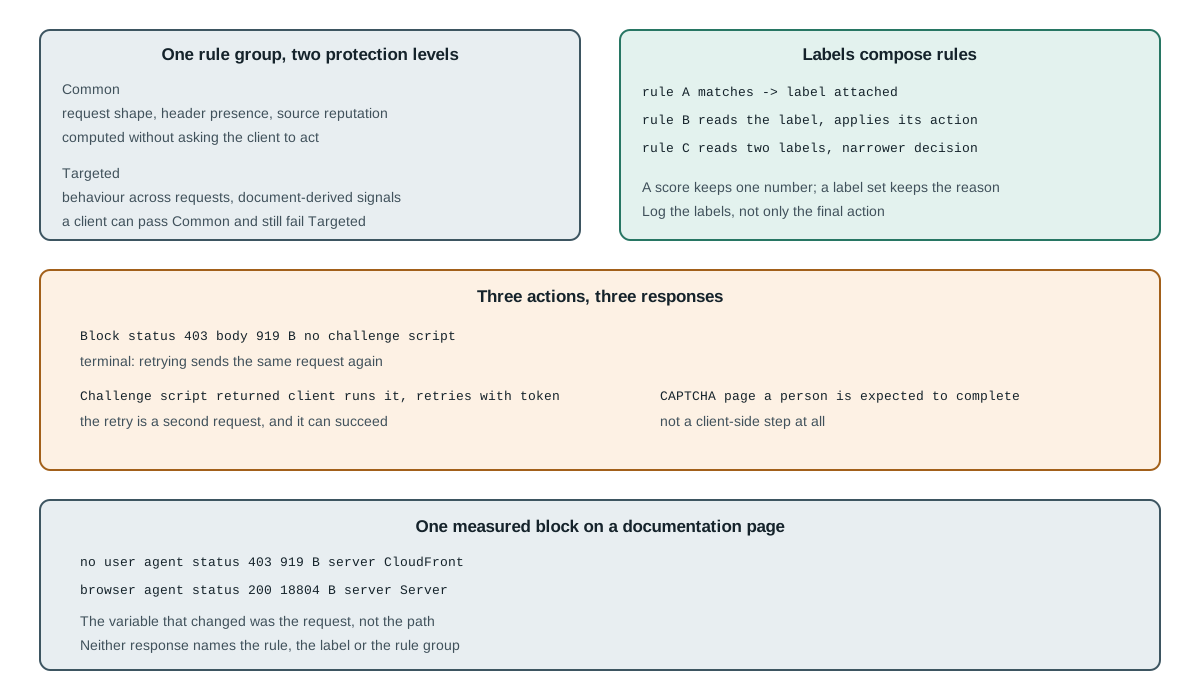
One rule group, two protection levels
The first thing to get right is that Bot Control has two protection levels inside a single managed rule group. The common level runs by default; the targeted level is an option that adds detection for clients that do not identify themselves. A team that leaves the targeted level off and reads the dashboard has covered a real slice of the problem and not the whole of it.
The common level detects a variety of self-identifying bots using traditional bot detection techniques such as static request data analysis. In the documentation's terms it labels self-identifying bots, verifies generally desirable ones such as search engines, and detects high-confidence bot signatures. These checks can be computed without asking the client to do anything, which is why they catch the least careful automation.
The targeted level includes the common-level protections and adds detection for sophisticated bots that do not self identify, mitigating with a combination of rate limiting, CAPTCHA and background browser challenges, and using browser interrogation, fingerprinting and behaviour heuristics, with optional machine-learning analysis of traffic statistics. That difference is the practical one for a data job: a client that satisfies the common level can still fail the targeted one, and the two failures look identical in a status code.
Reading the two levels together changes what a "blocked" number means, because the same 403 covers both. A block attributed to the common level is a statement about the request itself. A block attributed to the targeted level is a statement about the session, which means the same request sent once may pass and sent repeatedly may not. Without the level named, a report cannot tell those two situations apart, and the response to each is different.
Labels are the rule language
This is the structural difference that separates AWS WAF from a score-based product, and it is the part that repays study. When a rule matches, it can attach a label to the request. Later rules in the same web ACL can match on that label as if it were an input.
rule A matches   -> label aws:bot:category:http_library attached
                    (namespaced by the service, e.g. awswaf:managed:aws:bot-control:bot:category:http_library)
rule B reads     -> if label present, apply its own action
rule C reads     -> combine two labels into a narrower decision
That composition is what makes the language expressive. A score collapses every observation into one number, and a number cannot say which two checks agreed. A label set can, because each label keeps its own name and its own origin, and a rule that reads two labels is stating a conjunction rather than a cutoff.
The operational consequence is that a label is the unit to log. A dashboard that reports only the final action loses the reason, and a team debugging a false positive then has to change the client to find out which rule fired. Recording the labels present on a blocked request answers that question directly, and it costs one header in the log.
Labels also explain a behaviour that looks inconsistent from outside. Two requests with the same path and the same headers can receive different actions when an earlier rule matched on something the second request did not carry, and the difference is a label rather than a change in the endpoint.
The action set is where a client-side reading most often goes wrong, because both outcomes look like "it did not work" in a log that records only success or failure.
Block      -> 403 by default; the client receives an error response
Challenge  -> 202; the client receives a script, runs it, retries with a token
CAPTCHA    -> 405; the client receives a page a person is expected to complete
The middle one is the only action whose expected completion is a silent script run; CAPTCHA also returns JavaScript but additionally requires a person to finish a puzzle, which is why the 403 measured here cannot be retried into success. A client that treats every non-200 as a block will retry a challenge forever, because the retry never carries the token the challenge was asking for. A client that treats every non-200 as a challenge will run a script that does not exist, because the body is an error page rather than a challenge.
The distinction is visible in the response before any parsing. A challenge carries a script the client is meant to run; a block carries an error document. The default status codes differ, 202 for a challenge and 403 for a block, so a status check separates them until a deployment customises the block response. The response header the service sets is the more direct marker, and it is not readable from cross-origin page script.
A measured block, and the actions it separates
The claim that these are different is easy to assert, so one request was recorded. A plain HTTPS client asked for a documentation page with no user agent header at all, and then the same client asked for the same page with a browser user agent.
no_ua:        status=403 bytes=919  challenge_marker=false block_marker=true
              server=CloudFront content-type=text/html
browser_ua:   status=200 bytes=18804
              server=Server content-type=text/html
Three things in that output are worth naming. The first is the status, which is a plain error rather than a challenge handshake. The second is the body length, which is short enough to be an error document and far too short to be a page that a client is meant to interact with. The third is the marker scan, which found no challenge script anywhere in the response.
The fourth thing is the comparison. The same client, the same path and the same second of the day returned a full page once the request carried a browser user agent. That is not proof of a rule firing, because the endpoint could be doing something else entirely; it is a demonstration that the difference between the two requests was in the request, and that a client can change one and not the other.
A block also tells the client nothing about which rule produced it. The 403 body measured above carried no rule name, no label string and no rule-group identifier, and that is the design rather than an omission: a response that named the rule would tell an operator which control to study next. The information exists in the console and in the request logs, which is why the diagnosis has to move there once the action is known. That is by design: the response does not carry the rule identity, the label set or the rule group. The information exists in the vendor's logs and in the console, which is why the diagnosis has to move there rather than staying on the client.
The boundary is the same one that applies to every edge decision, and it is worth stating in the terms this product uses. A rule group reads what arrives: the request line, the headers, the source, the pattern of requests over time, and the connection parameters the edge can observe.
It does not read the document. A value that only exists after JavaScript runs, such as a canvas hash, a WebGL renderer string or a computed layout measurement, is not an input to a rule that runs before the response is sent. That is not a limitation the vendor chose; it is the order of operations. The edge decides before the page exists.
That order has a practical consequence for a data job, and the measured pair above shows it: the same path returned 403 with 919 bytes and 200 with 18804 bytes. A client that produces a perfectly consistent document still has to satisfy the checks that run earlier, and those checks are about the request rather than the render. Conversely, a client that satisfies every request-level check has said nothing about whether its document would look consistent, because the rule group never asked.
The two layers are therefore not a single score with one cutoff, and the 403 above answers only the first question. A single request is evaluated before its document exists, so the raw canvas or WebGL value is not an input to that evaluation. What the targeted level can do is ask the client to run a challenge first and then read the token that comes back, which is how limited browser-side signals reach it. The two are different mechanisms, and a report that merges them cannot say which one produced a decision. Recording the edge action next to the page-side result keeps them separable, and a 403 with a 919-byte body is a different record from a 200 with a full page.
A third measurement sharpens the block-versus-challenge distinction, because the same endpoint answered three differently shaped requests in three different ways:
clean_get:    status=200 bytes=18804 challenge_marker=false block_marker=false
no_ua:        status=403 bytes=919   challenge_marker=false block_marker=true
scripted_post: status=403 bytes=1053 challenge_marker=false block_marker=true
Two of those are blocks and one is a success, and the two blocks differ in body length by a hundred and thirty-four bytes. That difference is small enough that a reader who only records the status code would see one event, while a reader who records the length and the marker scan sees two. Neither block carried a challenge script, which is what makes both of them terminal: there is nothing for a client to run, so retrying the same request produces the same answer.
The header set adds a second reading, and it is the field that separates the two layers most cleanly. The successful response reported server=Server, and both blocks reported server=CloudFront. That is not a rule identity and it does not name the rule group, but it does tell a reader which layer answered, and it separates a block generated in front of the application from a response the application produced.
What a reader should not conclude from this is that the user agent is the deciding input, and the 200 above does not establish that a header alone satisfies a managed rule group. It was the variable that changed in the first comparison, and it was sufficient to move one endpoint from an error to a full page. Whether it is sufficient anywhere else is a question about that endpoint's configuration, and the only honest way to answer it is to record the same three fields on the site in question rather than generalising from this one.
There is a second-order lesson in the numbers. A 919-byte response and an 18804-byte response differ by a factor of twenty, and a pipeline that stores only the status treats them as the same class of event when one is an error document and the other is a page. Storing the length costs almost nothing and separates the two immediately, which is why it belongs in the record next to the status rather than in a separate debugging session.
The rule group also has a time dimension that a single request cannot show. Behaviour checks look across requests, so a client that sends one request and reads the answer has measured the cheapest part of the system. A job that sends thousands is exercising the part that accumulates, and a report built from single requests cannot describe it. That is not a gap in the vendor's documentation; it is a gap in what one observation can support.
What the rule group cannot see, and the practical conclusion
Read the action before changing the client. A 403 with a short body is a block and needs the console to explain it; a response carrying a challenge script is a challenge and needs a client that can run it. Name the protection level in the record, because the common and targeted levels fail for different reasons and the same status code covers both. Keep the labels, since they are the only field that says which rule agreed with which other rule, and a single number throws that away; the 919-byte and 18804-byte responses above differ in exactly that kind of detail. For the vendor that composes differently, read Cloudflare and DataDome: what a scraper sees; for which rules need a value that never reaches the page, read edge-layer rules a page script cannot evaluate.
A declared profile can keep the values a page exposes consistent with each other, and it does not decide what a managed rule group returns. The decision belongs to the endpoint, and the useful work on the client side is making the record precise enough that the decision can be explained afterwards.
The label mechanism changes what a report can be asked to prove. A single score discards the observations and keeps a number, so a reader who disagrees has nothing left to examine; a label set keeps them, so a reader can ask which labels were present and which rule emitted each. That is the difference between a verdict and a record.
There is a cost to that expressiveness: a web ACL whose rules read each other's labels is harder to reason about, because evaluation order matters and a label present in one path can be absent in another. Keeping the label list in the log is what makes the difference recoverable later.
Finally, the action set has one asymmetry worth remembering when a report is written, and the three status values above show it. A block is a decision that can be explained afterwards from the console, and a challenge is a decision that produced a second request. Counting only the first request undercounts a challenge path by half, because the retry with the token is a separate entry that may succeed and leave no trace in a failure count. A report that wants to describe what happened has to decide which of those two it is counting before it prints a number.
Sources
This article is part of the guide: What Is a Browser Fingerprint?
Related Articles
ua-parser-js: Client Hints, Bots and a 500-Char Cap
FingerprintUndetected Browser: What a Detector Actually Reads
FingerprintCloudflare Bot Score Evidence and Logs
FingerprintHow to Read Browser Fingerprint Signals
FingerprintCreepJS Signal Groups and How It Combines Them
FingerprintCSS Fingerprinting: How Stylesheets Track You
Run the same check in BotBrowser
Load a profile, keep the signals you just read about consistent inside the browser, and confirm the result on your own machine before a rollout.