What Is Widevine DRM? Headless Browser Setup and Privacy
What Widevine DRM exposes through EME, how CDM and provider decisions differ, and why capability signals do not prove device identity or playback.
BotBrowser Team
Prefer the maintained product doc?
This article has a matching page in the docs center. Use the docs for the canonical setup flow, current flags, and long-term reference.
Widevine is a digital-rights-management system that browsers expose through Encrypted Media Extensions (EME). EME, the Content Decryption Module (CDM), a provider's authorization decision, and playback are separate stages. BotBrowser documents profile-backed Widevine capability reporting in supported configurations; that report does not prove a CDM is loaded, a provider will authorize content, or a device has hardware-backed DRM.
TL;DR
Widevine DRM is a browser-mediated contract for protected media, not a device identity or a playback guarantee. A page can query supported key-system configurations through EME, while the CDM and provider handle later stages. The 2026-10-31 source observation listed eight temporary-session steps and placed provider license exchange at the final stage. Its Node host runtime exposed no EME entry points, so it was not a browser playback test. Capability, CDM availability, provider authorization, and playback remain separate findings.
Contents
- Introduction
- Why DRM Support Matters for Privacy Research
- What BotBrowser Provides
- Privacy Boundaries of Widevine Signals
- What a Widevine Result Establishes
Introduction
Widevine is Google's digital rights management (DRM) system. A website can use EME to ask whether a browser can support a requested key-system configuration; the answer describes a browser capability, not whether a particular account or title will be authorized. Playback can still depend on the installed CDM, host, content requirements, provider policy, and the response for that session.
The system has distinct roles. EME exposes browser-mediated requests and configuration to the page; the CDM processes protected-media operations; and a provider decides whether a session is authorized. The page-visible capability response does not contain a universal device identifier, and it does not settle the provider's later decision. Treating those stages as one Boolean such as drm=true loses the difference between declared support, a usable CDM, authorization, and rendered playback.
The string com.widevine.alpha names a key system that a page can pass to requestMediaKeySystemAccess. It is a protocol identifier, not proof that the browser has completed a protected playback session. A successful capability query can precede CDM initialization, session creation, provider authorization, and decryption; each later result has a different meaning and owner.
BotBrowser does not bundle or distribute the Widevine CDM. Installation and launch details belong to the Widevine setup reference. The concept boundary remains the same across products: documented capability reporting is not a provider authorization, a hardware-security claim, or evidence that protected frames can be captured.
Why DRM Support Matters for Privacy Research
Browser Identity Consistency
DRM capability is one browser-visible compatibility surface. A difference between a declared browser profile and its exposed EME configuration can be relevant when investigating consistency, but it does not identify a person, prove automation, or predict a site's decision. Browser version, operating system, CDM availability, policy, and requested media configuration can all affect what is available.
BotBrowser documents profile-aligned DRM capability reporting for supported configurations. This can help compare declared browser surfaces in authorized compatibility work; it does not establish that the profile corresponds to physical hardware or that an external detector will interpret it in a particular way.
Use the headless server setup guide when the same check moves into a deployment, how EME and Widevine queries reveal platform identity when a provider keeps rejecting a session that already reports support, and the EME failure checklist for automated browsers when the capability call itself fails. The DRM capability overview keeps those four checks in one order and records a value at each.
Real-World Content Interaction
Protected media appears in more than one kind of product, but a DRM capability query does not reveal which title a user can access. The page can request a configuration; the provider's policy and response remain outside that initial query. This distinction matters when a compatibility report is interpreted as a privacy signal.
Without the required capability, a protected-media flow may stop before playback. The observation is bounded to the requested configuration and context; it is not a general statement about every title, provider, account, or device.
Fingerprint Protection Through Completeness
EME responses can contribute to a browser-surface comparison, but a capability value is not an identity credential. A missing, rejected, or unavailable result can reflect configuration, platform support, policy, or context. Keep these states explicit and avoid turning them into a detector verdict or a claim about a physical device.
What BotBrowser Provides
Profile-backed capability reporting
BotBrowser documents profile-backed Widevine capability reporting for supported configurations. This describes the browser-facing EME surface; it does not mean that a CDM is bundled, installed, or initialized. CDM distribution and installation remain separate from the browser's capability response, as do provider authorization and playback.
The distinction matters when a compatibility report is read alongside other browser fields. A profile-associated response can be compared with the declared platform context, but it does not prove that the profile represents physical hardware or that every DRM-related API agrees with every other fingerprint surface. The available result is bounded to the requested key system, configuration, release, and host.
Setup belongs to the platform reference
Installation and launch configuration are covered by the Widevine setup reference. CDM files, command-line flags, provider accounts, and playback procedures depend on the release, host, CDM source, content provider, and authorization terms. A capability query can locate the stage reached by a permitted workflow; it cannot replace checking the setup requirements for that environment.
Privacy Boundaries of Widevine Signals
Capability is not playback
MediaKeys.isTypeSupported() and navigator.requestMediaKeySystemAccess() describe support for a key system and a requested configuration. They do not show that a provider accepted an account, authorized a title, or completed decryption and rendering. An unavailable API, rejected configuration, granted access, and a later session result are distinct states.
A CDM result is not a hardware identity
A Content Decryption Module participates in protected-media processing, but a page-visible key-system name or configuration does not establish a physical device model, hardware security level, or person. Profile declarations, software availability, host support, and provider policy can all affect the observation. Treat a capability value as one compatibility surface, not device attestation.
Authorization belongs to a later stage
EME can create a session and expose a message event for application-mediated communication. Reaching that event marks a protocol stage; it is not proof that a provider granted access. Account state, title policy, region, and provider response are later decisions. A browser report should not collapse them into a DRM fingerprint verdict.
Playback symptoms are ambiguous
A black or stalled video surface alone cannot distinguish an unavailable CDM, unsupported media configuration, provider denial, decoding failure, or rendering issue. Record the last confirmed browser-visible stage and leave later stages unknown until their own evidence exists. Do not collect keys or protected frames to answer a compatibility question.
What a Widevine Result Establishes
The EME sequence has separate stages
The 2026-10-31 source observation enumerated a temporary-session sequence. Its counts classify the specification path; they are not a browser playback run:
steps -> 8
reachable_without_license -> 7 MediaKeys.isTypeSupported() | navigator.requestMediaKeySystemAccess() | access.keySystem | access.getConfiguration() | access.createMediaKeys() | mediaKeys.createSession() | session.generateRequest()
needs_init_data -> 1 session.generateRequest()
needs_license -> 1 license exchange
claims -> total=4 verifiable=1 unverifiable=3
outcomes -> total=7 distinct=true
record -> {"steps":8,"reachableWithoutLicense":7,"needsInitData":1,"needsLicense":1,"verifiableClaims":1,"outcomes":7,"entryPresent":false}
The same record says the Node host runtime did not expose requestMediaKeySystemAccess or MediaKeys. It documents that absent-entry branch in that runtime, not missing Widevine support in a browser. In the specification sequence, session.generateRequest() needs initialization data and creates a challenge before a provider exchange; the exchange, not challenge generation, needs the provider's license response. Of four reviewed profile claims, only the key-system claim was verifiable in this source observation; robustness, CDM version, and decryption remained unverified.
Keep observations in their own layer
| Observation | What it can establish | What remains unknown |
|---|---|---|
requestMediaKeySystemAccess() returns access | The requested configuration was accepted in that context | CDM initialization, provider authorization, and playback |
| A session emits a message event | The page reached a session-message stage | Provider approval and successful playback |
| A provider response is recorded | The response observed for that request | Device identity, general capability, or other titles |
| A video error or stall appears | A playback symptom exists | Whether EME, CDM, policy, decoding, or rendering caused it |
Keep supported, rejected, unavailable, and not observed distinct. The Widevine setup reference covers installation and configuration. EME results describe a requested configuration and the last stage reached, not a provider decision or device identity.
Frequently asked questions
Does Widevine support identify a device?
No. A key-system identifier or accepted EME configuration is not a unique device identifier, hardware attestation, or proof of a person's identity.
Does accepted EME access prove that a video will play?
No. CDM availability, media configuration, provider authorization, and playback are separate conditions.
Does a missing result mean that a browser is fake?
No. An API may be unavailable or a requested configuration may be rejected for compatibility or policy reasons. The result is bounded to that context and request.
Summary
Widevine DRM support in BotBrowser is documented as a capability of supported releases, but playback remains conditional on CDM loading, host constraints, provider policy, account, geography, and license authorization. Profile-matched reporting can help a controlled comparison; validate behavior with the target content provider. Download BotBrowser for release details, or see the full feature list for documented DRM controls.
For related topics, see MIME and Codec Fingerprinting for media capability configuration, and DRM Fingerprinting for how DRM signals factor into browser fingerprint protection. Review the Proof Center for public validation scope before moving from evaluation to a paid profile.
BotBrowser supports documented Widevine playback setups for authorized DRM testing; it does not guarantee provider authorization, resolution, hardware-backed DRM, or capture.
Reading the requested configuration
requestMediaKeySystemAccess() receives a key-system name and one or more configuration requests. The browser evaluates whether a requested configuration can be supported in the current context and returns a MediaKeySystemAccess result or rejects the promise. The result therefore belongs to that request; changing the requested audio or video capabilities, identifier requirement, persistent-state requirement, or session type can change what is accepted.
getConfiguration() reports the configuration selected for the access object. It is more precise than recording only that the promise resolved, but it still describes the EME negotiation stage. It does not report a provider's account decision, title policy, or the outcome of a later license exchange. A diagnostic should preserve the requested configuration and selected configuration separately so that a difference is not mistaken for authorization.
The distinctiveIdentifier and persistentState fields are requirements in the requested configuration, not universal identity readings. Their values describe what the application asked the user agent to permit for that key system. An optional request is not evidence that an identifier was issued, and a rejected request does not identify why a provider would later deny content. Record the exact requirement values and the resolution returned by the browser, then leave any later decision to its own evidence.
The audio and video capability entries also need context. Each entry can name a media type and request a robustness value, but the request is not a measurement of the device's physical security. A browser may accept a configuration under its implementation, platform, and policy constraints; the returned configuration is the appropriate record of what the access object selected. Do not translate a requested robustness label into a claim about a hardware security level unless independent evidence establishes that level.
Session type is another boundary worth preserving. A page can ask for temporary or persistent session behavior, subject to the user agent's support and the application's intended workflow. Acceptance of the request does not show that a persistent license was stored, that a provider issued one, or that a later session will be reusable. Those claims require evidence from the relevant session and provider steps. Keep the requested session type next to the selected configuration, but never infer storage or entitlement from the request alone.
The same discipline applies to negative results. A promise rejection is not a single diagnosis: record the exact key-system string, ordered configurations, browser release, host context, and rejection name. Then distinguish an invalid request from a configuration the browser cannot accept, an API that is absent, and a failure after access was granted. The 2026-10-31 observation catalogued seven distinct outcomes for this reason. Its categories classify where evidence stops; they do not say that every browser implements every path or that a particular provider uses the same policy.
For a privacy review, compare only like-for-like requests. If two pages ask for different robustness values or session types, different responses cannot be attributed to the browser profile alone. If the requests are identical but the accepted configuration differs across hosts, the result supports a bounded compatibility difference under those conditions. It does not identify an individual or establish why an external service made a decision. A clean report states the request, response, and unknown later stages side by side, then avoids extending the finding beyond that record.
A request can include several candidate configurations. An access result describes the configuration selected for that request; it does not prove that every candidate in the list is supported. Preserve the original candidate order and exact field values when recording a comparison. Reordering candidates or changing one capability creates a different request, so the resulting difference cannot be attributed to the profile alone. This is especially important when an application supplies alternatives for audio or video media types. A single resolved promise establishes one accepted configuration in that context, not support for every codec, robustness value, or session mode that appeared elsewhere in the candidate list in that context.
The next boundary begins when an application creates keys and a session. A session message is an application-facing event used by the surrounding content-protection flow; observing it establishes that the page reached that protocol stage. It does not establish that the provider accepted a license request. A useful event record can therefore distinguish access resolution, selected configuration, session creation, message emission, provider response, and playback symptom without combining them into a single success flag.
These distinctions also make comparisons reproducible. Hold the key-system string, requested configuration, browser release, host, and profile constant when comparing two authorized contexts. If one promise resolves and another rejects, the evidence is a difference in the capability negotiation under those conditions. It does not by itself show whether the cause is a platform limit, policy, installation, or an identity signal. The EME result narrows the question; it does not answer the later stages.
Sources
Practical conclusion
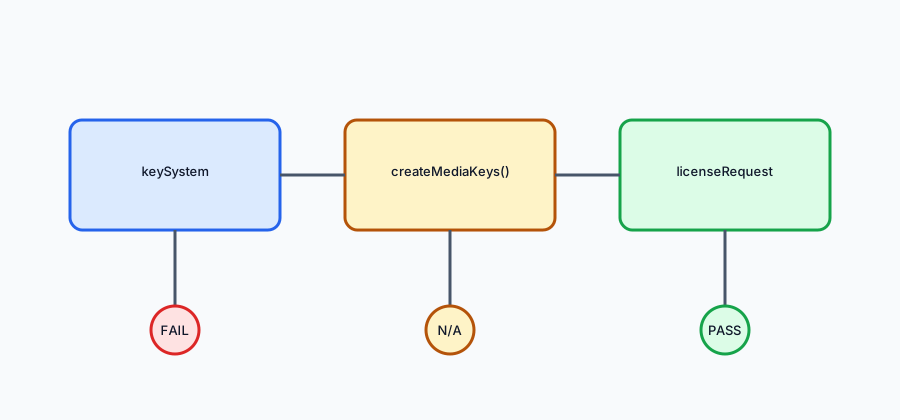
Record the requested and selected configuration and the last confirmed EME stage. If access is rejected, report the exact error without assigning its cause; if a session emits a message, record challenge generation, not license approval. Keep provider authorization and playback unknown until each is observed separately. Use the platform reference for installation details, and do not collect keys or protected frames.
This article is part of the guide: DRM Capability Checks: Key System, Robustness, Output
Related Articles
Widevine and Headless Browsers: The DRM Boundary Checklist
PlatformWidevine in Automated Browsers: Why EME Fails and How to Check
PlatformDRM Capability Checks: Key System, Robustness, Output
FingerprintDRM Fingerprinting: What EME and Widevine Queries Reveal
PlatformMedia Session API Controls and User Intent
PlatformHeadless and Headed Browser Profile Consistency
Run the same check in BotBrowser
Load a profile, keep the signals you just read about consistent inside the browser, and confirm the result on your own machine before a rollout.