Selenium Element Not Interactable: Diagnose the Cause
Fix Selenium element not interactable by checking the command, hidden duplicates, frame, control state and click obstruction. Includes a local Python fixture.
BotBrowser Team
Want the structured docs for Getting Started?
This article lives in the editorial library. For step-by-step setup, reference material, and ongoing updates, jump into the docs section.
A Selenium element not interactable error means the selected element cannot receive the requested interaction in its current state. Start with the failing command and the actual matched node: a hidden duplicate, an input that cannot take keyboard focus and a click blocked by another element need different repairs. BotBrowser supports declared browser environment settings for reproducing layout differences; it does not repair selectors or guarantee application readiness.
TL;DR
- Keep the exception class and command together.
ElementNotInteractableException,ElementClickInterceptedExceptionandInvalidElementStateExceptiondescribe different failures. - Count matches inside the intended document and component before adding a wait; Selenium can return the first hidden duplicate.
element_to_be_clickablechecks visibility and enabled state, not whether an overlay covers the click point.- Use the application's actual readiness condition and verify the resulting value or saved state. A command returning without error does not prove the action worked.
Contents
- Classify the failed command before changing waits
- Reproduce a hidden duplicate on a local page
- Follow the diagnostic path from identity to outcome
- Repair readiness without masking application defects
- Practical conclusion
Classify the failed command before changing waits
The WebDriver protocol defines element interaction in terms of the operation, not just the existence of a DOM node. Finding an element successfully establishes a reference; it does not establish that the element is the intended control or can receive a click. Preserve the error's first line, failing call and selector chain before rerunning the test against a different page state.
| Command and observation | What to inspect first | What it does not establish |
|---|---|---|
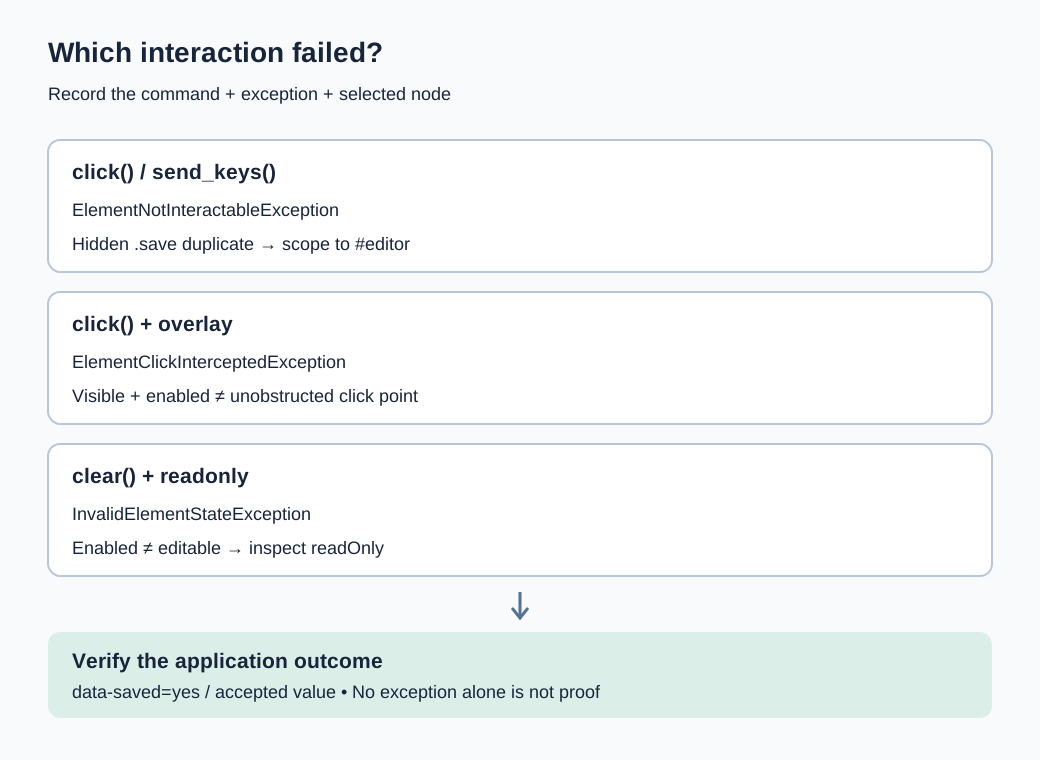
click() raises ElementNotInteractableException | Hidden target, geometry and whether scrolling can bring it into view | That the selector found the correct control |
click() raises ElementClickInterceptedException | The element covering the target's in-view center | That the target needs another selector |
send_keys() raises ElementNotInteractableException | The selected element's keyboard interactability | That text belongs in a nearby wrapper |
clear() raises InvalidElementStateException | Whether the selected element is editable, including readonly state | That an enabled element must be editable |
| A command returns but nothing changes | The input value or application-owned result | That lack of an exception proves success |
For an ordinary element, the Element Click algorithm scrolls the element's container into view and checks the click target. A target that remains out of view and an obscured center follow different error branches. Special controls such as options have their own handling, so an error taxonomy should not be treated as a complete implementation of every HTML control. Use the exception observed on the failing command, rather than renaming every click failure as not interactable.
The Element Send Keys algorithm checks keyboard interactability, with separate behavior for file inputs. A visually similar <div> beside a real <input> is not automatically a text field. The Element Clear algorithm checks editability. Consequently, is_enabled() alone cannot answer whether clear() is valid on a readonly input. Keep command-specific checks instead of building one generic is-ready Boolean.
Save evidence from the original failure
Record the Selenium binding version, browser and driver versions, document or frame identity, selector, match count and screenshot at the failed step. Log a small set of safe attributes rather than a full page containing credentials or customer records. A screenshot shows the rendered viewport; it cannot prove which of two matching nodes find_element() returned. Keep the selected node's ID, tag, displayed state and enabled state alongside it.
If the failure is intermittent, compare evidence before and after the application's transition. Querying the live page after manually closing a modal is evidence about the repaired state, not the failed state. Preserve the original ElementClickInterceptedException and its obstruction details, then investigate which application transition should have removed that obstruction. Browser startup and profile wiring are separate prerequisites covered by Selenium browser profile integration; a connected driver does not select the correct form.
Reproduce a hidden duplicate on a local page
Create a Python virtual environment, install Selenium with python -m pip install selenium, and save the following as interactable.py. With a supported local Chrome installation, webdriver.Chrome() uses Selenium's driver management. Initial setup may need network access to obtain a driver; the test document itself is an inline data: page and contacts no target website. In an offline environment, provide a compatible driver through Selenium's Service configuration instead of relying on a download during the test.
from urllib.parse import quote

from selenium import webdriver
from selenium.common.exceptions import ElementNotInteractableException
from selenium.webdriver.common.by import By
from selenium.webdriver.support.ui import WebDriverWait

HTML = """
<!doctype html><meta charset="utf-8">
<button class="save" style="display:none">Save</button>
<form id="editor" onsubmit="return false">
  <label>Name <input id="name"></label>
  <button class="save" type="button"
    onclick="this.form.dataset.saved='yes'">Save</button>
</form>
"""

options = webdriver.ChromeOptions()
options.add_argument("--headless")
options.add_argument("--window-size=1280,900")
driver = webdriver.Chrome(options=options)
try:
    driver.get("data:text/html;charset=utf-8," + quote(HTML))
    candidates = driver.find_elements(By.CSS_SELECTOR, ".save")
    assert len(candidates) == 2
    assert not candidates[0].is_displayed()
    try:
        candidates[0].click()
    except ElementNotInteractableException:
        pass
    else:
        raise AssertionError("Hidden target unexpectedly accepted a click")

    form = driver.find_element(By.ID, "editor")
    intended = form.find_elements(By.CSS_SELECTOR, "button.save")
    assert len(intended) == 1
    intended[0].click()
    WebDriverWait(driver, 5).until(
        lambda d: d.find_element(By.ID, "editor").get_attribute("data-saved") == "yes"
    )
    print("matches=2 hidden_click=rejected scoped_saved=yes")
finally:
    driver.quit()
Run python interactable.py. The expected output is matches=2 hidden_click=rejected scoped_saved=yes. The hidden first button deliberately shares the visible button's class. A page-wide find_element(By.CSS_SELECTOR, ".save") would select that earlier match, while the scoped query identifies the editor's button. Waiting longer for the hidden first match would not make it the intended control.
The fixture's data-saved attribute is an application-owned outcome set by the button's handler. A real test should observe its corresponding saved record, confirmation state or changed field. Do not copy that particular attribute into an application that has no such contract. The assertion makes the difference between choosing a plausible control and proving that the intended action happened.
An extended local fixture was executed on 2026-11-11 with stock Chrome 157.0.8103.79 on macOS arm64, using a same-build ChromeDriver 157.0.8103.50. Six cases passed across 3 concurrent browser sessions. Hidden click and hidden input typing raised ElementNotInteractableException; the covered button raised ElementClickInterceptedException even after the clickable condition passed. A disabled button returned without saving. Readonly typing returned without changing the value, while clearing that field raised InvalidElementStateException. These observations describe a synthetic stock-browser run, not a BotBrowser run or a guarantee about other browser implementations.
Use the failure as a counterexample
Keep the hidden duplicate while validating a repaired selector. Removing it would make the original broad selector pass without demonstrating a better targeting rule. Similarly, change the order of unrelated controls in an owned fixture and confirm that the repaired query still selects the editor. A selector that happens to work because the intended element comes first is fragile when responsive markup or a new component changes document order.
The data: fixture isolates DOM and interaction semantics. It does not cover a real site's authentication, network requests, framework rendering, shadow roots or nested frames. If driver startup fails before driver.get(), investigate that setup separately: no conclusion about element interactability follows from an unavailable browser binary. Record whether a custom binary_location or explicit driver was used so another machine can reproduce the launch assumptions.
Follow the diagnostic path from identity to outcome
Check the selected document first, then selector identity, control state, readiness and finally the application result. This order avoids turning a wrong-document or wrong-element problem into an ever-longer timeout. The Selenium error troubleshooting reference separates several exception families; preserve those distinctions when writing a failure report for a teammate.
Confirm the current document and component
An iframe contains another document. If the control belongs to a frame, switch to that identified frame before locating it; driver.switch_to.default_content() returns to the top document. Avoid frame indices when unrelated embeds can be inserted earlier. A missing element in the wrong document is normally a lookup failure, not evidence that the visible control is non-interactable. Shadow-root traversal is another boundary and should not be replaced with a longer descendant selector. For a missing child inside a component, the Selenium shadow DOM diagnosis traces host and root lookup before interaction checks.
Within the correct document, inspect all matches for the failed selector. find_elements() returning multiple nodes is not itself an exception; the first match from find_element() may simply be wrong. Prefer a stable form, dialog or record identity before its child selector. Selenium does not give a broad CSS selector an automatic understanding of which Save belongs to the workflow.
for index, element in enumerate(driver.find_elements(By.CSS_SELECTOR, ".save")):
    print({
        "index": index,
        "tag": element.tag_name,
        "id": element.get_attribute("id"),
        "displayed": element.is_displayed(),
        "enabled": element.is_enabled(),
        "rect": element.rect,
    })
These values are snapshots. A framework can replace a node after inspection, causing a later StaleElementReferenceException; that needs a fresh lookup tied to the same component identity. Catching stale references around every operation and choosing the first new match can silently change the target. Reacquire the intended form or record, then verify that it still represents the same application object.
Separate visibility, enabled state and editability
is_displayed() and is_enabled() answer different questions. Neither means that the element's click point is unobstructed, and an enabled readonly field need not accept edits. Inspect the real interactive node rather than a styled ancestor. For an input, retain its type, readonly and disabled properties, current value and any application state that controls editing.
field = driver.find_element(By.ID, "name")
print({
    "tag": field.tag_name,
    "type": field.get_attribute("type"),
    "readonly": field.get_property("readOnly"),
    "disabled": field.get_property("disabled"),
    "value": field.get_property("value"),
})
Do not infer an error solely from a disabled attribute. A command may return without producing the intended application action, so verify the business marker even when no exception appears. A readonly field can also leave its value unchanged after attempted typing. If editing is intentionally unavailable, follow the application's supported edit transition; removing readonly or disabled with script changes the test conditions and no longer tests the user's workflow.
Inspect obstruction after the right element is known
Selenium's Python expected conditions implementation implements element_to_be_clickable using visibility and enabled state. The name does not promise a hit test against overlays. A visible enabled button behind a modal can satisfy that condition and still raise ElementClickInterceptedException when clicked. That is a meaningful distinction between the wait predicate and the later WebDriver command.
Use a screenshot and the error's interception details to locate the covering element. On a reader-owned page, document.elementFromPoint() near the target's in-view center can provide additional evidence. Treat it as an inspection aid rather than a reimplementation of the WebDriver specification: clipping, scroll containers, descendant nodes and layout changes affect the relevant point. Do not classify an element solely from a hit test taken after the overlay has disappeared.
A fixed header can cover the eventual click point even after a manual scroll. A loading veil can have no visible text but still receive pointer input. If the application intentionally keeps a modal open, close it through its normal control or choose the workflow inside that modal. Deleting the overlay via JavaScript may help isolate a cause on a local fixture, but it is not a valid end-to-end repair for production behavior.
Repair readiness without masking application defects
Choose a wait for the state that makes the requested action valid. Selenium's wait strategies distinguish explicit conditions from fixed delays. A sleep neither checks the selected element nor explains why a page is ready. Avoid combining implicit and explicit waits without understanding their interaction, since lookup delays can make an explicit timeout harder to interpret.
Wait on a specific transition
For an owned application that removes a loading veil before enabling Save, an explicit wait can inspect both conditions. The illustrative block below assumes those exact selectors and that disappearance of #loading-veil is the application's readiness contract. It is separate from the static local fixture, which has no loading state.
from selenium.webdriver.support import expected_conditions as EC

wait = WebDriverWait(driver, 10)
wait.until(EC.invisibility_of_element_located((By.ID, "loading-veil")))
save = wait.until(EC.element_to_be_clickable((By.CSS_SELECTOR, "#editor button.save")))
save.click()
wait.until(
    lambda d: d.find_element(By.ID, "editor").get_attribute("data-saved") == "yes"
)
Invisibility can also succeed when the selected veil is absent. Therefore, a typo in loading-veil can produce a misleading immediate success; validate the locator and the application's state model instead of treating a passed predicate as universal readiness. If a hidden veil still intercepts input because another node covers the button, the subsequent click remains the meaningful check. The result assertion must identify this operation, not an unrelated saved banner left from a previous test.
For rerendered controls, prefer a locator-based condition that reacquires the current element over holding a stale reference from before navigation. Do not wrap the entire workflow in an unbounded retry. If the first click submitted the form but the confirmation arrived late, repeating the click may create a duplicate record. Diagnose the action and its outcome separately and use the application's operation identity where duplicate submissions matter.
The Selenium waits and stable tests analysis develops readiness conditions and stale references more broadly. Here, the exception class decides which condition is relevant: a hidden wrong match needs identity correction, a readonly field needs an edit-state decision, and an obscured center needs an obstruction transition. Replacing all three with the same clickable wait conceals that distinction.
Keep JavaScript activation separate from a user-like click
driver.execute_script("arguments[0].click()", element) invokes DOM activation through script. It does not establish that WebDriver could scroll to and click the element as a pointer target. A script call may trigger a handler on a hidden control and make the test appear repaired while a user still cannot reach it. Use it only when scripted activation is itself the behavior being tested, with that scope made explicit.
Likewise, setting an input's value through JavaScript does not prove that typing was possible or that the application processed the same events. Framework state may differ from the DOM property. Prefer the supported editing interaction and assert the actual accepted value. If an application-owned test hook is necessary, keep that hook's test separate from the end-to-end interaction claim.
Compare environment only after command and state
A different viewport can choose another responsive form; font metrics can move a fixed banner over the button; browser or driver changes can alter the reproduction. Keep browser version, driver version, window dimensions and application state in the failure record. The 1280 by 900 launch argument in the fixture is an explicit input, not proof that every operating system yields identical inner viewport geometry; record the observed viewport when layout determines the outcome.
BotBrowser supports declared screen and font settings through its profile configuration reference, which can help compare layout-dependent reproductions. It does not make the wrong Save button correct or guarantee that an application's overlay has finished. An environment comparison belongs after a deterministic selector and readiness contract; the stock-browser local fixture supplies no BotBrowser fingerprint or remote-service evidence.
FAQ
Is element not clickable the same error?
Keep the actual exception class. ElementClickInterceptedException points toward an obscured click target; ElementNotInteractableException has a different interaction branch. Informal reports saying not clickable can refer to either or to a timeout, so obtain the first error line and command before choosing a repair.
Does switching from Python to Java or C# solve it?
No language switch establishes the intended DOM node or removes an overlay. Binding syntax and exception names can differ in presentation, but the WebDriver command and application state remain the diagnostic starting point. Record binding and driver versions when comparing implementations.
Should every failure get a longer explicit wait?
Only a state that is expected to change needs waiting. A permanently hidden template match, an intentionally readonly field and the wrong frame need a different targeting or workflow decision. A timeout should report the condition that failed rather than hide it behind a generic retry message.
Sources
- W3C WebDriver: interactability and element commands
- Selenium: troubleshooting errors
- Selenium: waiting strategies
- Selenium Python: expected conditions source
- BotBrowser: profile configurations
Practical conclusion
Start with the failing command, verify the selected document and node, then test the state that makes that operation valid. Keep the hidden duplicate in the local reproduction and prove the scoped button changes data-saved. For a live application, preserve an equally specific outcome assertion before calling the interaction fixed.
This article is part of the guide: Browser Automation Getting Started: A First Run Map
Related Articles
Playwright Strict Mode Violation: Fix Duplicate Matches
Getting StartedSelenium WebDriver Waits for Stable Tests
Getting StartedSelenium Shadow DOM: Missing Elements and Stale Roots
Getting StartedSelenium Scraping: Capabilities and Records
Getting StartedSelenium Browser Profile Integration and Session Ownership
Getting StartedBrowser Automation Accessibility Testing Guide
Run the same check in BotBrowser
Load a profile, keep the signals you just read about consistent inside the browser, and confirm the result on your own machine before a rollout.