Playwright Strict Mode Violation: Fix Duplicate Matches
Fix a Playwright strict mode violation by inspecting duplicate matches, narrowing the intended component and verifying the result. Includes a runnable failure fixture.
BotBrowser Team
Want the structured docs for Getting Started?
This article lives in the editorial library. For step-by-step setup, reference material, and ongoing updates, jump into the docs section.
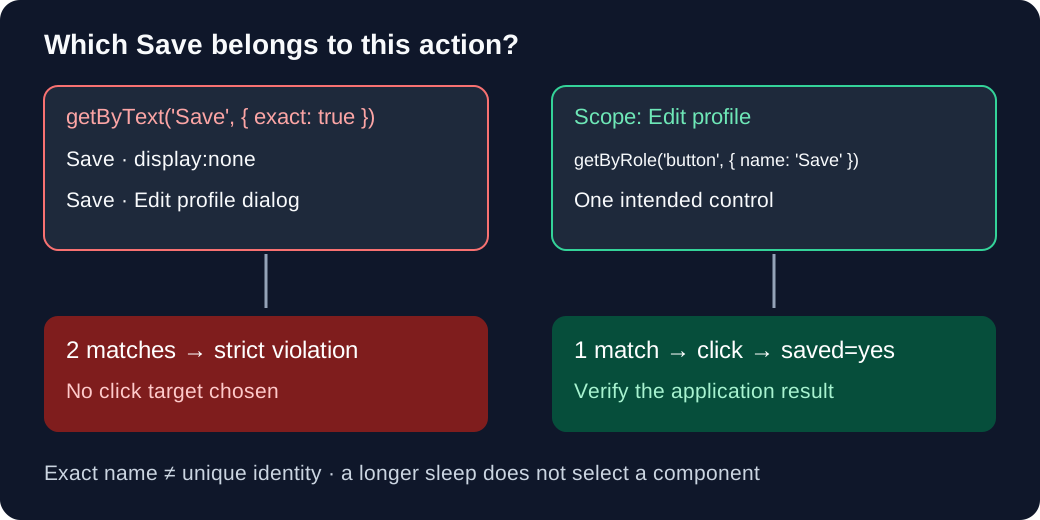
A Playwright strict mode violation means an operation that needs one element resolved to multiple elements. When the error says resolved to 2 elements, inspect both matches and narrow the locator to the intended component before changing timeouts. exact: true removes partial-name matches; it does not separate two controls with the same name. BotBrowser supports declared browser environment settings for reproducing layout differences; it does not decide which duplicate control a test intended to click.
TL;DR
- Check the locator's match count and all matched nodes at the failing step; a screenshot alone can hide an offscreen or hidden duplicate.
- Scope by an application boundary such as a uniquely named dialog or record, then use an exact accessible name or stable test ID.
- Separate
getByText()fromgetByRole(): role locators exclude hidden elements by default, while the hidden text in the fixture still matches. - Do not use a longer sleep,
force: trueor.first()as a general repair for ambiguous identity. Verify the application's result after the click.
Contents
- Read the failure before changing the locator
- Reproduce two matches on a local page
- Inspect candidates and repair their scope
- Separate strictness from readiness and races
- Keep environment differences in their own layer
- Practical conclusion
Read the failure before changing the locator
Playwright's strictness rule applies to operations targeting one element. A click() needs one target; count() intentionally describes a collection. Multiple matches are valid for a list assertion, so reducing every locator to one element would also break legitimate list tests. Record the failing operation as well as the selector.
| Observation | First check | Repair direction |
|---|---|---|
resolved to 2 elements | Both matched nodes and their containing components | Give the intended component a unique locator |
Save also matches Save draft | Text or accessible-name matching mode | Use exact: true when the full name is the contract |
Two controls both named Save | Dialog, form, row or application state | Add scope; exact naming alone cannot distinguish them |
| No matches at the failing step | Current page, frame and readiness condition | Locate the correct document and wait for its own signal |
| One match but click times out | Visibility, stability, enabled state and event reception | Investigate actionability after identity is established |
The error's locator aliases help identify the candidates; they are not instructions to paste the shortest generated selector. If a desktop and mobile navigation each contain the same link, choose the intended navigation landmark. If two product rows each contain Buy, choose the row by its record identity. Browser launch and extraction setup belong to the Playwright scraping setup; a successfully launched browser cannot establish selector intent.
Preserve the failing context
Before editing a selector, keep the error message, test revision, Playwright package version, final page URL category and the locator chain used by that action. A chain such as page.getByRole('dialog').getByText('Save') contains more information than its last text fragment. Copying only Save into a debugger can produce a different matching set and lead to an incorrect repair. Preserve frame selection too: a locator inside frameLocator() queries a different document from a page locator.
Use the number in the error as the observation from the failed operation. A diagnostic count() collected seconds later is a new observation; if the two counts differ, that is evidence of a changing DOM, not proof that the error was wrong. Capture the trace and relevant application transition rather than repeatedly refreshing until only one node remains. A consistent error with two permanent controls needs an identity fix; intermittent duplicate counts need a state-transition explanation as well.
Reproduce two matches on a local page
In an empty Node project, install playwright, install its Chromium with npx playwright install chromium, and save this as strict.mjs. No external website is contacted by the fixture. It catches the intended strictness error and then proves that a scoped click changed the correct dialog.
import assert from 'node:assert/strict';
import { chromium } from 'playwright';

const browser = await chromium.launch();
try {
  const page = await browser.newPage();
  await page.setContent(`
    <button style="display:none">Save</button>
    <div role="dialog" aria-label="Edit profile">
      <button onclick="this.parentElement.dataset.saved='yes'">Save</button>
    </div>
  `);
  const ambiguous = page.getByText('Save', { exact: true });
  assert.equal(await ambiguous.count(), 2);
  await assert.rejects(() => ambiguous.click({ timeout: 1500 }), /strict mode violation/);
  const dialog = page.getByRole('dialog', {
    name: 'Edit profile',
    exact: true,
  });
  const save = dialog.getByRole('button', { name: 'Save', exact: true });
  assert.equal(await save.count(), 1);
  await save.click();
  assert.equal(await dialog.getAttribute('data-saved'), 'yes');
  console.log('textMatches=2 scopedMatches=1 saved=yes');
} finally {
  await browser.close();
}
Run node strict.mjs. The expected final line is textMatches=2 scopedMatches=1 saved=yes; the first click is rejected, not performed. Remove assert.rejects() and await the ambiguous click directly to see the uncaught strict mode violation error. The hidden button deliberately makes the DOM different from what a screenshot suggests.
The repository's extended fixture was executed on 2026-11-11 with Playwright 1.58.0, stock Chrome 157.0.8103.51 and macOS arm64. Seven assertions passed, including hidden-role filtering, duplicate dialogs and an or() union. The evidence is a synthetic locator test, not a BotBrowser run or proof about an application's timing. The portable launch above uses Playwright's installed Chromium; the recorded run used an explicit stock Chrome executable.
Inspect candidates and repair their scope
Place diagnostics immediately before the failing operation. Capture only attributes needed to distinguish candidates, since full DOM exports can include account data. This snapshot is useful evidence at that moment, not a guarantee that the DOM will remain unchanged.
const target = page.getByText('Save', { exact: true });
console.log(await target.count());
console.table(
  await target.evaluateAll(nodes =>
    nodes.map(node => ({
      tag: node.tagName,
      id: node.id,
      testId: node.getAttribute('data-testid'),
      dialog: node.closest('[role="dialog"]')?.getAttribute('aria-label'),
      rects: node.getClientRects().length,
    }))
  )
);
rects is a diagnostic hint, not a complete Playwright visibility or accessibility calculation. A node can have geometry while being covered, and CSS visibility can differ from its accessible-tree exposure. The role locator reference specifies includeHidden; exact controls the accessible name. In the fixture, a default role locator finds one Save button, while includeHidden: true finds two. Do not generalize text-locator behavior to every locator engine.
Prefer a unique dialog, form or record scope that expresses why the target is correct. A stable data-testid is appropriate when the application exposes no useful semantic distinction. Both getByRole('dialog', { name: 'Edit profile', exact: true }) and its Save child must identify the intended component. If the application renders two identically named dialogs, the scoped child can still match twice; repair the application state or add a genuine identity, rather than another positional selector.
For Save and Save draft, exact matching is enough when the desired label really is Save. For two identical Save labels, it changes nothing. A visibility filter can be useful when visibility is the intended distinction and the pinned Playwright version supports that filter; it will still fail if both copies are visible. Validate this condition against responsive layouts instead of treating visible as a synonym for correct.
Repeated records need a record identity
For a table, identify the record before identifying its action. If the application deliberately exposes a row test ID, the locator can encode that contract without depending on a price, a row index or an unrelated cell that happens to contain the same words. The following is an illustrative test block for an owned orders table, not another output from the local Save fixture. It requires @playwright/test and an application that renders the named row and confirmation.
const row = page.getByTestId('order-1042');
await expect(row).toHaveCount(1);
const archive = row.getByRole('button', { name: 'Archive', exact: true });
await expect(archive).toHaveCount(1);
await archive.click();
await expect(page.getByTestId('archived-order-1042')).toBeVisible();
The important invariant is order identity, not that the target happens to occupy the first row. Sorting, filtering and a new incoming record can move the same order to a different position. If a virtualized table removes offscreen rows from the DOM, an absent row is a separate loading or navigation issue. Do not change .getByTestId('order-1042') to .first() to make that absence disappear; bring the intended record into the rendered collection through the application's normal controls.
When no test ID exists, filter({ has: ... }) can express a relationship to a uniquely identified descendant. The inner locator is evaluated relative to the candidate element; it is not a free-standing page query for any occurrence of that record. Verify the filtered row count, because a record number printed in a footer or a nested detail row can create another match. Prefer an accessible label or deliberate test contract over a brittle ancestry chain tied to today's CSS wrappers.
Distinguish frames from duplicate page elements
An iframe does not become part of the parent's document just because it appears in the screenshot. A page locator with zero matches can therefore be correctly scoped to the wrong document. Select the intended frame first, for example with page.frameLocator('iframe[title="Checkout"]'), then locate its control. Conversely, two frame elements matching that selector are another ambiguity; adding a unique button name inside both frames does not make the frame choice unique.
Record the frame's stable application identity rather than using the first frame returned by enumeration. Adverts, analytics and embedded previews can change frame ordering between runs. For a cross-origin owned test integration, use Playwright's supported frame locators; do not infer that a DOM query in the parent can traverse the embedded document. This separates a missing target caused by the document boundary from two targets inside the same document.
Check the accessible name rather than only visible text
A role locator's name is the computed accessible name, which can come from aria-label, aria-labelledby or native labeling rather than the text painted inside the button. Two visible icons can therefore share the name Save even when their glyphs differ. Conversely, a button showing Save may have an accessible name such as Save profile. Inspect the owning control's accessibility information in the browser tools before changing exact; broadening the name pattern can add candidates instead of recovering the intended one.
If an incorrect aria-labelledby points several controls at the same label, fix the component's labeling when you own the application. A test-only selector can unblock a diagnosis, but it does not fix confusing names for assistive-technology users. Preserve a separate accessibility assertion if that labeling is part of the product contract.
Separate strictness from readiness and races
Playwright checks actionability before clicking, including a unique target, visibility, stability, event reception and enabled state. Auto-waiting does not define which of two valid controls belongs to a task. Longer timeouts and fixed sleeps cannot express that choice. force: true relaxes some actionability checks; it does not resolve the semantic ambiguity of two matching elements.
During a component transition, old and new copies may briefly coexist. If the application has a completion signal, use a web-first assertion such as await expect(dialog).toHaveCount(1) from @playwright/test, then click the intended child and assert the business result. A standalone count() is a snapshot and does not retry like that assertion. Even an assertion followed by a click is not an atomic lock; locators resolve again, so a new duplicate can correctly cause the later action to fail.
The Playwright trace investigation provides action snapshots and a timeline for deciding whether duplicates were permanent or transitional. Retain the trace of the actual failed run; opening today's live DOM after a failure can miss the duplicate entirely. A loading indicator disappearing is useful only if the application promises that its disappearance means the relevant component has settled.
a.or(b) combines alternatives; it is not a priority operator. If both branches match, a single-element action can throw strictness. When two different states may appear, wait on an appropriate condition, inspect the actual application state and act on its specific locator. .first() or .nth() is reasonable only when ordering itself is the tested requirement, such as selecting the first ranked result. With unrelated duplicate buttons it can silently click the wrong control after a layout change.
Wait for a named transition, then verify its outcome
Suppose closing an editor starts an animation and another editor opens before the old one is detached. A named dialog locator can briefly match both copies. The strongest application contract is an explicit state such as one active editor for a specific record. If the product instead guarantees that the old dialog is removed before the new one becomes actionable, wait for the old record-specific dialog to disappear and assert the new one's identity. Waiting for every dialog to disappear would be wrong when the destination intentionally keeps one open.
Retries should preserve these distinctions. A retry that clicks twice can submit a form twice if the first click succeeded but its result assertion ran too early. Keep a unique operation identifier or an application-provided completion marker where the workflow requires it. Do not swallow a strictness exception and continue to an unrelated success banner: that banner may belong to an earlier action. The Save fixture verifies a local data-saved attribute on the scoped dialog precisely so an unrelated node cannot satisfy its success condition.
After repairing a selector, test a counterexample rather than only the happy path: render a second record with the same button label, reorder the records, and keep an inactive component in the DOM. The repaired locator should continue to select the intended record or fail clearly if that identity becomes duplicated. These are application-specific checks, not claims that a passing synthetic fixture covers every framework or transition. The extended fixture's two identically named dialogs intentionally demonstrates the latter failure boundary.
Keep environment differences in their own layer
A breakpoint can render both desktop and mobile markup, and a font or viewport change can change which dialog layout appears. Reproduce with the same browser version, viewport, locale and application state before attributing different candidates to browser behavior. A new browser profile does not repair a selector that intentionally matches two account rows.
BotBrowser supports declared screen, font and browser environment settings described in the profile configuration reference. It does not supply an application's component identity, remove a hidden duplicate or guarantee that a click reaches the business outcome. Keep this environment comparison after locator and application-state diagnosis; the seven local fixture checks establish no fingerprint or remote-service outcome.
FAQ
Is this JavaScript strict mode?
No. A 'use strict' directive controls JavaScript language behavior. Playwright locator strictness controls how many elements a single-target operation accepts. Disabling JavaScript strict mode does not change the locator's matching set.
Does the same diagnosis apply to Python Playwright?
Yes; the locator decision is the same, although Python uses names such as get_by_role() and exact=True. Preserve the component scope when translating the code. Java Selenium's element exceptions are a different API and should not be classified from a Playwright error string.
Why does count succeed while click fails?
count() reports a collection and permits more than one result. A click needs one intended element. A count of two is therefore a successful observation of the ambiguity, not evidence that the following action will be accepted.
Sources
- Playwright locator strictness
- Playwright actionability and forcing actions
- Playwright role locator options
- Playwright locator alternatives with or()
- BotBrowser profile configuration
Practical conclusion
For a Playwright strict mode violation, keep the failing locator, inspect its complete matching set and express the intended component in the selector. Run the local fixture first, then replace its dialog boundary with the application's actual identity and assert the result of the click. Investigate readiness or browser environment only after the intended target is unambiguous.
This article is part of the guide: Browser Automation Getting Started: A First Run Map
Related Articles
Selenium Element Not Interactable: Diagnose the Cause
Getting StartedSelenium Shadow DOM: Missing Elements and Stale Roots
Getting StartedSelenium WebDriver Waits for Stable Tests
Getting StartedPlaywright Trace Viewer for Authorized Test Debugging
Getting StartedPlaywright Proxy: Routing, Auth and Unchanged Signals
Getting StartedScraping with Playwright: Browser and Profile Setup
Run the same check in BotBrowser
Load a profile, keep the signals you just read about consistent inside the browser, and confirm the result on your own machine before a rollout.