Selenium Shadow DOM: Missing Elements and Stale Roots
Diagnose Selenium shadow DOM lookup failures with a local Python fixture: document boundaries, nested roots, closed roots and component replacement.
BotBrowser Team
Want the structured docs for Getting Started?
This article lives in the editorial library. For step-by-step setup, reference material, and ongoing updates, jump into the docs section.
When Selenium cannot find a shadow DOM element that is visible in DevTools, check the search context before changing the selector or timeout. Locate the component's host, obtain its native shadow_root, then search inside that root; repeat for each nested host. BotBrowser supports declared browser environment settings for comparing reproductions, but it does not cross component boundaries for a selector or guarantee that a component has finished rendering.
TL;DR
- A document query does not automatically pierce shadow roots. A longer CSS descendant selector still searches the wrong tree.
- Traverse each host with Selenium's native
shadow_rootcommand. Frame switching and shadow-root traversal solve different boundaries. - A closed root makes the JavaScript
.shadowRootgetter returnnull; that does not establish that native WebDriver access must fail. - After a component host is replaced, reacquire the complete host/root path and verify the application outcome. Reusing an old root can raise
DetachedShadowRootException.
Contents
- Classify the failing boundary before changing the selector
- Reproduce document, nested and replaced roots locally
- Separate closed-root getters from native WebDriver access
- Reacquire a replaced component without repeating its action
- Practical conclusion
Classify the failing boundary before changing the selector
The Selenium element finder documentation uses a host element followed by its shadow root as a separate search context. The host is an ordinary element in its containing tree; the attached root contains another tree. A matching button inside that root is not an ordinary descendant available to a document CSS lookup. DevTools can display both trees together without making their WebDriver search contexts interchangeable.
Preserve the command, selector and context from the original exception. NoSuchElementException from driver.find_element() and the same exception from root.find_element() leave different questions open: the first may be using the wrong tree, while the second may have reached the right root before searching too early or using the wrong child selector. A screenshot alone cannot distinguish those cases. Record the identified host and whether native root acquisition succeeded.
| Observation | First check | Meaning of a successful repair |
|---|---|---|
| Document query returns no matching button | Is the button inside an authored shadow tree? | The intended host's root contains the target |
host.shadow_root raises NoSuchShadowRootException | Correct host, root attachment timing and driver support | A root is acquired from that host |
Root query raises NoSuchElementException | Child selector, another nested host or readiness | The intended root contains the required child |
Old element raises StaleElementReferenceException | Was its host or document replaced? | A fresh path identifies the current component |
Old root raises DetachedShadowRootException | Was that root's host detached? | A new root belongs to the current connected host |
Lookup works but click() fails | Target identity, interaction state and obstruction | The application records the intended action |
The WebDriver shadow-root commands distinguish acquiring a root from finding an element within it. A plain <div> with no attached root is a valid element but not a valid shadow host for that command. Conversely, an existing root can contain no matching .save element. Those are separate failures; catching both and reporting “shadow DOM unsupported” discards the useful distinction.
Keep frames and nested roots in the path
An iframe changes the current document through driver.switch_to.frame(...). A shadow host changes the search context through host.shadow_root; it does not require switching frames. If a component lives inside an iframe, enter the correct frame first and then traverse its hosts. If an iframe sits inside a shadow root, locate that frame element through the root before switching. Preserve the actual boundary order rather than applying a generic frame switch to every missing element.
Nested components require another native root acquisition at each boundary. The outer root can locate an inner host, but a single CSS selector such as #outer #inner #save does not cross both roots. Record a short, named path: document, outer host, outer root, inner host, inner root, button. A failure then identifies the missing boundary. Inspect match counts where an application can render multiple copies; a correct root type does not prove that the selected component represents the intended record.
Once root traversal succeeds, interaction remains a separate question. The Selenium element-not-interactable diagnosis distinguishes hidden controls, intercepted click centers and editability. A root lookup returning a button does not establish that the button is visible, enabled or unobstructed. Keep the lookup evidence before moving to those command-specific checks; otherwise a click failure may be misreported as an inaccessible shadow tree.
Reproduce document, nested and replaced roots locally
Install Selenium in a Python virtual environment with python -m pip install selenium, then save the following as shadow_roots.py. It uses a local inline data: page, not a third-party target. webdriver.Chrome() needs an installed browser and compatible driver; Selenium's driver management may download a driver during setup. In an offline environment, configure a known compatible binary and Service explicitly. A startup error before navigation supplies no evidence about shadow-root lookup.
from urllib.parse import quote

from selenium import webdriver
from selenium.common.exceptions import (
    DetachedShadowRootException,
    NoSuchElementException,
    NoSuchShadowRootException,
    StaleElementReferenceException,
)
from selenium.webdriver.common.by import By

HTML = """
<!doctype html><meta charset="utf-8">
<div id="open"></div><div id="outer"></div><div id="closed"></div>
<script>
function populate(host, mode) {
  const root = host.attachShadow({mode});
  root.innerHTML = `<button id="save"
    onclick="this.getRootNode().host.dataset.saved='yes'">Save</button>`;
  return root;
}
populate(document.getElementById('open'), 'open');
const outer = document.getElementById('outer').attachShadow({mode:'open'});
outer.innerHTML = '<div id="inner"></div>';
populate(outer.getElementById('inner'), 'open');
populate(document.getElementById('closed'), 'closed');
window.replaceOpen = () => {
  window.oldHost = document.getElementById('open');
  const fresh = document.createElement('div');
  fresh.id = 'open'; fresh.dataset.version = 'new';
  populate(fresh, 'open'); window.oldHost.replaceWith(fresh);
};
</script>
"""


def rejects(exception, command):
    try:
        command()
    except exception:
        return
    raise AssertionError(f"Expected {exception.__name__}")


options = webdriver.ChromeOptions()
options.add_argument("--headless")
options.add_argument("--window-size=1280,900")
driver = webdriver.Chrome(options=options)
try:
    driver.get("data:text/html;charset=utf-8," + quote(HTML))
    assert driver.find_elements(By.CSS_SELECTOR, "#save") == []
    rejects(NoSuchElementException,
            lambda: driver.find_element(By.CSS_SELECTOR, "#save"))

    host = driver.find_element(By.ID, "open")
    root = host.shadow_root
    button = root.find_element(By.CSS_SELECTOR, "#save")
    button.click()
    assert host.get_attribute("data-saved") == "yes"

    outer = driver.find_element(By.ID, "outer").shadow_root
    rejects(NoSuchElementException,
            lambda: outer.find_element(By.CSS_SELECTOR, "#save"))
    inner = outer.find_element(By.CSS_SELECTOR, "#inner")
    inner.shadow_root.find_element(By.CSS_SELECTOR, "#save").click()
    assert inner.get_attribute("data-saved") == "yes"

    closed = driver.find_element(By.ID, "closed")
    assert driver.execute_script("return arguments[0].shadowRoot", closed) is None
    try:
        closed_root = closed.shadow_root
    except NoSuchShadowRootException:
        closed_native = "unavailable"
        assert closed.get_attribute("data-saved") is None
    else:
        closed_root.find_element(By.CSS_SELECTOR, "#save").click()
        assert closed.get_attribute("data-saved") == "yes"
        closed_native = "saved"

    driver.execute_script("window.replaceOpen()")
    assert driver.execute_script("return window.oldHost.isConnected") is False
    rejects(StaleElementReferenceException, button.click)
    rejects(DetachedShadowRootException,
            lambda: root.find_element(By.CSS_SELECTOR, "#save"))
    current = driver.find_element(By.ID, "open")
    current.shadow_root.find_element(By.CSS_SELECTOR, "#save").click()
    assert current.get_attribute("data-version") == "new"
    assert current.get_attribute("data-saved") == "yes"
    print(f"open=saved nested=saved closed_native={closed_native} reacquired=saved")
finally:
    driver.quit()
Run python shadow_roots.py. A driver supporting the closed-root branch prints open=saved nested=saved closed_native=saved reacquired=saved. If native closed-root acquisition reports no such root, the fixture records closed_native=unavailable instead; that branch does not count as a successful closed-root interaction. Other unexpected exceptions remain failures. The deliberately repeated id="save" values belong to different shadow trees, allowing the fixture to test scope without changing the child selector.
The button handler sets data-saved on its own host, making the result component-specific. The open-root and nested-root assertions would fail if an action silently targeted another component. After replacement, data-version=new distinguishes the new host from the old detached one. A production application needs its own operation or record identity; copying the fixture's marker into a test without an application contract would not establish a real save.
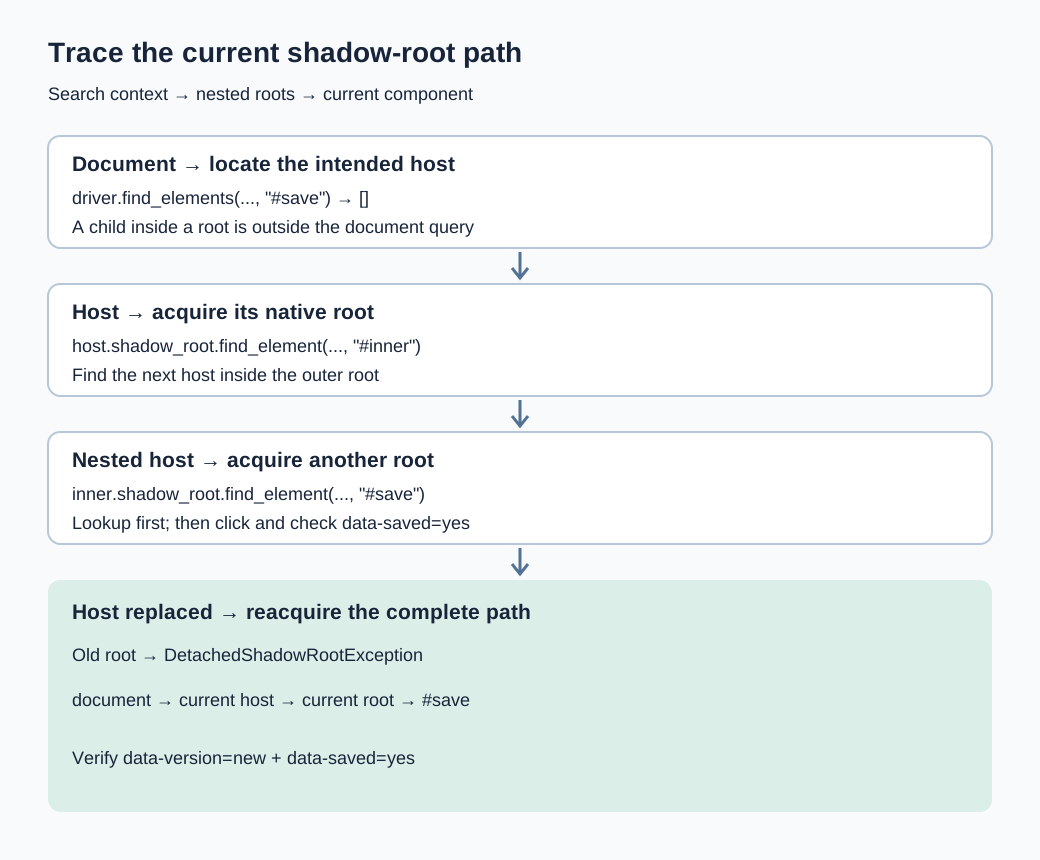
What the local cases establish
The five-case local fixture on 2026-11-11 used Selenium 4.52.0, stock Chrome 157.0.8103.79 and ChromeDriver 157.0.8103.50 on macOS arm64. Document lookup missed an open-root child; native traversal clicked it successfully. Another case crossed two nested roots. The closed-root JavaScript getter returned None, while native root access found and clicked its button. A plain host raised NoSuchShadowRootException, whereas a missing child in an existing root raised NoSuchElementException.
Replacing a host made its cached button stale and its cached root detached; reacquiring the host and root reached the new component and saved successfully. These are synthetic stock-browser observations, not a BotBrowser capability run or evidence about an external site's component implementation. Keep browser, driver and binding versions with any reproduction, especially when the disagreement concerns closed-root support rather than selector syntax.
Separate closed-root getters from native WebDriver access
The DOM specification's shadowRoot getter returns null when a root is absent or its mode is closed. Therefore execute_script("return arguments[0].shadowRoot", host) cannot distinguish those two cases on its own. An empty JavaScript result is an observation about that getter, not proof that the host has no internal root. A DevTools view showing the root and a script returning null can both be correct.
WebDriver's native Get Element Shadow Root algorithm works with the element's internal shadow root, rather than prescribing that JavaScript getter. ChromeDriver's closed-shadow-root support change, committed on 2024-10-14, explicitly added that support. Older implementations can behave differently. Record the actual command result and implementation versions; neither “closed always works” nor “closed is always inaccessible to Selenium” is a sound cross-driver rule.
Keep the command and implementation evidence separate
On a failing machine, run the same owned fixture with native .shadow_root and retain the exception class. If it differs from the recorded environment, compare browser, driver and binding versions before rewriting the page. A stale host, an incorrect host or an attachment race can also make root acquisition fail; the word closed is not a substitute for identifying the selected node. The fixture creates each root synchronously to avoid conflating support with application timing.
The recorded closed-root result concerns an authored component created with attachShadow({mode:'closed'}). It does not establish that every browser-internal control exposes its user-agent shadow tree to the same automation command. Native support for one fixture also says nothing about the application's permission model or whether an operation should be exercised. Keep diagnosis on reader-owned or otherwise authorized components.
Use CSS within a known root
The Selenium Python ShadowRoot API supplies element-finding methods. The returned button is a WebElement with click(); the root itself is not a clickable element. CSS is the strategy exercised by this fixture. Do not assume an XPath expression can climb out of a shadow tree or pierce the next one merely because XPath works in a document context. Unsupported strategy and missing-match errors should retain their actual protocol categories.
Avoid substituting a long JavaScript traversal for the native command without recording the change. A script chain using .shadowRoot inherits the getter's closed-root behavior and can fail at a different boundary. A script that directly invokes the button's handler also changes an interaction test into scripted activation. Native lookup followed by a normal WebDriver click preserves the distinction between reaching the node and interacting with it.
Reacquire a replaced component without repeating its action
A root reference belongs to a particular host instance, not to every future element with the same ID. When an application replaces <settings-panel> with a new element, the string selector may remain valid while the old host and root references become unusable. WebDriver's shadow-root definition includes detachment checks. Re-querying only the button through an old root retains the broken part of the path.
The fixture deliberately retains window.oldHost after replacement. That JavaScript reference keeps the old object reachable but does not keep it connected to the document; isConnected is false. This makes a useful counterexample to “the object still exists, so Selenium should use it.” The old button raises a stale-element error, and a lookup through the old root raises a detached-root error in the recorded driver. Both require current component identity rather than another descendant selector on the old object.
Wait for acquisition, then perform the action once
For an application that attaches its root asynchronously, an explicit wait can reacquire host, root and child on every poll. The following helper assumes #open identifies one intended component and its shadow child has ID save. It returns a visible, enabled target; it does not promise an unobstructed click point. Its retry scope is lookup only, so polling cannot submit the same operation repeatedly.
from selenium.webdriver.support.ui import WebDriverWait


def current_save(driver):
    try:
        host = driver.find_element(By.ID, "open")
        root = host.shadow_root
        button = root.find_element(By.CSS_SELECTOR, "#save")
        if button.is_displayed() and button.is_enabled():
            return button
        return False
    except (NoSuchElementException, NoSuchShadowRootException,
            StaleElementReferenceException, DetachedShadowRootException):
        return False


save = WebDriverWait(driver, 5).until(current_save)
save.click()
There is still a race between the returned element and the subsequent click. If the application can replace the component in that interval, use an application-owned stable-state condition or report the new stale error rather than silently replaying an entire purchase or save. The Selenium waits and stable-tests diagnosis develops readiness and result contracts; here the additional requirement is reacquiring every shadow boundary belonging to the current component.
After the action, wait for its real result separately. A network response, saved record or component confirmation must refer to the operation just performed. A permanent data-saved=yes left by a previous interaction is insufficient for repeated-save tests. Where duplicate submissions matter, preserve an operation identity and inspect the outcome before deciding whether another click is safe. A generic catch-and-retry loop cannot make that business decision.
Diagnose persistent timeouts with the failed boundary
The helper intentionally converts expected acquisition failures into another poll, so a final timeout should retain diagnostic context elsewhere. Record whether the most recent attempt failed at host lookup, root acquisition or child lookup, and capture a screenshot plus safe component attributes. Do not log full shadow markup containing credentials or customer data. Temporarily running a single acquisition without the catch can also expose the underlying protocol exception on an owned fixture.
If a root never attaches, inspect the application's initialization signal and earlier script or network failures. If it attaches but the target remains absent, inspect the intended state and selector within that root. If the target appears and interaction fails, move to visibility and obstruction diagnosis. Those branches make a timeout actionable; merely increasing WebDriverWait(driver, 5) hides which state was expected to change.
Compare environment after the component path
Browser versions and rendering environments can change component behavior or layout, so retain them once document and root identity are established. BotBrowser supports declared screen and font settings through its profile configuration reference, but it does not repair a root selector or guarantee native closed-root support in every driver combination. The integration docs cover launching and connecting; this diagnostic path addresses search contexts after the connection already works.
The local fixture loads no remote scripts, authenticates no account and exercises no framework hydration. It isolates traversal and reference lifetime. An application's asynchronous custom-element upgrade, navigation or responsive duplication needs an additional owned reproduction with the corresponding state markers. Keep that added test separate from the fixture's synchronous assertions so a driver-support claim does not accidentally become a promise about application readiness.
FAQ
Why does a visible button return no matches?
Visibility in DevTools does not identify Selenium's current search tree. Confirm the frame, then obtain the host's root and search there. If the outer root contains another host, acquire that inner root before querying the button.
Does Java or C# avoid the Python boundary?
Changing bindings changes syntax, not the document and shadow-root search contexts. Preserve the same host/root path and actual WebDriver command when comparing languages, and record binding versions if their exposed APIs differ.
Is a closed root a testability contract?
Closed mode restricts the page JavaScript getter; it is not a universal statement about automation support. For an owned component, prefer an explicit supported testing contract and verify the actual driver rather than depending on an unrecorded getter workaround.
Sources
- Selenium: evaluating the shadow DOM
- W3C WebDriver: shadow-root commands and references
- WHATWG DOM: the shadowRoot getter
- Chromium: closed shadow root support in ChromeDriver
- Selenium Python: ShadowRoot API
- BotBrowser: profile configuration boundaries
Practical conclusion
Preserve the failed context, traverse each native root explicitly, and reacquire the complete path after host replacement. Run the local fixture before attributing a failure to closed mode or browser environment. A successful lookup establishes a target reference; the component's current operation result establishes whether the intended action worked.
This article is part of the guide: Browser Automation Getting Started: A First Run Map
Related Articles
Selenium Element Not Interactable: Diagnose the Cause
Getting StartedSelenium WebDriver Waits for Stable Tests
PlatformBrowser Compatibility Review for Web Components
Getting StartedPlaywright Strict Mode Violation: Fix Duplicate Matches
Getting StartedSelenium Browser Profile Integration and Session Ownership
Getting StartedSelenium Scraping: Capabilities and Records
Run the same check in BotBrowser
Load a profile, keep the signals you just read about consistent inside the browser, and confirm the result on your own machine before a rollout.