Web Unblocker and Scraping API: What They Do and When Not To
A hosted unblocker returns data, not a session. That single fact decides which jobs it fits, and which jobs need a browser you own. A cost framework included.
BotBrowser Team
Want the structured docs for Documentation?
This article lives in the editorial library. For step-by-step setup, reference material, and ongoing updates, jump into the docs section.
A hosted unblocker answers one HTTP request with data and forgets it, and that request shape decides almost everything about where it fits. BotBrowser provides a declared profile that keeps the surfaces a page can read consistent with each other across launches, and it does not provide a proxy pool, a managed fleet or a retry service. Reading the vendor documentation closely shows what the category actually sells: a request pipeline that owns routing, retries, rendering and its own fingerprint generation, and a session identifier that keeps a proxy for a bounded window rather than a browser that stays the same.
Summary
- An unblocker is a request pipeline: you send a URL, you receive a result, and there is no browser process to inspect afterwards.
- The documented pieces are routing, retries, JavaScript rendering and fingerprint generation performed by the provider.
- Continuity is bounded and scoped: one vendor documents a session identifier that holds a proxy for up to ten minutes.
- That is continuity of egress, not continuity of a browser identity, and the two answer different requirements.
- Managed services fit one-off extraction, small volumes and jobs without a login.
- They fit badly when the requirement is the same recognisable browser across days, or when the request content cannot leave your perimeter.
- The cost comparison is a utilisation question, and the framework below computes both sides without quoting any price.
Contents
- What the category actually sells
- The limits that follow from the request shape
- When a hosted service is the right tool
- When it is the wrong tool
- Cost, honestly
- Practical conclusion
What the category actually sells
The documentation is unusually explicit about the composition, which makes this section short. Oxylabs describes Web Unblocker as an AI-powered proxy solution that manages automatic proxy type management, browser fingerprint generation, automatic retries, session maintenance and JavaScript rendering. Browserless exposes the same idea through REST endpoints, where one HTTP request performs one browser task and returns a result rather than a session.
you send      -> https://unblock.oxylabs.io:60000  (proxy endpoint) or /content, /scrape (REST)
you receive   -> HTML, JSON or an image, once
you do not get-> a browser process, a profile directory or a build you chose
Two details in that list matter more than the headline claim. The first is fingerprint generation: the provider generates it, which means it is not yours to keep constant across days. The second is retries: the provider decides when to retry, which is convenient until you need to know whether a given response came after three attempts or on the first one, and the documented billing rule only refunds the attempts you did not see in the invoice.
That is not a criticism. A request pipeline is the correct shape for a large class of jobs, and it is the reason the category exists. The point is that the shape is a shape: it decides what you can assert afterwards.
The shape also decides what you can compare. A team choosing between a hosted pipeline and a browser of its own is really choosing between two protection models, and what a browser core changes compared with injected script overrides explains why partial protection can be more distinctive than none. A hosted pipeline is coherent by construction because one system produces every value; a self-hosted browser is only coherent if the profile declares all of them.
assertable after a request    -> status code, body, latency, credit cost
not assertable               -> which browser build ran, which profile, which fingerprint
The limits that follow from the request shape
Three limits follow from sending a URL and receiving a result, and each one is documented rather than inferred.
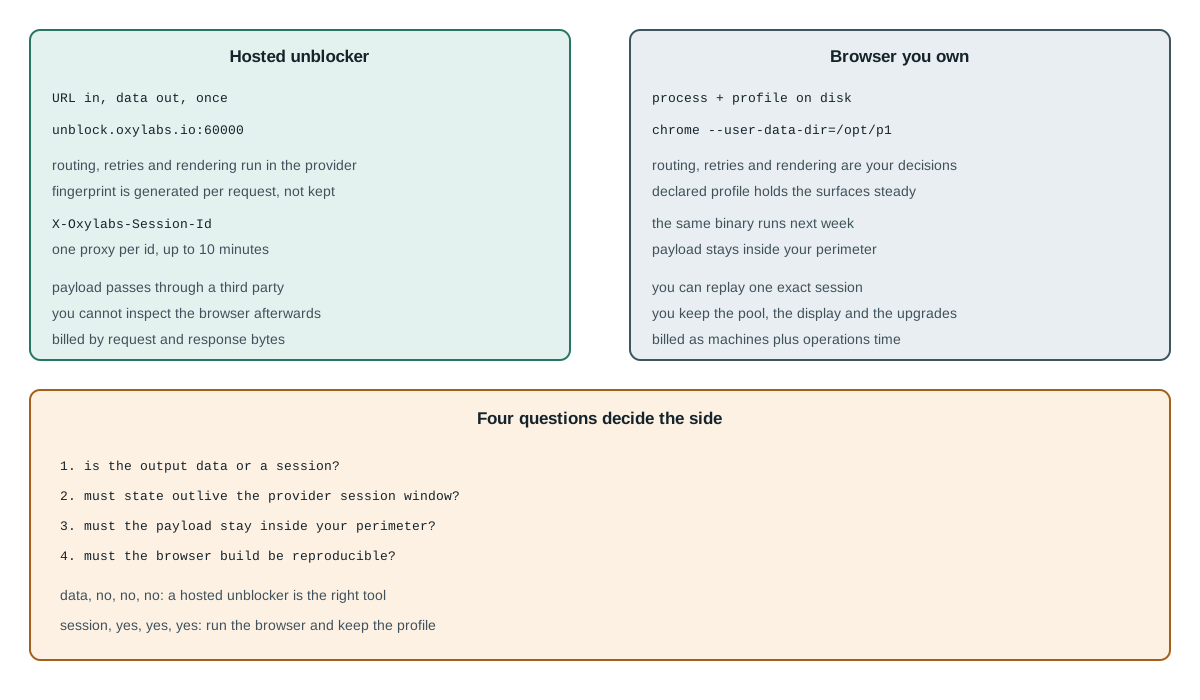
The first is bounded continuity. Oxylabs documents an X-Oxylabs-Session-Id header that assigns one proxy to a session identifier for up to ten minutes, after which a new proxy is assigned. That is a real feature and it is useful for multi-step flows. It is also a proxy affinity window, not a durable browser identity: after ten minutes the egress changes, and nothing in the response tells you what the browser looked like before or after.
session id -> one proxy for up to 10 minutes -> new proxy afterwards
             (egress continuity, not browser continuity)
The second is that the fingerprint is generated inside the provider. That is stated directly in the feature list, and it follows from the architecture: a service that runs thousands of requests per minute cannot read your profile from disk. What it can do is generate a coherent one per request, which is what the documentation claims. The consequence for a reader is narrow: if the requirement is "the same browser on Monday and on Friday", this is the wrong layer to ask.
The third is data path. A request that goes through a hosted pipeline carries the URL, the headers you set, the cookies you pass and the response body through a third party. For public pages that is often acceptable, and for anything with a login, a customer identifier or a contractual data-residency clause it usually is not. That is a compliance fact rather than a product defect, and it belongs in the decision before the price does.
That third limit has a practical test attached to it, and the test is short enough to run before signing anything. List the fields the request carries: the URL, every header, every cookie, the body, and the response. Then ask, for each field, whether it can legally leave the environment the job runs in. If one field cannot, a hosted pipeline is out for that target regardless of how well it performs, and the replacement is not a better vendor but a browser inside the perimeter.
allowed to leave -> public URL, no cookies, no account identifiers
not allowed      -> session cookies, bearer tokens, customer records, regulated data
leaves your perimeter -> target URL, request headers, cookies, response body
stays with provider   -> retry history, generated fingerprint, routing decision
Two more properties matter for reproducibility. A hosted pipeline upgrades on its own schedule, so two identical requests a month apart may be served by different internal components; and the credit model meters traffic, so the size of the bodies you receive matters as much as the number of requests. The documented retry rule is the reassuring half: an internal retry that ends in success is billed once. Neither is hidden, and both are visible in the documentation and the dashboard rather than in the response.
There is a fourth limit that is easy to miss until it bites: the endpoint speaks HTTP, which means the only lever you have over the browser is the header set the vendor documents. Oxylabs offers custom browser instructions and a JavaScript rendering header for Web Unblocker, and both are genuinely useful. Neither lets you assert which build ran, which fonts were installed or which GPU path was taken, because the browser is behind the endpoint rather than in front of you. A test written against a hosted endpoint can assert the data; it cannot assert the browser, and any claim that it can is a claim about the vendor's internal generation rather than about your reproduction.
assertable through the endpoint -> status, body, latency, credits spent
assertable only on a browser    -> build, profile, fonts, GPU, extensions, timing
This is also the reason a hosted service is a poor choice for a regression suite. A suite that compares yesterday's screenshot to today's needs both images to come from the same browser build with the same fonts and the same device pixel ratio, and a hosted endpoint deliberately varies all three across its fleet to defeat fingerprint checks. The variation that makes it work against a target is the same variation that makes it useless as a fixed reference.
The practical response is a split, not a winner. Use the hosted endpoint where the question is "does this URL return the data", and use a browser you run where the question is "does this page still render the way it did". Both questions are legitimate, and they need different instruments.
When a hosted service is the right tool
The fit is easiest to state as a list of conditions that all have to hold, because a job that satisfies four of five usually belongs somewhere else.
- The output you need is data rather than a session, so nothing downstream has to drive a page.
- The job is a one-off or a low steady volume, where running a fleet would cost more than it saves.
- No login state has to survive between requests, so the ten-minute affinity window is enough.
- The request content is public or non-sensitive, so a third party in the data path is acceptable.
- You do not need to reproduce the browser itself, only the extraction result.
When those hold, the hosted pipeline is cheaper in every sense that matters: one HTTP request replaces a process, and a 200 with a body is the whole contract. No machine to keep, no browser to upgrade, no pool to health-check. That is what the category is for, and a team that needs exactly this should not build it.
A second legitimate use is a first pass on a new target. Sending a handful of requests through a hosted service answers whether the page returns data at all before anyone writes a browser harness, and the answer costs a few credits. Diagnosing a blocked scrape by layer is the method that turns that first pass into a decision rather than a habit.
A third is a workload whose targets rotate. A monitoring job that watches two hundred unrelated public pages once a day gets little from a persistent browser, because each page is a different origin and the identity that matters is per-request coherence rather than continuity. Hosted routing solves that case directly: the provider picks an egress that fits the target, and the job never has to know what that egress was. The same job on a self-hosted browser would need a pool sized to the number of concurrent targets and a rule for which egress each origin sees, which is more machinery than the job justifies.
one origin, many runs      -> continuity matters; a browser you own
many origins, one run each -> coherence per request; a hosted pipeline
When it is the wrong tool
The mirror conditions are equally concrete, and each one names the requirement the request shape cannot meet.
- The same browser has to be recognisably the same next week, so the identity must outlive the request.
- The data cannot leave your infrastructure, whether for residency, contract or customer obligation.
- You need to pin the browser build, because a layout or codec difference changes the result.
- You need to replay one exact session to compare two runs, which requires holding the session rather than re-requesting it.
- You need per-identity state that persists for days, which is a profile directory rather than a session header.
For those, the browser has to run somewhere you control, and the work that a hosted service absorbed becomes explicit: install a pinned build, keep a profile directory, keep the display or the container healthy, and record what ran. Chrome for Testing version pinning is the artefact half of that work, and browserless versus self-hosted browsers is the adjacent decision about where the process lives when the identity is still yours.
The last of those conditions is the one that surprises teams, so it is worth spelling out. Replaying one exact session means holding the browser between two observations, not sending the same request twice. A hosted endpoint cannot do it, because the second request is a new session by construction; a browser you own can, because the profile directory and the process are still there. When a report says "it worked on Tuesday", the only way to test that claim is to go back to the same browser, and that is a capability rather than a convenience.
replay definition -> same process, same profile, same build, second observation
not a replay      -> same URL sent again through a stateless endpoint
hosted unblocker  -> you own: the query, the parsing, the decision to retry
self-hosted       -> you own: the binary, the profile, the pool, the display, the record
Cost, honestly
Neither side is a number without your workload, but both sides are computable, and writing the formula down is more useful than reading someone else's price.
hosted monthly    ~= consumed_traffic x unit_price    (request bytes + response bytes)
self-hosted cost  ~= machines x hours + ops_hours x loaded_rate + egress
crossover         -> where hosted_traffic x unit_price equals the fixed side
Two corrections make that arithmetic honest, and both come from the vendor's own billing page rather than from a guess about how a proxy pool works. The first is that the meter is traffic, not requests: Oxylabs bills the request bytes and the response bytes of successfully extracted data, so a large JSON body costs more than a small one and a compression difference changes the invoice without changing the request count. The second is the retry rule, and it runs in the opposite direction from the intuition most readers bring. When a request takes three attempts internally and the last one succeeds, the documentation states that only the traffic consumed during the last, successful attempt is billed; and when the provider's own side fails with a 5xx, the attempt is not billed at all. The documented exception points the other way: a failure caused by the client is still billed, so a malformed request or bad credentials can cost traffic without returning data.
A worked example makes the shape concrete without quoting any vendor's rate. Suppose a job issues fifty thousand requests a month and one in ten of them needs one extra internal attempt before succeeding, which is fifty-five thousand attempts in total. Under the documented rule the billed units are still fifty thousand successful requests, because the extra attempt inside a successful request is not billed on its own. The term that does move is traffic: if each of those successes consumes two hundred kilobytes of request and response bytes, the month is ten gigabytes of billed traffic, and a target whose page size doubles moves the bill twice as far as a target whose retry rate doubles. On the self-hosted side the same job fits in a handful of concurrent browsers on two machines at eight hours a day, and the arithmetic is machine hours plus the hours someone spends upgrading them.
requests issued          50000
internal attempts        55000  (1 in 10 needs one extra)
billed successful units  50000  (only the last, successful attempt)
billed traffic           ~10 GB at 200 kB per success
low, spiky volume   -> per-request billing follows the spikes; hosted usually cheaper
high, steady volume -> fixed machines amortise; self-hosted usually cheaper
either way          -> the identity requirement is not in this arithmetic at all
The free tier deserves a plain sentence rather than a dismissal, because a large share of the searches around this category are looking for one. Vendors publish a free allowance, and Oxylabs documents a welcome credit. A free allowance is a legitimate way to evaluate a pipeline; what it is not is a way to run a workload that needs concurrency, because the published free tiers cap concurrent sessions and session length. Reading the cap before building on the free tier is the difference between a pilot and an outage.
An open-source alternative is the other thing those searches are looking for, and it deserves the same plain treatment. A self-hosted unblocker exists, and it is essentially the browser-pool work set out above plus a routing layer and a detector-reporting loop, which is a large amount of code to own. It is worth it when the volume is steady and the identity requirements are real; it is not worth it as a way to avoid a subscription for a job that runs twice a week, because the operating cost of a pool is dominated by the hours someone spends watching it rather than by the machines it uses. A pool that nobody watches is a pool that fails silently on a Saturday, and the subscription it replaced was paying for exactly that attention.
free tier        -> good for a pilot, capped on concurrency and session length
open-source      -> good at steady volume, costs engineering hours to operate
paid per request -> good for spiky or low volume, follows the spikes
Practical conclusion
Ask four questions in order. Does the output need to be data or a session? Does any state have to survive longer than the provider's window? Does the request content have to stay inside your perimeter? Does the browser itself have to be reproducible? A job that answers "data, no, no, no" belongs on a hosted unblocker, and the ten-minute session header is enough for it. A job that answers "session, yes, yes, yes" belongs on a browser you run, and no amount of tuning the hosted request will substitute.
The failure mode to avoid is the mixed case, where a team starts on a hosted pipeline, adds a login, then adds a persistent requirement, and keeps extending the request until it is a browser harness built out of retries. At that point the honest move is to run the browser, keep the profile, and use the hosted service only for the targets that still fit the request shape.
Both changes cost less than the alternative, which is a pipeline whose behaviour nobody can reproduce. Record which side a target uses, and record why; headless browser scraping: what changes is the list of things that differ once the browser is on your side of the line.
Sources
Related Articles
Browserless vs Self-Hosted Browsers: What the Service Owns
ComparisonWhat Does an Anti-Detect Browser Change?
Getting StartedBest Browser for Web Scraping: Six Criteria
ComparisonBrowser Core vs JavaScript Overrides for Fingerprint Consistency
DeploymentBrowser Fingerprint Protection for Web Data Collection
DeploymentScraping Shopify: Storefront API, Ajax or Browser?
Run the same check in BotBrowser
Load a profile, keep the signals you just read about consistent inside the browser, and confirm the result on your own machine before a rollout.