Best Browser for Web Scraping: Six Criteria
Choose a browser for authorized web scraping with six workload-based measures for correctness, state, cost, concurrency, observability, and maintenance.
BotBrowser Team
Want the structured docs for Getting Started?
This article lives in the editorial library. For step-by-step setup, reference material, and ongoing updates, jump into the docs section.
A “best browser for web scraping” depends on the pages, records, and operating limits a team is authorized to handle. BotBrowser documents profile-backed browser configuration and performance settings; those are inputs to evaluate, not proof that it wins a workload scorecard or guarantees access. A vendor ranking cannot tell whether a candidate renders the required fields, preserves the declared session state, or fits a workload’s resource budget. A useful choice starts with a fixed fixture and six measures that can be repeated for each candidate. Before any of that, the rendering diagnosis decides whether the workload needs a browser at all.
TL;DR
- Define the authorized workload and the record that counts as accepted before comparing browsers.
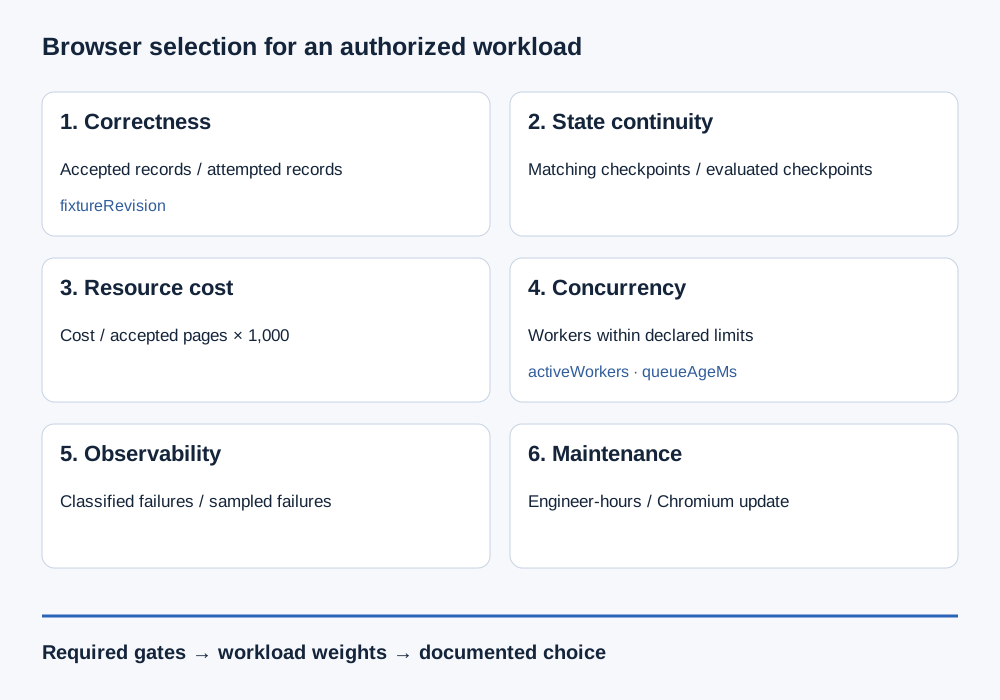
- Measure render correctness, declared state continuity, resource cost per 1,000 accepted pages, sustainable concurrency, failure observability, and upgrade maintenance.
- Reject a candidate that fails a required correctness or policy gate; do not let a weighted average hide that failure.
- Set weights from the workload’s operating priorities. The example weights below are illustrative, not a universal ranking.
- Treat the result as evidence about the tested configuration and fixture, not a promise about another site.
Contents
- Why a ranking is the wrong artifact
- Define the workload before scoring
- Measure the six criteria
- Choose weights for the workload
- Use the blank scorecard
- What the score cannot establish
- BotBrowser capability and limitation
- Practical conclusion
Why a ranking is the wrong artifact
Browser comparisons often compress different questions into one label: browser engine, automation library, executable, launch configuration, storage model, and hosting environment. A result from one combination does not automatically transfer to another. Playwright’s browser documentation distinguishes browser installations and supported browser channels; Puppeteer’s configuration guide documents settings that affect how its browser is launched. Those are useful inputs to a comparison, but neither document declares a universally best browser for scraping.
The decision also depends on what “works” means. A page may render while a required field is absent. A navigation may return successfully while the extracted record fails validation. A run may complete but cost more than the team’s budget. If those outcomes are collapsed into one pass/fail label, the score cannot explain the trade-off or identify the next action.
Use a scorecard to state the decision boundary. First define the minimum acceptable outcome and the evidence that demonstrates it. Then compare candidate configurations against the same controlled workload. A candidate that fails a hard requirement is not rescued by being inexpensive or easy to update. A candidate that clears every hard requirement can be compared on the operating costs that matter to the team.
The browser comparison methodology for product teams covers comparison design across products. For a scraping workload, the selection record needs a declared page set, acceptance rules, and resource limits rather than a brand-wide verdict.
Define the workload before scoring
Write a one-page workload contract before opening a benchmark. Record the target environment you own or have permission to use, the pages in scope, the fields required, the expected navigation path, and the stop conditions. Give the fixture revision its own fixtureRevision field, so the same page set remains identifiable after an application update. Specify whether the task is a local fixture, a staging site, or an authorized production integration. A browser configuration does not create permission to collect data, and a scorecard is not a reason to ignore a site's access rules.
Define an accepted page in observable terms. For example, the record might require a canonical URL, a non-empty title, a currency-qualified amount, and a capture timestamp. State which missing fields make a record invalid and which are legitimately optional. Keep navigation status separate from data acceptance: an HTTP response or completed load is not proof that the expected business record is present.
Fix the inputs that can alter the comparison. Record the browser name and version, automation package and version, executable path or channel, operating system, viewport, locale, time zone, storage state, network route, and fixture revision. Playwright and Puppeteer expose configuration choices that can change launch behavior; Chrome’s headless documentation describes the current headless mode and its relationship to Chrome. The point is not to force every candidate into identical internals, but to write down the differences that may explain an outcome.
Keep the sample bounded and repeatable. Use the same page set, the same number of repetitions, the same acceptance rules, and the same time window for each candidate. Separate cold-start measurements from warm-session measurements. If a candidate requires a different supported launch path, record it as part of that candidate rather than silently normalizing it away. For a broader comparison design, the engine and API protection comparison explains why changing layers can change what is being compared; this scorecard keeps the selection question focused on workload fit.
Measure the six criteria
The six measures below use one fixed fixture and one declared set of limits. Each produces evidence with a unit or explicit denominator. Scores are summaries of that evidence; they do not replace it.
1. Render correctness on the target fixture
Choose the smallest set of required fields that represents a useful record. For every sampled page, compare the browser-visible result with a known fixture expectation or an independently maintained ground-truth file. Report field coverage as valid required fields / required fields expected, and report record acceptance separately as accepted records / records attempted. A field can be visible but malformed, so define validation as well as presence.
For a local catalogue, a rule might require an item identifier, a title, and a price with a recognized currency. The exact selector and validation rule belong to that catalogue, not to a browser vendor. Include an explicit state for “not applicable” so a candidate is not penalized for a field the workload does not need. Keep retries visible: a record accepted only after a retry should not be indistinguishable from one accepted on the first attempt.
Set a hard minimum for fields that are legally or operationally required. If a candidate misses that minimum on the same fixture, mark correctness as a gate failure. Do not average an unacceptable result with successful pages to make it appear adequate. A score of 1 to 5 can describe performance above the minimum, but the underlying numerator, denominator, invalid-field reasons, and fixture revision must remain in the record.
2. Declared state continuity across runs
State continuity asks whether the inputs the workload intends to preserve remain available under the declared lifecycle. Name those inputs: an application setting, a consent choice in an owned fixture, a test account state, or a deliberately empty context. Do not use “identity” as a vague proxy for these different artifacts. Browser profile configuration, an automation context, and application storage are not interchangeable concepts.
Measure continuity by defining checkpoints before the run. At each checkpoint, record whether the expected state is present, absent, or intentionally reset. A simple rate is checkpoints matching the declared state / checkpoints evaluated; record the checkpoint count and reset policy. Include a clean-start case and a repeat-start case when both are part of the workload. If state is expected to be isolated, a value leaking into another context is a failure even if the page still renders.
This measure does not prove that two runs are the same person, that a session is anonymous, or that a site will accept it. It only tests whether the declared application state follows the documented lifecycle on the selected configuration. Treat storage expiration, user sign-out, and explicit cleanup as lifecycle events rather than browser quality defects. If state is irrelevant to the task, give this criterion zero weight instead of manufacturing a score.
3. Resource cost per 1,000 accepted pages
Choose a cost boundary that includes the resources the team actually pays for: browser-process time, worker time, memory allocation if billed, hosted runtime, and any required storage or logging. Do not mix one candidate’s browser-only cost with another candidate’s full service cost. Record currency, measurement interval, and which costs are omitted.
Use a stable denominator: accepted pages, not navigations started. A transparent formula is:
cost per 1,000 accepted pages
= measured workload cost / accepted pages * 1,000
If a run costs 12 units and accepts 800 pages, the normalized value is 12 / 800 * 1,000 = 15 units per 1,000 accepted pages. This is arithmetic for an illustrative input, not a measured browser result. Keep failed pages and retries in the numerator because they consumed resources; keep them out of the accepted-page denominator because they did not meet the record contract.
Report the sample size and spread, not only an average. A small number of unusually slow pages can dominate a batch, while a run with zero accepted pages makes the ratio undefined rather than “free.” In that case report the failure count and cost separately. Cost should be compared only after hard correctness and authorization gates pass; otherwise the cheapest unusable run can look falsely attractive.
4. Sustainable concurrency ceiling
Concurrency is not the maximum number of tabs that can be opened. It is the highest tested level that stays within the workload’s declared resource and service limits while preserving accepted-record quality. Test only a target you own or are authorized to exercise. Do not increase request pressure on a third-party site to discover its limits.
For each planned concurrency level, record active browser workers, queued pages, memory, CPU if available, timeouts, retries, and accepted records. Proposed record fields activeWorkers and queueAgeMs distinguish a worker count from the oldest queued page's waiting time in milliseconds. Define a stopping rule in advance, such as a memory ceiling, a queue-age ceiling, or a sustained decline in acceptance on the owned fixture. The measured ceiling is the highest level that meets all declared constraints over the fixed observation window; it is not a general capacity claim about the browser or vendor.
Keep browser concurrency separate from site-side rate policy. The browser may have spare capacity while the authorized workload’s permitted request rate is lower. Respect the more restrictive limit. When diagnosing scaling, SERP scraping browser requirements covers workload constraints specific to search-result collection; concurrency serves as one selection dimension, not as permission to increase collection volume. For an HTTP 429 response, the scraping rate-limit decision record separates dispatch frequency from in-flight work and applies Retry-After together with a finite job budget.
5. Failure observability
A useful configuration makes it possible to distinguish the stage where a record failed. Use a small, consistent set of outcomes: launch, navigation, readiness, extraction, validation, persistence, and operator stop. Attach a run ID, fixture revision, browser/package versions, page identifier that does not expose unnecessary personal data, start/end time, retry count, and a bounded error category.
Score whether an operator can answer three questions from the retained record: which stage failed, which declared input changed, and whether the page was accepted. An observability measure can be failures with a classified stage and usable run ID / failures sampled. It should also note missing logs. A screenshot or trace can help explain a local fixture, but retention should be limited to what the investigation needs and should not capture credentials or unrelated user data.
Avoid comparing log volume as a proxy for quality. More output can create more noise and retention risk. Prefer structured, bounded records that can be correlated without exposing secrets. The useful distinction is not whether a tool emits a particular logging product; it is whether the chosen setup preserves enough evidence to route a failure without guessing.
6. Maintenance effort per Chromium update
Record maintenance as work, not as a vendor reputation. For each planned Chromium update, count the operator time spent reviewing release notes, updating the executable or channel, checking package compatibility, running the owned smoke fixture, resolving regressions, and documenting the resulting versions. A unit might be engineer-hours per accepted update, with an explicit list of activities included.
Separate routine update work from an incident caused by an application or target change. Otherwise a selector change may be incorrectly charged to the browser. Keep a short change record with old and new browser versions, automation package version, fixture revision, test cases run, and unresolved differences. If an update is deferred, record the age of the pinned version and why; a low immediate maintenance score should not hide the operational cost of remaining behind.
The Puppeteer configuration guide and Playwright’s browser-installation documentation describe parts of the package and executable lifecycle. They do not determine how much maintenance a particular team will spend. That number depends on its cadence, application surface, support policy, and ability to validate updates. Measure those activities over the same window for every candidate. For version pinning and update promotion, the browser automation release guide explains the release contract to retain with the maintenance record.
Choose weights for the workload
First mark each criterion as a hard gate, a weighted preference, or not applicable. Correctness and authorization are usually gates: a candidate that violates either is rejected before scoring. The remaining measures can be weighted from 0 to 5, where 0 means the criterion does not affect this workload and 5 means it is a major operating priority. Weights should describe consequences, not enthusiasm for a particular product.
For a low-volume catalogue with strict field requirements, correctness and observability may receive more weight than concurrency. A high-volume owned fixture may place more weight on cost and sustainable concurrency, while a team with frequent browser updates may emphasize maintenance effort. These are examples of reasoning, not prescribed profiles. A different workload should produce different weights.
For each candidate, score evidence on a common 1 to 5 rubric that the team defines before seeing the results. One possible rubric is: 1 = misses the declared minimum; 2 = meets it with substantial operator intervention; 3 = meets it within the stated limit; 4 = meets it with operational headroom; 5 = exceeds the team’s predeclared target on repeated samples. If a hard gate fails, the candidate remains rejected regardless of the weighted total.
Compute a weighted result only across applicable, non-gate criteria:
weighted result = sum(criterion score * criterion weight) / sum(applicable weights)
If every applicable weight is zero, do not calculate a weighted result; compare the raw measurements or define a relevant priority first. Show the raw measurements next to the total. A weighted number can hide a poor dimension if readers cannot inspect its components. Preserve the decision note that explains why each weight was chosen and what would change the choice. If two candidates are close, report them as a tie under the current evidence rather than inventing precision.
Use the blank scorecard
The table is a record template, not pre-filled benchmark data. Copy one set for each candidate and fill it only from the declared fixture. “Evidence” should point to a run artifact or source record that the team can inspect; it is not a place for an unqualified impression.
| Criterion | Gate or weight | Measurement and unit |
|---|---|---|
| Rendering | Required fields pass? | Accepted records / attempted records; field coverage |
| State | Weight: ___ | Matching checkpoints / checkpoints evaluated |
| Cost | Weight: ___ | Cost per 1,000 accepted pages |
| Capacity | Weight: ___ | Highest level within declared limits |
| Failures | Weight: ___ | Classified failures / failures sampled |
| Updates | Weight: ___ | Engineer-hours per accepted update |
| Candidate result | Evidence reference | Interpretation |
|---|---|---|
| Rendering: Fill from fixture | Fixture revision and record set | Pass gate or reject |
| State: Fill from lifecycle run | State policy and checkpoint log | Preserve, reset, or investigate |
| Cost: Fill from cost boundary | Billing interval and accepted count | Compare after hard gates |
| Capacity: Fill from owned workload | Window, queue, memory, failure log | Capacity for this workload only |
| Failures: Fill from retained records | Run IDs and stage categories | Can an operator route failures? |
| Updates: Fill from change record | Versions, tasks, fixture results | Include deferred-update risk |
Store the filled sheet beside the workload contract, not as an isolated number in a presentation. Keep the rejected candidates and their gate failures in the record so a future reader can tell whether a changed decision came from new requirements, a new browser version, or a different fixture. Redact secrets and personal data before retaining any logs.
What the score cannot establish
A scorecard is bounded by the fixture, configuration, observation window, and policy assumptions that produced it. It cannot establish the result on a different site, under a different account, or after a site changes its markup. It cannot establish that collection is permitted, that a particular record is complete for every business purpose, or that an external service will remain available.
If the target blocks access, requests authentication, presents a challenge, or signals that the collection should stop, the scorecard does not provide a workaround. Follow the applicable authorization, site policy, and rate limits. Record the stop condition and end the collection at that boundary. A responsible selection process includes the ability to stop as an operational requirement.
BotBrowser capability and limitation
BotBrowser’s first-verification guide describes a documented starting point for confirming a browser setup, while its performance optimization guide discusses configuration choices relevant to resource use. Those materials can help a team identify candidate settings to include in the workload record. They do not show that BotBrowser leads this scorecard or that any configuration will produce a particular result on a third-party site.
For a fair comparison, apply the same acceptance rules and workload boundaries to every candidate, and preserve BotBrowser-specific launch or profile settings as declared configuration inputs. Do not attribute an outcome to the product when the fixture, network path, application state, automation package, or browser version also changed. The score belongs to the measured configuration and the stated sample, not to a brand in isolation.
FAQ
Is there one best browser for web scraping?
There is no workload-independent winner established by these sources. Choose only after comparing candidates against the same authorized fixture and the constraints that matter to the team.
Should a scorecard include the automation framework?
Yes, if framework choice changes launch behavior, executable selection, context lifecycle, or update work. Record the framework and version as part of the candidate configuration so the comparison does not silently attribute its behavior to the browser alone.
Can a high concurrency score justify more requests?
No. Browser capacity is separate from permission and site-side rate limits. Use only the permitted workload and stop when its declared boundary is reached.
How often should the scorecard be repeated?
Repeat it when a material input changes: browser or automation version, launch configuration, fixture schema, operating environment, cost boundary, or workload policy. Keep old records so the decision history remains interpretable.
Sources
- Playwright: Browsers
- Puppeteer: Configuration
- Chrome for Developers: Headless mode
- BotBrowser: First verification
- BotBrowser: Performance optimization
- Browser comparison methodology for product teams
- Engine and API protection comparison
- SERP scraping browser requirements
Practical conclusion
The best browser for a web-scraping workload is the candidate that clears its authorization and correctness gates, then fits the team’s measured state, cost, concurrency, observability, and maintenance limits. Fill the six rows with evidence from one declared workload, keep the raw values beside any weighted score, and rerun the comparison when a material input changes. The next safe action is to define the owned fixture and acceptance rules before evaluating a candidate. Where the browser runs is a separate criterion from which browser it is, and a hosted unblocker compared with a browser you own covers that split for jobs that only need data.
This article is part of the guide: Browser Automation Getting Started: A First Run Map
Related Articles
Browser Automation Performance: Optimizing for Scale
Getting StartedBrowser Automation Release Pinning and Updates
Getting StartedScraping with Playwright: Browser and Profile Setup
NetworkScraping Rate Limits: 429, Retry-After and Concurrency
DeploymentSERP Scraping at Scale: Browser Requirements
Getting StartedUndetected Chromedriver: Browser-Layer Alternatives
Run the same check in BotBrowser
Load a profile, keep the signals you just read about consistent inside the browser, and confirm the result on your own machine before a rollout.