Browser Automation Performance: Optimizing for Scale
Practical tips for optimizing memory, CPU, network throughput, and instance density when running browser automation at scale.
BotBrowser Team
Prefer the maintained product doc?
This article has a matching page in the docs center. Use the docs for the canonical setup flow, current flags, and long-term reference.
When browser jobs slow down as concurrency grows, the useful question is which resource or queue is limiting this workload. BotBrowser provides profile isolation and workload controls, but it cannot promise a universal instances-per-host target; measure the target pages, route, and host together before changing capacity. Compare this workload with other browser candidates using the six-criterion scraping-browser scorecard, which keeps update effort beside correctness, state, cost, concurrency, and failure evidence.
TL;DR
- Measure representative cold and warm jobs before setting a worker limit.
- Find the constrained resource and keep a bounded queue with explicit admission and recovery rules.
- Change one cost at a time, then accept or roll back against the same workload and service objective.
Contents
- Measure the workload first
- Protect the budget with backpressure
- Tune one cost at a time
- Accept releases with recovery evidence
- Where BotBrowser fits
- Practical conclusion
Measure the workload first
A browser automation workload uses memory, CPU time, storage, and network capacity in proportions set by the pages and the work performed on them. A short text navigation behaves differently from a long session with media, screenshots, downloads, or several application steps. Capacity planning therefore starts with the real job mix, not a fixed instance target. BotBrowser can run isolated profiles side by side in a controlled test environment so you can measure your own job mix; it cannot guarantee the same throughput on other builds, platforms, or hardware.
Production capacity depends on the pages, browser mode, session duration, network route, release, graphics backend, profile package, host, and concurrency used by the application. Measure those inputs together before changing memory, CPU, network, or lifecycle settings. The objective is stable task completion with consistent privacy protection, not the largest possible worker count.
When capacity must be evaluated before a deployment exists, the SERP scraping browser requirements provides a pre-purchase timing sheet that separates startup, proxy initialization, navigation, response wait, and downstream completion.
Performance is also a reliability concern. Running out of memory can stop a browser mid-operation and leave incomplete results and damaged session state. Overloaded CPUs slow every instance, which increases page load time and timeout failures. Orphaned browser processes slowly exhaust the host. A host with no memory headroom can turn a single browser exit into a wider service interruption, so reserve capacity for normal workload variation and for simultaneous startup.
Build a capacity baseline
Choose a small set of jobs that reflects production. Include a fast page, a heavier page, the longest normal session, and any workflow that captures media or downloads files. Run the same set on the target host class with the intended BotBrowser release, profile family, route policy, and browser mode.
Record completed jobs, failed jobs, queue delay, total duration, launch duration, memory pressure, CPU saturation, storage activity, and network throughput. Use percentiles for latency instead of a single average. Averages can conceal the slow jobs that determine timeout and queue behavior.
Measure a cold start and a warm run separately. The cold result represents host replacement and deployment recovery. The warm result represents steady service. Both matter, but combining them into one number makes a release comparison difficult to interpret.
Keep a written baseline for each workload class. The record should identify the host class, release pair, profile family, page set, route region, browser mode, test window, and result. It should not contain page content, credentials, or personal browsing data.
Set a resource budget
Reserve capacity for the operating system, monitoring, deployment activity, and simultaneous startup. The remainder is the browser workload budget. Treat memory, CPU, storage, and network as separate limits because a job can exhaust one while the others still look healthy.
Memory planning should use the observed peak and the sustained trend. CPU planning should consider both saturation and task latency. Storage planning should include profile access, downloads, temporary artifacts, and logs. Network planning should include the approved route as well as the target pages.
The budget also needs a failure allowance. A worker that retries immediately after a timeout can create more pressure than the original task. Include normal retries and recovery activity in staging measurements before approving a production ceiling.
Match each symptom to the counter that explains it
A symptom names where to look, not what to change. The table pairs a common observation with the counter that settles it, so a capacity review starts from measured evidence instead of a guess about the host.
| Symptom | Counter to read | Decision |
|---|---|---|
| Queue wait grows while CPU stays flat | p95_queue_wait against completion_latency | Admission policy is the limit; add per-class slots only after queue wait falls |
| Resident memory climbs while CPU stays low | rss_per_context across open contexts | Close idle contexts or cut page weight; the host is memory-bound, not CPU-bound |
| CPU sits near the host ceiling | cpu_saturation with error_rate_after_retry | Lower concurrency or move short sessions to a trimmed build |
| p95 page time rises while throughput is flat | p95_page_time per route with error_rate_after_retry | One slow dependency or route; isolate the URL before adding hosts |
error_rate_after_retry climbs with queue_depth | Retries per completed job | Backpressure returns capacity before cleanup finishes; delay the retry |
Read the row that matches the incident before opening a capacity review. Buying a host on the wrong row hides the real limit and adds cost without restoring the service objective.
Triage an incident in a fixed order
Write the order down as policy so that two operators reach the same answer:
- Freeze new admissions so the sample stops moving while it is read.
- Compare
rss_per_contextat the failing concurrency with the same value at the last accepted concurrency. A flat value while free host memory sits below one quarter of nominal points at the host. - Compare
p95_queue_waitwithcompletion_latency. Queue wait above completion latency while CPU sits under half of nominal points at admission policy. - Compare
launch_durationat the two concurrency levels. A launch time that grows with the number of parallel profile reads points at profile storage.
This order rules out a host problem only when steps 2 and 4 come back flat and step 3 shows the wait sitting in the queue. The row that crosses the policy line is the one to change first; changing two rows at once leaves the incident without an owner. Treat one quarter and one half as the operating policy for this deployment, not as a universal fact about browsers.
Protect the budget with backpressure
Place a bounded queue in front of browser work. Admit a new job only when the deployment has capacity for its workload class. When the queue reaches its limit, reject, defer, or redirect work according to the service policy. Do not let callers create unbounded browser work directly.
Use separate queues when workloads have materially different costs or service objectives. A long media job should not consume every slot needed by short application checks. Fair scheduling and per-class limits make the service easier to operate than one global concurrency number.
Set queue ownership explicitly. The scheduler should distinguish waiting, active, completed, cancelled, and uncertain work so recovery does not silently duplicate a task. Apply retry limits and delayed retry at the queue level, and return capacity only after the previous session has closed cleanly.
Backpressure should respond to sustained evidence, not a single noisy sample. Queue delay, task latency, browser exits, host headroom, and cleanup completion provide a useful combined view. Reduce admissions when several indicators move outside the approved range, and restore them gradually after recovery.
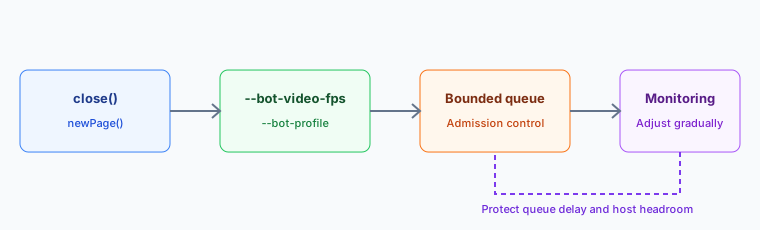
Review the budget after a browser release, host image, profile family, route, or workload changes. A previous ceiling remains a historical observation, not an entitlement to the same throughput. Re-running the baseline keeps operational decisions tied to current evidence.
A workload that passes at 20 contexts and fails at 40
The same host, the same pages, and the same profile family can pass a capacity review at 20 contexts and fail it at 40. The failure has three common causes, and each one leaves a different counter behind.
- Host memory.
rss_per_contextstays flat, but total resident memory crosses the free host memory, the kernel reclaims pages, and the slowest contexts stall. The decision is fewer contexts per host or a larger host. - Profile load time.
launch_durationgrows with concurrency because every context reads its profile at startup. Local storage and a smaller profile set shorten the launch path; the host itself is not the limit. - Admission policy.
p95_queue_waitgrows while CPU sits well under the ceiling and memory is stable. The queue admits work faster than cleanup returns capacity, so split the classes or delay the retry.
Run the 40-context case once with admissions frozen after the first stall. If rss_per_context and launch_duration match the 20-context run, the host is not the cause and the queue owns the fix. If they diverge, correct the resource before tuning admission, because a policy change cannot recover memory that is already gone.
Write the chosen cause, the two concurrency levels, and rss_per_context, launch_duration, and p95_queue_wait into the capacity decision record for the workload, so the next review starts from this comparison rather than a blank page.
Tune one cost at a time
Validate one optimization at a time in a controlled staging workload. Compare task completion, browser exit status, memory trend, page creation latency, screenshot completion, and context teardown against the unchanged release configuration. Keep the profile family, network route, graphics backend, and page set constant across the comparison.
Memory and page lifecycle
Treat heap limits as workload-specific controls. A low limit can terminate legitimate JavaScript work, while an oversized limit can remove host headroom. Measure retained heap during the representative workflow and change limits only with an application owner and a rollback plan.
Close pages promptly so the browser can release resources owned by completed work. Calling page.close() gives the browser a clear lifecycle boundary, while navigating to another URL does not end ownership of the page. Close the browser itself on every exit path and use the deployment supervisor to identify an unresponsive worker.
const page = await context.newPage();
try {
  await page.goto('https://example.com', { waitUntil: 'domcontentloaded' });
  // Read the data the workflow needs here.
} finally {
  await page.close();
}
Prefer domcontentloaded over waiting for the network to go idle when the workflow only needs the document. Idle detection can add seconds on heavy pages, and the DOM is ready much earlier. Derive navigation and operation timeouts from the approved service objective and the observed latency distribution, and handle a timeout as an explicit failure with enough diagnostics to separate page delay from resource pressure.
Recycle browser instances from observed lifecycle evidence. Introduce a task or time boundary only after staging and production trends show that it improves stability, keep the boundary configurable, and review it after each release change. Reuse a page only while it represents the same session and identity plan, and create a fresh context when storage or profile state must be separated.
Record launch completion, exit status, stderr, task duration, queue delay, and context closure in application logs, and watch host memory with standard operating system tools. Set alerts from the measured capacity of the host and the service target, and watch trends rather than waiting for exhaustion.
CPU and video cadence
Keep browser features that the application needs. Disabling background behavior, extensions, media, or update services can change page behavior and operational safety. Start with the documented release configuration and remove a feature only after representative QA confirms that the workflow does not depend on it.
Limit concurrency from measured CPU saturation. Increase workers gradually while tracking completed work, browser errors, queue time, and host headroom. Screenshot, media, complex JavaScript, and Canvas workloads need different ceilings, so a universal instances-per-core ratio is not reliable.
Lower the video cadence when full visual playback is not required. Video-heavy pages can keep decode and render work active even when the automation only needs occasional visual updates. For profiles with Video FPS Control enabled, --bot-video-fps sets the actual video cadence separately from the media FPS that pages see reported.
chromium-browser \
  --bot-profile="profiles/profile.enc" \
  --bot-video-fps=1:30 \
  --headless
Use this for video-heavy monitoring, QA, or long-running pages where frame-by-frame video pixels are not part of the result. See Video FPS Control for the syntax and the benchmark for the tested workload. The benchmark CPU reductions are reference ranges for one tested video workload, not capacity commitments or pass or fail limits.
Separate workload classes instead of using one global value for every page. Pages that play video as the primary content usually need normal cadence, while pages that keep video elements in the background often do not. Measure CPU before and after the change on the same host, with the same page set and the same concurrency, and keep the sample window long enough to include steady playback rather than only page startup.
Also check the output type that matters for the workflow. DOM extraction, API capture, screenshots, and pixel-level media checks tolerate lower visual cadence differently, and pixel output follows the actual cadence. Keep the setting next to the launch profile or job definition so each job's media cadence is explicit, and keep it separate from display FPS controls. Display cadence and video cadence are separate limits, and frame rate control covers the display value that pages read through requestAnimationFrame.
Network and storage
Blocking unnecessary media can reduce network and rendering work. Keep the resources that the application needs for layout, interaction, authentication, and privacy validation, and test every blocking rule against representative pages. Keep stylesheets and fonts when text rendering matters.
When route bandwidth is limited, selective routing can keep chosen request paths off the proxy. See Proxy Selective Routing for the rule syntax and the license it requires. Matching requests connect directly, so decide which assets may leave the proxy route under the approved network policy, and repeat route validation whenever credentials, region, or exit change.
A proxy adds network latency to every request it carries. Keep the route stable during a benchmark and compare p95 request latency before changing the exit region.
Store profile packages on fast local storage instead of network-mounted volumes. Profile loading happens once at startup, and its relative cost depends on the full launch workflow. For deployments that restart instances often, local storage can reduce network-related delay in the startup path.
Graphics and headless hosts
Extra capacity provides useful headroom, but it does not correct unbounded queues, incomplete teardown, or an unsuitable graphics backend. Measure the workload before adding hosts, and add capacity when a sustained workload no longer meets the service target after queueing and teardown have been verified.
Headless mode can reduce some window-system work, but the page still uses visual, network, JavaScript, and storage resources, so treat the difference as workload-specific. Keep graphics support enabled, because removing it can change rendering capabilities for workloads that rely on WebGL or WebGPU.
Use the Linux GPU Backend guide when the deployment runs without a physical display. Keep the selected graphics backend consistent across comparable workers on Linux. A change that removes a required browser capability is not a valid performance improvement.
Accept releases with recovery evidence
Compare representative operating phases
A release candidate should be measured against the approved baseline with the same workload classes and host image. Keep cold startup, warm steady work, and controlled shutdown as separate phases. Cold startup shows whether new workers can enter service predictably. The steady phase shows whether queue delay and resource use remain stable after caches and connections have settled. Shutdown shows whether capacity returns after completed, cancelled, and failed work. Compare p95 queue delay with completion latency so faster workers do not hide admission waits.
Run each phase long enough to expose normal variation in page response and route latency. Compare distributions for completion time and queue delay, together with sustained memory pressure, CPU contention, storage activity, and network use. A short successful run is useful for basic compatibility, but it is not enough to approve a production resource budget.
Document the workload mix used for the decision. Include ordinary jobs, the longest supported session, and an authorized failure case. This keeps the acceptance record useful when the application, route, host image, or browser release changes later.
Apply explicit acceptance criteria
Release acceptance should answer whether the service completes the required work while preserving operational headroom. Review successful completion, expected error handling, queue growth, cleanup completion, and recovery time together. A release should not pass merely because its fastest jobs improve while heavier jobs become less reliable.
Use the existing service objective as the decision boundary. When no formal objective exists, establish one from the current approved release before comparing a candidate. Record any deliberate tradeoff, such as a modest latency increase in exchange for lower sustained memory pressure, and obtain the application owner's approval. Keep the candidate's SLO and measurement window in the acceptance record.
Keep privacy and functional checks in the same acceptance plan. A resource-saving change that removes required rendering, storage, media, or network behavior is a regression even when host utilization falls. Performance evidence supports a release only after the representative workflow still produces the authorized result.
Exercise backpressure and recovery
Acceptance testing should include a period when arrivals exceed available service capacity. Confirm that the bounded queue applies the intended admission policy, protects work already in progress, and returns to its normal range after demand falls. Observe whether retries are delayed according to policy instead of immediately adding more pressure.
Also test a controlled worker interruption. The supervisor should identify the unavailable worker, preserve a clear task outcome, and admit replacement work only after capacity is available. Completed work must not be repeated silently, and uncertain work should follow the application's reconciliation policy.
After the interruption, verify that memory, storage activity, queue delay, and completion latency return to the approved operating range. A service that resumes accepting jobs while cleanup remains incomplete has not fully recovered. Keep admission reduced until the evidence shows that both task flow and host headroom are stable; include queue depth in the recovery observation.
Preserve rollback evidence
Every performance change needs a rollback condition and an owner. The condition may be sustained queue growth, reduced completion reliability, incomplete cleanup, or loss of recovery headroom. Define it before rollout so the decision does not depend on an improvised interpretation during an incident.
Preserve the release identifier, host image, workload manifest, route class, configuration record, observation window, and summarized results for both the candidate and the approved baseline. Keep the candidate and baseline release_id values paired with their observation windows. Store logs according to the organization's retention and access policy, and remove credentials, page content, and personal data from the record.
During a staged rollout, expand only after the previous stage meets the acceptance criteria for an adequate observation window. If a rollback condition appears, stop new expansion, reduce admissions, complete or reconcile accepted work, and restore the last approved configuration. Repeat the representative baseline after rollback to confirm that recovery is complete rather than assuming that changing the version was sufficient.
Where BotBrowser fits
For video-heavy sessions, BotBrowser supports --bot-video-fps (ENT Tier2, on profiles with Video FPS Control enabled), which lowers the actual video decode and render cadence while the media FPS reporting is set separately. Where full visual frame cadence is not required, this can reduce CPU, so it is worth testing as one controlled change in the plan above. BotBrowser cannot guarantee a CPU saving or a capacity figure for every workload, it does not replace the capacity baselines, queueing, backpressure, and teardown that the operator owns, and it cannot preserve frame-by-frame pixel output once the actual cadence is lowered. Raise the actual value when a workflow samples video pixels.
For deployments that evaluate per-context workflows, Per-Context Fingerprint (ENT Tier3) is a license-dependent option to benchmark with the same authorized workload and privacy requirements as the existing topology. Treat the result as workload-specific evidence, not a general capacity commitment. BotBrowser does not set host capacity, queue policy, proxy performance, or page behavior, so those decisions stay with the application owner.
Download BotBrowser for deployment setup, or contact our enterprise team for infrastructure planning. For implementation context, see Headless Server Setup, Docker Deployment Guide, CLI Recipes, and Screenshot Best Practices.
When a page must choose queue hints as well as host capacity, scheduler.postTask priorities gives the cancellation and fallback record to keep that boundary explicit.
Public sources
- BotBrowser FPS Control
- BotBrowser benchmark
- BotBrowser Proxy Selective Routing
- BotBrowser Linux GPU Backend
- Playwright Page API
Practical conclusion
Start with a workload baseline that includes queue delay, completion latency, resource pressure, and cleanup. Set a bounded admission policy from that evidence, change only one cost at a time, and keep the previous configuration available until the same representative jobs meet the service objective after rollout.
This article is part of the guide: Browser Deployment and Release: Operations Map
Related Articles
Scaling Browser Contexts with Per-Context Profiles
DeploymentBrowserContext Capacity Planning for Memory and Long-Running Sessions
DeploymentBrowser Container Resource Limits: A Practical Planning Method
Getting StartedBest Browser for Web Scraping: Six Criteria
DeploymentSERP Scraping at Scale: Browser Requirements
DeploymentBrowser Deployment and Release: Operations Map
Run the same check in BotBrowser
Load a profile, keep the signals you just read about consistent inside the browser, and confirm the result on your own machine before a rollout.